
This post contains affiliate links. As an Amazon Associate, I earn from qualifying purchases at no extra cost to you.
My Top Pick — HyperX Cloud Stinger 2 Core
If you just want the short answer, the best gaming headset under $50 for most people is the HyperX Cloud Stinger 2 Core. It’s light enough to forget you’re wearing it, the memory foam doesn’t cook your ears after two hours, and the DTS Headphone:X spatial audio genuinely helps you place footsteps. At its budget price, it does the important things right and skips the gimmicks.
That said, we compared four wired headsets in this price range, and the “best” one depends on what you actually play. So here’s the honest breakdown.
Best Gaming Headset Under $50 — Quick Comparison
Here are the four picks at a glance. All four are wired 3.5mm headsets that work with PC, PS5, Xbox, and Switch, and all four sit in the same budget price bracket.
| Headset | Price Tier | Best For | Rating |
|---|---|---|---|
| HyperX Cloud Stinger 2 Core | Budget | Best overall / comfort | 4.3/5 |
| Razer BlackShark V2 X | Budget | Competitive FPS / footsteps | 4.7/5 |
| Logitech G335 | Budget | Lightweight / all-day wear | 4.7/5 |
| Turtle Beach Recon 70 | Budget | Budget / consoles | 4.3/5 |


Prices move around, so check the current number before you buy. But at the time of writing, every one of these was a legitimate sub-$50 option with real reviews behind it. If gaming isn’t your only use case, our roundup of the best noise cancelling earbuds under $50 covers the same budget for everyday listening.
Reviews — Detailed Breakdown
1. HyperX Cloud Stinger 2 Core — Best Overall

- DTS Headphone:X Spatial Audio: Unlock accurate 3D audio spatialization and localization. The included activation code pr…
- Crisp, clear in-game sound: Cloud Stinger 2 Core’s 40mm directional drivers are tuned to provide enhanced bass for impac…
- Improved in-game chat experience: HyperX quality-of-life features like the swivel-to-mute microphone are built to enhanc…
Key Specs
- Drivers: 40mm dynamic
- Audio: DTS Headphone:X Spatial Audio (activation code included)
- Weight: about 275g
- Mic: swivel-to-mute, built in
- Connection: wired 3.5mm
- Works with: PC, PS5, PS4, Xbox, Switch, mobile
Who this is for: Anyone who wants one headset that does everything well without thinking too hard about it.
The first thing owners mention about the Cloud Stinger 2 Core is how little it weighs. At roughly 275 grams it’s genuinely light, and reviewers describe the memory foam on the earcups as soft without being flimsy. Owners consistently report getting through four-hour sessions without that hot, achy feeling you get from cheaper pads that press too hard.
The steel slider in the headband stands out at this price. A lot of budget headsets use all-plastic adjustment arms that creak and eventually crack. This one has a proper metal slider, so it flexes and holds its size instead of feeling like it’s one bad drop away from the trash. Owners don’t call it premium exactly, but they do say it feels built to last.
Sound is where it earns the top spot. By default it’s a warm, slightly bass-forward tuning that makes explosions and engine noise satisfying. Turn on the DTS Headphone:X spatial audio (you redeem a code, it takes two minutes) and directional cues sharpen up noticeably. Owners consistently report being able to tell whether an enemy is above or behind them in shooters, which is the whole point of a gaming headset. It’s not going to embarrass a premium set, but for the money the imaging is legitimately good.
The swivel-to-mute mic is the small feature owners keep praising. You flip the boom up and it mutes; flip it down and it’s live. No hunting for a tiny button mid-match. Mic quality is fine for Discord and team chat — reviewers say teammates hear them clearly, though it’s not a streaming-grade mic. Honestly, at this price, none of these are.
What stands out:
- Genuinely light and comfortable for long sessions
- Steel slider in the headband — rare at this price
- Spatial audio actually helps with directional sound
What could be better:
- The bass-heavy default tuning muddies busy music a little
- Cable is fixed, not detachable, so a snag is a bigger deal
Bottom line: The most well-rounded headset here. If you don’t want to overthink it, buy this one.
2. Razer BlackShark V2 X — Best for Competitive FPS

- ADVANCED PASSIVE NOISE CANCELLATION — sturdy closed earcups fully cover ears to prevent noise from leaking into the head…
- 7.1 SURROUND SOUND FOR POSITIONAL AUDIO — Outfitted with custom-tuned 50 mm drivers, capable of software-enabled surroun…
- TRIFORCE TITANIUM 50MM DRIVERS — our new, cutting-edge proprietary design divides the driver into 3 parts for the indivi…
Key Specs
- Drivers: Razer TriForce 50mm
- Audio: 7.1 surround (via Razer software on PC)
- Mic: HyperClear cardioid, built in
- Isolation: passive noise cancellation
- Connection: wired 3.5mm
- Works with: PC, PS5, PS4, Xbox, Switch
Who this is for: Competitive players who care more about hearing footsteps than about thumping bass.
The BlackShark V2 X is the one I’d hand to a friend who plays a lot of Valorant, CS, or Apex. Razer’s TriForce 50mm drivers split the highs, mids, and lows, and the practical result is a sound signature that pushes footsteps and reloads forward instead of burying them under bass. Reviewers often mention catching flanks they’d normally have missed. That’s not placebo — on paper, the tuning genuinely favors detail.
Build-wise it’s plain in a good way. Matte finish, no RGB, no flashy plates. The earcups clamp a touch firmer than the HyperX, which helps with passive noise isolation — the outside world drops away nicely — but owners with larger heads say they feel that clamp by hour three. Most reviewers find it comfortable, just noticeably more “there” than the featherweight Logitech.
On PC you can install Razer’s software and switch on 7.1 surround, which widens the soundstage for single-player and open-world games. On console you’re getting stereo, and honestly the stereo tuning is so good for competitive play that many owners rarely bother with the surround toggle. Based on specs and verified owner reviews, the HyperClear cardioid mic is the best of the four — it picks up your voice and rejects a surprising amount of keyboard clatter behind it. Pair it with one of our budget mechanical keyboards under $60 and you’ve got a competitive setup for not much money.
What stands out:
- Best footstep clarity of the four for competitive shooters
- Excellent cardioid mic that rejects background noise
- Strong passive isolation from the firmer clamp
What could be better:
- That firmer clamp gets tiring for big heads on long sessions
- Surround sound is locked to PC software
Bottom line: If you play ranked shooters and want every audio edge you can get on a budget, this is the pick.
3. Logitech G335 — Best Lightweight

- Lightweight Design: Weighing in at only 8.5 oz (240 g), G335 is smaller and lighter than the G733, features a suspension…
- All-day Comfort: Soft memory foam ear pads and sports mesh material are comfortable for extended use so you can take you…
- Plug and Play: Quickly jump into your game and simply connect with the 3.5 mm audio jack; these colorful headphones are …
Key Specs
- Drivers: 40mm
- Weight: about 240g
- Mic: flip-to-mute boom
- Headband: suspension strap design
- Connection: wired 3.5mm
- Works with: PC, PS5, PS4, Xbox, Switch
Who this is for: People who hate the feeling of a heavy headset and want something that disappears on their head.
The G335 is the lightest headset in this roundup at around 240 grams, and you feel that difference immediately. Instead of a hard clamp, it uses a suspension headband — an elastic strap that spreads the weight across the top of your head. Owners often say it barely registers once it’s on. For anyone who gets pressure headaches from gaming headsets, this design is worth the price alone.
It also looks good, which matters more to some buyers than they’ll admit. It comes in black, white, and a mint colorway, and the whole thing has a clean, non-gamer aesthetic that doesn’t scream RGB. The white one in particular looks more like a lifestyle headphone than a gaming rig.
Sound is the trade-off. The 40mm drivers are clear and perfectly good for everything — dialogue is crisp, footsteps are audible, music is enjoyable — but the low end is politer than the HyperX or Razer. If you love chest-thumping bass in explosions, you’ll notice it’s holding back. For competitive play that restraint is arguably a plus; for cinematic single-player games, it’s a small miss. The flip-to-mute mic is convenient and sounds clean, though it’s a touch quieter than the Razer’s.
What stands out:
- Lightest, most comfortable fit here thanks to the suspension band
- Genuinely nice looking in all three colors
- Flip-to-mute mic is clean and convenient
What could be better:
- Bass is reserved — not for the boom-boom crowd
- Suspension band picks up a little cable microphonics when you move
Bottom line: The comfort king. If long sessions leave your head sore, this fixes it.
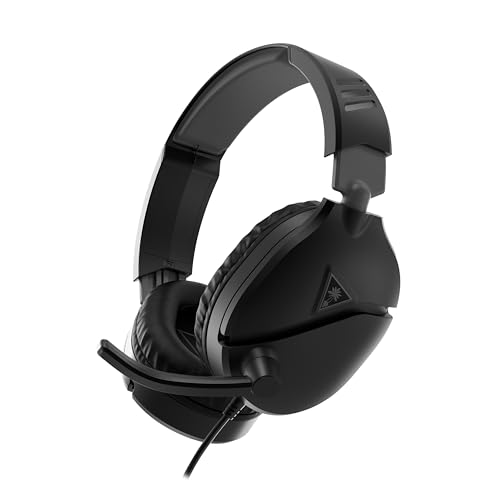
4. Turtle Beach Recon 70 — Best Budget / Best for Consoles

- PC Splitter Cable Included
- Convenient Flip-To-Mute Mic
- Comfortable Lightweight Headset Design
Key Specs
- Drivers: 40mm speakers
- Mic: high-sensitivity flip-to-mute boom
- Weight: lightweight plastic build
- Connection: wired 3.5mm (splitter cable in some bundles)
- Works with: Xbox, PS5, PS4, Switch, PC, mobile
Who this is for: Console players who want a no-fuss headset and the lowest realistic price without buying junk.
The Recon 70 is the one I’d buy for a teenager or a second controller setup. It’s the most plastic-feeling of the four — you can tell where Turtle Beach saved money — but owners describe it as simple rather than cheap. It’s light, the earcups are soft, and it just plugs into a controller and works. No software, no setup, no fuss.
For console gaming that simplicity is the whole appeal. Plug the 3.5mm jack into your Xbox or PS5 controller and you’ve got game audio and chat instantly. The flip-to-mute mic is high-sensitivity, so quiet talkers come through fine, and flipping the boom up to mute is second nature after a day. The 40mm speakers put out a punchy, slightly aggressive sound that works well for the big, loud moments in action games.
Where it shows its price is refinement. The soundstage is narrower than the Razer, so directional cues aren’t as precise, and at high volume the drivers can get a little shouty in the treble. The headband padding is thinner too, so if you’ve got a bigger head, longer sessions get noticeable. But for the money — and for a kid who’s going to drop it on the floor twice a week — it’s a smart, honest buy.
What stands out:
- Dead-simple plug-and-play for consoles
- Sensitive flip-to-mute mic that catches quiet voices
- Punchy, fun sound for action games
What could be better:
- Plastic build feels the most budget of the four
- Narrower soundstage — less precise for competitive play
Bottom line: The best true-budget pick, especially for console players who just want it to work.
How to Choose a Gaming Headset Under $50: What Actually Matters
Spending under $50 means making trade-offs. The trick is making them in the right places. Here’s what I’d pay attention to.
Comfort and Weight
This is the spec nobody lists on the box but everyone feels within an hour. A headset that weighs 240 grams with a suspension band (like the G335) feels completely different from one that clamps hard on your temples. If you wear glasses, clamp force matters even more — a firm grip presses the arms of your glasses into your head. When in doubt at this price, go lighter. You’ll enjoy every session more, and you’ll actually reach for the thing.
Sound Signature vs. Your Games
Under $50, no headset does everything perfectly, so pick the tuning that matches how you play. If you live in competitive shooters, you want a detail-forward signature that pushes footsteps and reloads to the front — that’s the Razer. If you mostly play story games and want explosions to feel big, a warmer, bass-forward set like the HyperX is more fun. Don’t chase “7.1 surround” as a headline feature; on a budget headset it’s software processing on two drivers, and good stereo tuning usually matters more.
The Microphone
Every headset here has a built-in mic, and all of them are fine for Discord and team chat. None are streaming-grade — if you’re serious about streaming, you’ll want a separate USB mic eventually. Between these four, owner reviews rate the Razer’s cardioid mic best at rejecting keyboard noise, and the HyperX’s swivel-to-mute is the most convenient. Flip-to-mute booms (Logitech, Turtle Beach) are handy because muting is a physical, obvious motion.
Build and the Cable
At this price almost everything is plastic, so look for one reinforced part — the HyperX’s steel headband slider is a good example. And pay attention to the cable: all four here use a fixed (non-detachable) 3.5mm cable, which means a bad snag can kill the headset. It’s the single most common failure point for budget headsets, so route your cable so you won’t roll a chair over it.
Frequently Asked Questions
What is the best gaming headset under $50?
For most people it’s the HyperX Cloud Stinger 2 Core — it’s comfortable, light, and its spatial audio genuinely helps with directional sound. If you play competitive shooters, the Razer BlackShark V2 X edges it out for footstep clarity.
Are cheap gaming headsets under $50 any good in 2026?
Yes, much better than they used to be. The big brands now sell genuinely competent wired headsets in the budget tier. You give up wireless, fancy build materials, and streaming-grade mics, but the core experience — comfortable fit, clear directional sound, usable chat mic — is all there.
Should I get a wired or wireless headset under $50?
Wired, without hesitation at this budget. A good budget wired headset will out-perform almost any wireless headset at the same price, because the maker isn’t spending your money on a battery and a wireless chip. Wired also means zero latency and nothing to charge.
Do these gaming headsets work with PS5 and Xbox?
All four do. They use a standard 3.5mm jack that plugs straight into a PS5, Xbox, or Switch controller for both game audio and chat. The Turtle Beach Recon 70 is especially console-friendly and needs no setup at all.
Is 7.1 surround sound worth it on a cheap headset?
It’s a nice bonus, not a reason to buy. On sub-$50 headsets, “7.1 surround” is software processing applied to two drivers, usually only on PC. Good stereo tuning matters more for actually hearing where sounds come from, which is why the Razer’s plain stereo beats a lot of “surround” headsets for competitive play.
Which gaming headset under $50 has the best mic?
Based on specs and verified owner reviews, the Razer BlackShark V2 X. Its HyperClear cardioid mic picks up your voice clearly while rejecting a lot of the mechanical keyboard noise behind it. The HyperX and Logitech mics are close behind and perfectly fine for team chat.
Are these headsets good for long gaming sessions?
The Logitech G335 is the most comfortable for marathon sessions thanks to its 240g weight and suspension headband. The HyperX Cloud Stinger 2 Core is a close second. The Razer clamps a bit firmer, and the Turtle Beach’s thinner headband padding is the first to be noticeable on very long sessions.
Do I need a separate mic if I already have a gaming headset?
Only if you stream or record. For gaming, Discord, and team chat, the built-in mics on all four of these are good enough that nobody will complain. If you start streaming to an audience, that’s when a dedicated USB microphone becomes worth it.
Is the HyperX Cloud Stinger 2 Core worth it in 2026?
Yes. At its budget price it’s still the best all-rounder in the sub-$50 category — light, comfortable, with a steel headband slider and spatial audio that actually works. Unless you specifically need the Razer’s competitive edge or the Logitech’s featherweight comfort, it’s the safe buy.
Final Verdict
If you want one recommendation, buy the HyperX Cloud Stinger 2 Core — it’s the most well-rounded gaming headset under $50 and the one I’d hand to almost anyone. Competitive shooter players should grab the Razer BlackShark V2 X for its footstep clarity and excellent mic. If comfort is your priority, the Logitech G335 is the lightest and kindest on your head. And for console players or anyone on the tightest budget, the Turtle Beach Recon 70 just plugs in and works. You genuinely can’t go badly wrong with any of these four on this budget.
- Lightweight Design: Weighing in at only 8.5 oz (240 g), G335 is smaller and lighter than the G733, features a suspension…
- All-day Comfort: Soft memory foam ear pads and sports mesh material are comfortable for extended use so you can take you…
- Plug and Play: Quickly jump into your game and simply connect with the 3.5 mm audio jack; these colorful headphones are …
- ADVANCED PASSIVE NOISE CANCELLATION — sturdy closed earcups fully cover ears to prevent noise from leaking into the head…
- 7.1 SURROUND SOUND FOR POSITIONAL AUDIO — Outfitted with custom-tuned 50 mm drivers, capable of software-enabled surroun…
- TRIFORCE TITANIUM 50MM DRIVERS — our new, cutting-edge proprietary design divides the driver into 3 parts for the indivi…
- DTS Headphone:X Spatial Audio: Unlock accurate 3D audio spatialization and localization. The included activation code pr…
- Crisp, clear in-game sound: Cloud Stinger 2 Core’s 40mm directional drivers are tuned to provide enhanced bass for impac…
- Improved in-game chat experience: HyperX quality-of-life features like the swivel-to-mute microphone are built to enhanc…
- PC Splitter Cable Included
- Convenient Flip-To-Mute Mic
- Comfortable Lightweight Headset Design
See full specs on HyperX’s official Cloud Stinger 2 Core page.
Last updated: September 2026 | Prices subject to change.
Questions about any of these picks? Get in touch via our contact page.