
This post contains affiliate links. As an Amazon Associate, I earn from qualifying purchases at no extra cost to you.
My Top Pick — Sphero Mini (Blue)
The Sphero Mini is the best all-around coding robot for kids who want something that’s genuinely fun to drive and teaches real programming. It’s small enough to fit in a backpack, but the app-based coding experience is surprisingly deep. If your kid is 8 or older and you want one robot that’ll actually hold their attention past the first week, this is it.

- LITTLE ROBOT, LOTTA FUN: Sphero Mini packs a ton of fun into a tiny programmable robot the size of a ping pong ball. Equ…
- LEARN TO CODE: Powered by the free Sphero Edu app, you can create and customize games and code Sphero Mini by drawing on…
- DRIVE MODE: Beginner learners can drive and play STEM-inspired games with the free Sphero Play App. Drag and drive with …
Best Coding Robots for Kids — Quick Comparison


Reviews — Detailed Breakdown
1. Sphero Mini (Blue) — Best Overall
- LITTLE ROBOT, LOTTA FUN: Sphero Mini packs a ton of fun into a tiny programmable robot the size of a ping pong ball. Equ…
- LEARN TO CODE: Powered by the free Sphero Edu app, you can create and customize games and code Sphero Mini by drawing on…
- DRIVE MODE: Beginner learners can drive and play STEM-inspired games with the free Sphero Play App. Drag and drive with …
Key Specs
- Age range: 8 years and up
- Connectivity: Bluetooth
- App: Sphero Edu (iOS + Android, free)
- Coding methods: Draw (drag path on screen), Scratch-style blocks, JavaScript
- Size: 1.57 inches diameter
- Battery: ~45 min play time
Who this is for: Kids aged 8 and up who want a coding robot they can actually race around the room and program with real code.
Plenty of coding toys promise “real programming” but end up being glorified remote controls. The Sphero Mini doesn’t do that. The Sphero Edu app genuinely lets kids progress — from drawing a simple path with their finger, to dropping in visual code blocks, to typing actual JavaScript. That kind of progressive learning curve is rare at this price tier.
The ball itself is tiny — at 1.57 inches, it fits in a closed fist — and owners consistently report it moves fast and responsively on hard floors. Setup is quick: charge it for a couple of hours, pair via Bluetooth, and kids are rolling in under five minutes. The main complaint in owner reviews is that it doesn’t do great on carpet, so if your kid’s room is mostly carpeted, just know it works best on hardwood or tile.
There’s a whole library of coding activities in the app, from beginner challenges to multi-step programs that make the Mini spin, change LED color, and navigate obstacle courses. For a kid who likes a challenge and doesn’t want to be bored after 20 minutes, this holds attention surprisingly well.
What we like:
- Three levels of coding (draw → blocks → JavaScript) let kids actually grow with it
- Widely owned and well established — this isn’t a niche product
- Small size makes it portable; great for taking to a friend’s house or classroom
What could be better:
- Struggles on thick carpet — works best on hard floors
- The ball shell can crack if it takes repeated hard drops from a height
- Younger kids (under 8) may need help with the app initially
Bottom line: The Sphero Mini is the best coding robot for kids who are ready for something genuinely challenging. It’ll grow with them from beginner to intermediate level, and the app keeps getting updated.
2. Botley the Coding Robot — Best for Young Kids (Screen-Free)
- SCREEN-FREE CODING – Introduce your child to programming fundamentals without the need for tablets or smartphones, elimi…
- GROWS WITH YOUR CHILD – Perfect for ages 5+ with 80-step programming capabilities, loops, and advanced obstacle detectio…
- IMMEDIATE ENGAGEMENT – Ready to use right out of the box (requires 5 AAA batteries, not included) with simple-to-underst…
Key Specs
- Age range: 5–8 years
- Screen: None required — fully screen-free
- Programming: Physical remote control (button sequences)
- Pieces: 77-piece set including coding cards and obstacle accessories
- Battery: 3 AAA batteries (included)
Who this is for: Parents of younger kids (ages 5–8) who want a no-screen introduction to coding concepts.
Botley is one of the more thoughtfully designed kids’ coding toys in this category. The idea is smart: you program Botley’s movements using a small handheld remote — press forward, turn left, turn right — and then hit “go” to watch it execute your sequence. No app, no tablet, no screen at all. For a 5 or 6-year-old, that simplicity is actually a feature, not a limitation.
The set includes obstacle pieces and coding cards that help structure activities, so kids aren’t just driving it randomly — they’re following challenges and solving mini-puzzles. Parents consistently report this means kids sit with it for longer stretches than you’d expect. It also introduces loop concepts in a really accessible way for young kids.
The catch: Botley doesn’t scale. Once a child reaches 8 or 9 and starts wanting more complexity, they’ll outgrow it fairly quickly. But for a 5 or 6-year-old getting their first introduction to the idea that computers follow instructions, it’s hard to beat.
What we like:
- Screen-free design is a real plus for parents of young kids
- 77-piece kit includes enough accessories to keep activities varied
- The coding remote is chunky and easy for small hands to press
- Parents consistently rate it highly in owner reviews
What could be better:
- Limited ceiling — kids will outgrow it around age 8–9
- Batteries run down faster than expected during longer play sessions
- The remote’s button layout takes a few minutes to get used to
Bottom line: For parents wanting a no-screen first robot for a 5–8 year old, Botley is the most trusted option in this category. Simple, reliable, and genuinely educational.
3. Learning Resources Code & Go Robot Mouse — Best for Toddlers & Early Learners
- SCREEN-FREE CODING FUNDAMENTALS: Kids practice sequencing, problem-solving, and early programming by using simple button…
- HANDS-ON CODING CHALLENGES: Use the 30 double-sided coding cards to plan step-by-step paths, then test, debug, and try a…
- DESIGNED FOR KIDS AGES 4+: Built for early learners, this coding toy supports STEM learning as kids develop logic, direc…
Key Specs
- Age range: 4–7 years
- Screen: None required
- Programming: Arrow-key button sequence on the mouse’s back
- Set includes: Mouse robot + 30 double-sided coding cards + activity guide
- Batteries: 3 AAA (not included)
- Price tier: Budget (lowest-priced pick for ages 4–7)
Who this is for: Kids aged 4–7 who are just getting started — the youngest entry point on our list.
The Code & Go Robot Mouse is designed for the 4–6 age range, and it shows in the design. The “robot” is a purple plastic mouse with big chunky buttons on its back. Kids press arrow buttons to program a sequence of moves, then watch the mouse scurry across the floor or tabletop. It’s as simple as coding toys get, and that’s exactly the point.
Think of this as the “training wheels” of coding robots. It teaches the core concept — you give a machine a sequence of instructions and it executes them — without any app, any screen, or any complexity. For a kindergartener, that’s genuinely a meaningful first lesson.
The 30 double-sided coding cards help kids plan and track each step of a sequence, and the activity guide adds structured challenges so they don’t just run the same path over and over. It also comes from Learning Resources, an established STEM brand — you’re not gambling on an unknown toy from a random brand.
What we like:
- Budget tier — the most affordable option here for ages 4–7
- Works great for kids as young as 4 — no reading required to operate
- 30 double-sided coding cards help kids plan sequences step by step
- Learning Resources is a well-established STEM education brand
What could be better:
- Very simple — 7+ year olds will be bored within a few sessions
- No maze included — the maze grids and walls are sold separately in the Activity Set
- Arrow buttons can be confusing for left/right turns if kids don’t know directional concepts yet
Bottom line: If you want a coding robot for a 4–6 year old and want to stay in the budget tier, this is the one. It’s simple by design, and that’s a strength — not a weakness.
4. Teach Tech Mech 5 — Best Budget Pick (No Battery Required)
- Mech-5 is a one-of-a-kind Mechanical Coding Robot. This stem robot can throw, lift, kick, draw, and more, All by snappin…
- This mission-based, entry level robot is designed to inspire young engineers to learn about mechanical engineering princ…
- Build it. Code it. Watch it move!
Key Specs
- Age range: 10 years and up
- Coding method: Mechanical coding wheel (no app, no batteries)
- Actions: Throw, lift, kick, draw, and more
- Assembly: Required (build-it-yourself style)
- Price tier: Budget
Who this is for: Older kids (10+) who want a hands-on mechanical challenge — and parents who want to skip both screens and batteries entirely.
The Teach Tech Mech 5 is genuinely different from every other robot on this list. There’s no Bluetooth, no app, no batteries. Instead, you program it using a physical coding wheel — literally a circular disc you rotate to set actions. The robot is also assembly-required, which means kids build it themselves before they ever program it.
That build-first approach is actually fantastic for STEM learning. Kids spend time understanding how the robot works mechanically before they start coding its movements. It’s similar to how much more you understand a recipe when you cook it from scratch versus heating up a ready-made meal.
It’s the lowest-priced robot on this list and still has a strong owner-review track record. The trade-off is that it’s age-appropriate for 10 and up — younger kids may struggle with the assembly and the mechanical coding concept.
What we like:
- No batteries, no app, no screen — completely self-contained
- Build-it-yourself assembly adds an extra STEM dimension
- Budget tier — the lowest price on this list
- Strong owner feedback gives good buyer confidence for a budget pick
What could be better:
- Assembly can be fiddly for younger kids without an adult’s help
- The coding wheel concept is less intuitive than app-based alternatives
- Not as visually exciting as the Sphero or Botley once assembled
Bottom line: If your kid is 10+ and you want a budget STEM gift that teaches both building and coding, the Mech 5 is a standout budget pick. It’s low-tech in the best possible way.
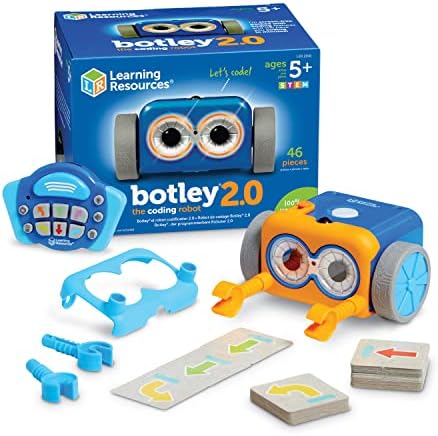
5. Botley 2.0 — Best Upgrade Pick
- LEARN WHILE YOU PLAY: Botley helps your child learn early STEM skills while playing and having fun. He teaches kids to c…
- READY TO GO RIGHT OUT OF THE BOX: Botley is ready to code right out of the box! Have 5 AAA batteries and a Phillips scre…
- SCREEN FREE PLAYING TIME: Botley features completely screen-free coding: no phone or tablet required. Botley’s easy-to-u…
Key Specs
- Age range: 5–10 years
- Screen: None — fully screen-free
- Programming: Physical remote (button sequences)
- New vs. Original: Adds object detection, self-driving mode, and more accessories
- Price tier: Premium
Who this is for: Families who already love Botley’s screen-free approach and want a step up in capability, or parents buying for the 6–10 age range who want more longevity.
Botley 2.0 keeps everything that works about the original — the screen-free remote programming, the chunky design for small hands, the educational structure — and adds some genuinely useful new tricks. The big addition is object detection: Botley 2.0 can detect obstacles in its path and stop, which opens up a whole category of more complex coding challenges.
The self-driving mode is also new, and parents often mention kids love it — it basically lets Botley navigate autonomously while kids set parameters. It’s a simple introduction to the concept of sensors and automated decision-making, dressed up in a way a 6-year-old can actually understand.
Is it worth the small price bump over the original? If you’re buying new, yes — especially if your kid is on the older end (8–10) and you want a higher ceiling before they outgrow it.
What we like:
- Adds object detection that the original Botley lacks
- Still completely screen-free — same parent-friendly approach
- Stronger ceiling than original Botley for kids 8–10
- Includes more accessories than the original Botley
What could be better:
- Far fewer owner reviews than the original Botley — less community/review confidence
- Highest price tier on this list for what’s essentially a modest hardware upgrade
- Still has the same “will outgrow it” limitation as the original
Bottom line: If you’re choosing between original Botley and Botley 2.0, go with 2.0 — the object detection alone makes it a meaningfully better toy. It’s worth the slight price bump.
How to Choose a Coding Robot for Kids: What Actually Matters
1. Age Matters More Than Price
The biggest mistake parents make is buying by price rather than age fit. A budget toy matched to a 10-year-old will hold their attention longer than a pricier toy designed for 5-year-olds. Match the robot to your child’s age range first:
- Ages 4–6: Code & Go Robot Mouse (Budget) — no reading required, screen-free, simple sequences
- Ages 5–8: Botley Original (Mid-range) or Botley 2.0 (Premium) — screen-free, moderate complexity
- Ages 8+: Sphero Mini (Mid-range) — app-based, scales from beginner to intermediate coding
- Ages 10+: Teach Tech Mech 5 (Budget) — mechanical, build-first, budget-friendly
Don’t buy a Sphero Mini for a 5-year-old expecting it to go well. The app will frustrate them. And don’t give a Code & Go Robot Mouse to a 10-year-old expecting more than 20 minutes of engagement.
2. Screen-Free vs. App-Based
Screen-free (Botley, Code & Go, Teach Tech) means the coding happens via physical buttons or wheels — no tablet or phone needed. App-based (Sphero Mini) means the coding experience lives in a smartphone or tablet app.
Both approaches have real merits. Screen-free is better for younger kids and for parents who want to limit device time. App-based is better for older kids who want more depth — the Sphero Edu app, for example, includes a library of activities and lets kids graduate from visual blocks to real JavaScript.
3. Build Quality Over Brand Recognition
At the $30–$80 price range, brand name doesn’t tell the whole story. Teach Tech is less well-known than Learning Resources, but the Mech 5’s owner feedback speaks for itself. Our selection criteria: an established review history, consistently strong ratings, and steady recent sales as a freshness signal.
Related STEM Guides for Kids
- Best AI STEM Toys for Kids — smarter robots that grow with them
- Best Electronics Kit for Kids — from code to circuits
- Best 3D Pen for Kids — build what they design
Frequently Asked Questions
What age is a coding robot appropriate for?
Most coding robots start at age 4–5 for screen-free models (like Code & Go Robot Mouse or Botley), and age 8+ for app-based models like the Sphero Mini. Mechanical build-first robots like the Teach Tech Mech 5 work best at age 10 and up. The age range printed on the box is actually a reliable guide here — coding concepts genuinely have a developmental fit.
What’s the difference between Botley and Botley 2.0?
Botley 2.0 adds object detection (it stops when it senses something in its path) and a self-driving mode, neither of which are in the original. The remote design is also slightly improved. If you’re buying new, go with 2.0 — it costs only slightly more and offers a meaningfully longer engagement window for kids on the older end of the age range.
Do coding robots for kids require a screen or app?
Not always. Botley, Code & Go Robot Mouse, and Teach Tech Mech 5 are all completely screen-free — no tablet, no phone, no app required. The Sphero Mini does require a smartphone or tablet for its coding features (though it can be driven manually via touch controls without coding). If screen time is a concern, the screen-free options are solid.
Are coding robots worth it for kids?
Yes — with one caveat. They’re worth it when matched to the right age. A well-matched coding robot teaches sequencing, logical thinking, and basic cause-and-effect programming in a hands-on way that no app or worksheet really replicates. The key is buying for your child’s actual age range, not the most impressive-looking box on the shelf.
What’s the cheapest coding robot that still teaches real programming?
The budget-tier Teach Tech Mech 5 is the best budget option if your kid is 10+. It uses a mechanical coding wheel instead of an app, which actually teaches the fundamentals of instruction sequencing in a tactile way. For younger kids (4–7), the budget-tier Code & Go Robot Mouse is the most affordable entry point from a trusted brand.
Final Verdict
For most families, the Sphero Mini (Blue) is the best all-around coding robot for kids — it’s genuinely fun to drive, the app has real depth, and it grows with kids from beginner coding to JavaScript. If you have a younger child (5–8) who needs a screen-free option, Botley is the most trusted pick in that space.
On a budget? The Teach Tech Mech 5 is hard to beat for older kids — no batteries, no app, just mechanical build-and-code satisfaction. And for the youngest learners (4–6), the Code & Go Robot Mouse gives kids their first taste of programming without any screen time at all.
No layout selected.See full product details on Learning Resources’ official site.
If you’re looking for more STEM picks, check out our guides to the Best AI STEM Toys for Kids in 2026 and the Best Eco STEM Kits for Kids in 2026.
Last updated: May 2026 | Prices subject to change.
Questions about any of these picks? Get in touch via our contact page.
Pingback: Best Science Kits For Kids Under $50 In 2026
Pingback: Best Electronics Kit For Kids In 2026
Pingback: Best Magnetic Tiles For Kids In 2026 — Top 3 Picks
Pingback: Best Marble Run For Kids In 2026 — Top 3 Picks