
This post contains affiliate links. As an Amazon Associate, I earn from qualifying purchases at no extra cost to you.
Hand a kid a 3D pen on a Saturday afternoon and by the end of it you might be looking at a tiny plastic Eiffel Tower that — honestly — looks better than anything most adults could make. That’s the thing about 3D pens: they have a way of pulling kids into a creative zone where an hour feels like five minutes. But buying the wrong one is a real problem. Too hot, too complicated, or just cheap plastic that clogs after 20 minutes, and the pen ends up forgotten in a drawer.
I’ve spent time researching and comparing the top-rated options, based on specs, verified owner reviews and manufacturer data, to find the best 3D pen for kids across every age group and budget. Here’s what actually works — and what to skip.
My Top Pick — SCRIB3D P1 3D Printing Pen
If I had to recommend just one 3D pen for most families, it’d be the SCRIB3D P1. It’s the #1 bestseller in 3D Printing Pens on Amazon for a reason — it’s affordable, reliable, and ships with everything you need to start immediately. Best for older kids and teens (ages 14+) who want serious creative control without the serious price tag.

- [FOR CREATIVE PROJECTS] Create, draw, doodle, and build in 3D with this versatile, high-quality 3D pen. The SCRIB3D P1 e…
- [READY-TO-USE KIT] Includes 3 colors (30 feet) of PLA plastic to keep you Doodling for ages, as well as a power adapter,…
- [BEGINNER FRIENDLY] Plug the adapter into the back of the pen and choose your filament. The red light will turn on indic…
Best 3D Pen for Kids — Quick Comparison
![MYNT3D Junior2 3D Pen for Kids [2020 Model] Child Safe Low Temperature Printing Pen (NOT Compatible with ABS/PLA)](https://m.media-amazon.com/images/I/5101DwHxMiL.jpg)
| Product | Price Tier | Best For | Age Range | Filament Type | Rating |
|---|---|---|---|---|---|
| SCRIB3D P1 | Budget | Best Overall / Budget Pick | 14+ | PLA / ABS (1.75mm) | 4.4★ |
| 3Doodler Start+ Essentials | Premium | Best for Young Kids | 6+ | PCL (low-temp, burn-safe) | 4.4★ |
| MYNT3D Super | Mid-range | Best for Tweens | 7+ | ABS / PLA (1.75mm) | 4.3★ |
Reviews — Detailed Breakdown
1. SCRIB3D P1 — Best Overall
- [FOR CREATIVE PROJECTS] Create, draw, doodle, and build in 3D with this versatile, high-quality 3D pen. The SCRIB3D P1 e…
- [READY-TO-USE KIT] Includes 3 colors (30 feet) of PLA plastic to keep you Doodling for ages, as well as a power adapter,…
- [BEGINNER FRIENDLY] Plug the adapter into the back of the pen and choose your filament. The red light will turn on indic…
Key Specs
- Price tier: Budget
- Rating: 4.4★ (23,643 reviews)
- Filament: PLA and ABS (standard 1.75mm)
- Temperature range: 160–235°C
- Display: LCD screen with real-time temperature readout
- Speed control: Stepless slider
- Recommended age: 14+
- What’s included: 3D pen, 3 starter colors of PLA (30 feet total), stencil book, project guide, power adapter
- Safety feature: Auto-sleep after 2 minutes of inactivity, ceramic nozzle with anti-clogging
Who this is for: Teens and older kids who want a full-featured pen with precise speed and temperature control — without spending $60+.
The SCRIB3D P1 ranks as the #1 bestselling 3D pen on Amazon, and looking at its feature set, that ranking makes sense. The LCD screen is something you don’t usually see at this price point — it shows you the current temperature in real time, which matters more than it sounds. When you’re switching between PLA (recommended at around 180–190°C) and ABS (needs 210°C or higher), being able to see exactly where you are prevents clogging and keeps the flow consistent. On cheaper pens with no display, you’re guessing — and that guessing leads to frustrating jams.
The stepless speed slider is the other feature that separates this pen from the pack. Unlike pens with just “fast” and “slow” buttons, you can dial in the exact flow rate you want mid-stroke — slow it to a crawl for thin detail work like lettering or lattice structures, then push it up when filling in a large flat section. Owners say it takes a couple of sessions to get the feel for it, but once you do, it becomes second nature. The auto-sleep feature is a genuinely useful safety touch — if your kid gets distracted and walks away, the pen powers down after 2 minutes so nothing overheats or burns the desk.
Setup takes about 3 minutes: plug in the adapter, wait for the nozzle to reach temperature (the LCD counts it down), feed the filament from the back, double-click the forward button, and you’re drawing. The ceramic nozzle has anti-clogging features that owners say work well in practice — reviewers often mention swapping colors and PLA brands without running into jams.
One important note: the SCRIB3D P1 uses PLA and ABS plastics that melt at 160–235°C. The nozzle gets genuinely hot. This isn’t a pen for 7-year-olds, no matter what the product description says about “creative projects” — treat it as an older-kid or teen tool and supervise appropriately. If your child is under 12, scroll down to the 3Doodler Start+ instead.
What stands out:
- LCD display for real-time temperature monitoring — no guesswork
- Stepless speed slider gives precise extrusion control for detailed work
- Ceramic nozzle with anti-clogging features — reliable across multiple sessions
- Removable nozzle for easy cleaning if it ever does clog
- Stencil book + project guide included — great for first sessions
- Auto-sleep after 2 minutes — passive safety feature for distracted users
- #1 bestseller in its category, 23,000+ reviews at 4.4 stars
What could be better:
- Nozzle gets extremely hot — requires adult supervision for younger teens
- Only 30 feet of starter filament included — you’ll want extra within a few sessions
- ABS plastic produces a slight smell when printing — use in a ventilated room
Bottom line: The SCRIB3D P1 hits the sweet spot for older kids and teens who want a capable, reliable pen without paying $60+. It’s the one I’d buy for a 14-year-old interested in art, engineering, or just building cool things.
2. 3Doodler Start+ Essentials — Best for Young Kids (Ages 6+)

- [THE ONLY CHILD-SAFE 3D PRINTING PEN] Designed with no hot parts, completely safe for kids aged 6+. Pen nozzle and plast…
- [UPGRADED EXPERIENCE with MORE PLASTICS & STENCILS] Slimmer and easier to hold, charges 50% faster, has 50% more 3Doodle…
- [FUN & SCREEN-FREE LEARNING TOOL] Cut back on children’s screen time with 3Doodler Start+ and let them enjoy hours of pl…
Key Specs
- Price tier: Premium
- Rating: 4.4★ (11,230 reviews)
- Filament: PCL (low-temperature, biodegradable) — 2.5mm proprietary 3Doodler Start strands
- Temperature: Low-temp (~70°C) — external surface stays cool to the touch
- Battery: Rechargeable via micro-USB (~2 hours to full charge, ~15 min per charge of use)
- Recommended age: 6+
- What’s included: 3D pen, 2 mixed-color packs of Start Eco-Plastic (48 strands total), micro-USB charger, activity guide with templates, doodle mat
Who this is for: Kids ages 6–12 where burn safety is the top priority — the only pen where you genuinely don’t need to worry about a hot nozzle.
The 3Doodler Start+ is in a completely different safety category from everything else on this list. The outside of the pen — including the area near the tip — stays cool enough to touch. That’s not a marketing claim: it’s a fundamental design difference. 3Doodler engineered this pen around PCL (polycaprolactone) plastic, which melts at a much lower temperature than PLA or ABS. The nozzle area doesn’t get dangerously hot, and the plastic hardens in about 5 seconds once it exits, so there’s very little window for burns from liquid plastic either.
For parents with kids in the 6–10 age range, this is the detail that matters most. Kids instinctively reach for the nozzle out of curiosity — it’s just what kids do. With most 3D pens, that results in a burn. With the 3Doodler Start+, it results in nothing bad happening. That peace of mind is worth the premium over a cheaper PLA pen.
The pen itself is designed for smaller hands — it’s lighter and slimmer than the SCRIB3D P1, and the operation is one-button simplicity. Press and hold to extrude plastic. That’s the entire interface. No temperature controls, no speed sliders, no modes to switch between. For a 7-year-old, that simplicity is a genuine feature, not a limitation. The companion app (available on iOS and Android) adds free stencils and video tutorials organized by skill level, which can fuel multiple sessions without running out of ideas.
A few trade-offs are worth knowing about upfront: the PCL filament is proprietary to 3Doodler’s Start+ series — you can’t use generic 1.75mm PLA and expect it to work. Refill packs cost more per foot than standard PLA and must be purchased from 3Doodler or Amazon. Battery life runs about 15 minutes per full charge, which can mean interruptions on longer projects. That said, it charges from any standard micro-USB cable and powers back up in about 2 hours, so shorter sessions with charging breaks work fine. See the full accessory lineup on 3Doodler’s official site.
What stands out:
- No hot external parts — the safest 3D pen available for young kids
- PCL plastic hardens in ~5 seconds — nearly immediate results, less risk from liquid plastic
- Biodegradable, non-toxic filament — the most eco-friendly option on this list
- Single-button operation — perfect for ages 6–8 who find multiple controls frustrating
- Companion app with free stencils and tutorial videos
- Wireless during use (rechargeable battery, no cord while drawing)
What could be better:
- Proprietary PCL filament — can’t use cheap generic PLA, ongoing refill cost is higher
- Battery life is ~15 minutes per charge — works better in short focused sessions
- Pricier than the SCRIB3D P1 despite being a simpler design
- No speed or temperature control — limits what older, more experienced kids can do
Bottom line: If your child is under 12 and burn safety is non-negotiable, the 3Doodler Start+ is the only 3D pen I’d confidently recommend. The filament is proprietary and slightly more expensive, but no other pen on this list gives you the same freedom to let kids explore without needing to watch every moment.
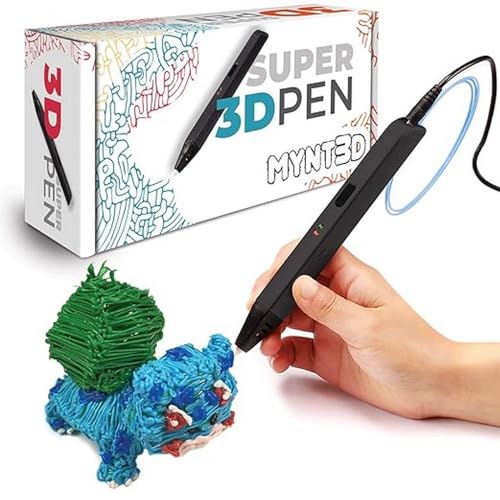
3. MYNT3D Super — Best for Older Kids and Tweens
- Turn your ordinary drawings into 3D works of art
- Stepless speed slider lets you regulate flow for optimal control of material while you’re drawing
- New: ultrasonic sealed nozzle is nearly clog-proof and provides market leading durability
Key Specs
- Price tier: Mid-range
- Rating: 4.3★ (21,930 reviews)
- Filament: ABS and PLA (standard 1.75mm)
- Temperature settings: Dial-switch between PLA (374°F) and ABS (410°F)
- Speed control: Stepless speed slider
- Nozzle: Ultrasonic-sealed, nearly clog-proof; replaceable
- Certifications: FCC, CE, RoHS
- Recommended age: 7+
- What’s included: 3D pen, 3 colors of ABS filament, A/C adapter, USB cord
- Warranty: 1 year limited — replacement-friendly customer service documented in reviews
Who this is for: Creative tweens and teens who want more control than a basic beginner pen but don’t need an LCD display — a step up that grows with their skill level.
The MYNT3D Super sits between the simplicity of the 3Doodler Start+ and the full-featured LCD of premium pens. It’s built on the same gearbox design as MYNT3D’s professional-grade pen, which means the core mechanics are solid. Compared with display-equipped pens, you get a simple temperature dial instead of a screen — two positions, one for PLA and one for ABS. That’s less flexibility than the SCRIB3D P1’s per-degree control, but for most projects, it’s plenty.
The feature that sets the MYNT3D Super apart from generic competitors is its nozzle. MYNT3D uses an ultrasonic-sealed design they describe as “nearly clog-proof,” and based on the user review data, this claim holds up. Clogging mid-project is the most common complaint with cheaper 3D pens — frustrating for adults, deeply demoralizing for kids who’ve spent an hour on something. The Super’s nozzle is significantly more reliable than what you’d find in a generic $20 pen, and because it’s replaceable, a worn nozzle doesn’t mean a dead pen.
The stepless speed slider gives kids real, granular control over the flow rate — something that makes a bigger creative difference than most people expect. Slowing it down for thin detail work, then opening it up for filling large sections, is a skill that improves quickly and makes projects look substantially better within a few sessions. Parent reviewers often describe kids getting frustrated at first (normal with any 3D pen), then producing much better results after a few practice sessions.
A note on long-term durability: some reviews mention the motor failing after months of heavy daily use. MYNT3D’s customer service is consistently praised — one review documented a full kit replacement (entire box, new pen, all accessories) without needing to return the broken unit. The 1-year warranty is genuine and they actually honor it. That said, if your child plans to use this every day for hours at a time, managing expectations on lifespan is reasonable.
What stands out:
- Ultrasonic-sealed nozzle is dramatically more clog-resistant than generic pens in this price range
- Replaceable nozzle extends the useful lifespan of the pen significantly
- Stepless speed slider for precise, adjustable flow control
- Slim, ergonomic profile — comfortable to hold during longer creative sessions
- FCC/CE/RoHS certified for safety compliance
- Genuine warranty support with documented full-kit replacements
- #2 bestseller in 3D Printing Pens on Amazon with 21,000+ reviews
What could be better:
- No display — two preset temperatures only, no per-degree fine-tuning
- Some durability concerns with very heavy daily use over months
- Nozzle tip gets very hot — requires active supervision for kids under 10 despite the “ages 7+” label
- Only 3 colors of ABS filament included — you’ll want to pick up a PLA pack separately
Bottom line: The MYNT3D Super is a solid pick for a creative 10–14 year old who wants more control than a beginner pen but doesn’t need the LCD display. The clog-resistant nozzle and genuine warranty make it a better long-term investment than cheaper alternatives at a similar price.
How to Choose a 3D Pen for Kids: What Actually Matters
Age and Safety First — Match the Pen to the Child, Not the Price Tag
The biggest mistake parents make when buying the best 3D pen for kids is picking the most feature-rich option and assuming a quick safety talk is enough. The temperature difference between pen types is significant and real: PCL-based pens like the 3Doodler Start+ keep the external surface cool to the touch. PLA/ABS pens like the SCRIB3D P1 and MYNT3D Super run nozzle temperatures between 160–235°C — hot enough to cause immediate burns on contact.
Here’s my honest age breakdown: under 10, the 3Doodler Start+ is the only choice I’d make. Ages 10–13, the MYNT3D Super with active adult supervision. Ages 14+, the SCRIB3D P1 is fully appropriate — most teens pick up the heat-safety habits quickly once they understand why the nozzle is dangerous. The SCRIB3D P1’s auto-sleep feature (it powers down after 2 minutes of inactivity) serves as a useful passive safety net for teenagers who get distracted mid-project.
Understanding Filament Types: PCL vs PLA vs ABS
Three types of plastic appear in kids’ 3D pens, and they’re not interchangeable — knowing the differences saves a lot of frustration and unexpected cost:
PCL (Polycaprolactone) is the safest option — it melts at around 70°C (well below PLA or ABS), is biodegradable, and is food-grade certified. It’s what the 3Doodler Start+ uses. The downside: PCL filament in the Start+ is proprietary (2.5mm diameter, not standard) and costs more per foot than generic PLA. Finished creations made with PCL also tend to be slightly softer and more flexible than PLA or ABS structures.
PLA (Polylactic Acid) is plant-based, melts at 160–210°C, and is the most popular filament for everyday use. It’s relatively odorless and comes in a huge range of colors. The SCRIB3D P1 and MYNT3D Super both use standard 1.75mm PLA — which means you can buy inexpensive third-party refills on Amazon rather than brand-specific packs. Multicolor PLA variety packs are widely available and inexpensive, which makes ongoing costs much lower than the 3Doodler Start+ system.
ABS (Acrylonitrile Butadiene Styrene) requires temperatures of 210–235°C and produces stronger, more rigid structures than PLA — good for things that need to hold their shape under stress. The downside is a noticeable plastic smell during printing. For most kids’ projects, PLA is the better everyday choice — it’s easier to work with and doesn’t produce fumes.
Speed and Temperature Controls: How Much Complexity Does Your Kid Need?
Beginner-friendly pens (3Doodler Start+) have no controls — press the button, plastic comes out. This is genuinely ideal for kids 6–9 because it removes every source of frustration except the drawing itself. Intermediate pens (MYNT3D Super) add a temperature switch and speed slider — more creative flexibility, but a small learning curve. Advanced pens (SCRIB3D P1, MYNT3D Professional) add LCD or OLED displays with precise temperature control, unlocking the full range of creative techniques.
For kids just starting out, I’d lean toward simpler controls every time. Fewer variables = less frustration = more time actually creating. As they develop a feel for the tool — usually after 3–5 sessions — they’ll naturally start wanting more control. That’s the signal it’s worth considering an upgrade.
What’s Included in the Kit — and What You’ll Need to Buy Extra
Every pen on this list ships with some starter filament, but “how much” varies a lot. The SCRIB3D P1 includes 30 feet of PLA in 3 colors — enough for several small projects. The 3Doodler Start+ includes 48 strands of PCL (2 mixed-color packs). The MYNT3D Super includes 3 rolls of ABS filament and an adapter, but no stencil book or project guide.
Budget for extra filament when you buy, especially for enthusiastic kids. With the SCRIB3D P1 and MYNT3D Super, an inexpensive multicolor PLA variety pack from Amazon adds dozens of colors and hundreds of feet of filament. With the 3Doodler Start+, order a couple of 3Doodler-brand PCL refill packs — they’re specifically formulated for the pen and avoiding generic substitutes protects the warranty.
Related STEM Guides for Kids
- Best Electronics Kits for Kids — build real circuits next
- Best Drawing Tablet for Kids — for the kid who loves creating
- Best Magnetic Tiles for Kids — hands-on building for younger kids
Frequently Asked Questions
What age is appropriate for a 3D pen?
It depends on the type of pen. Low-temperature PCL pens like the 3Doodler Start+ are safe for ages 6+ because the external surface doesn’t heat up to dangerous levels. Standard PLA/ABS pens — including the SCRIB3D P1 and MYNT3D Super — have nozzles that run at 160–235°C and require adult supervision for kids under 12. Manufacturer age labels can be optimistic; I’d treat “ages 7+” on a PLA/ABS pen conservatively and always supervise closely for the first several sessions regardless of age.
Are 3D pens safe for kids?
Yes, with the right pen choice and appropriate supervision. PCL-based pens like the 3Doodler Start+ are specifically designed for children and keep all external surfaces cool to the touch. PLA/ABS pens are safe with active adult supervision and a clear conversation about not touching the hot nozzle. None of the pens on this list use toxic materials, though ABS filament produces a mild plastic smell — use in a ventilated space. The SCRIB3D P1’s auto-sleep feature is a useful passive safeguard for older kids.
What’s the difference between PCL, PLA, and ABS filament?
PCL melts at the lowest temperature (~70°C) and is the safest for young children — it’s biodegradable and food-grade. PLA melts at 160–210°C, is plant-based and nearly odorless, and is the most common filament for everyday projects. ABS melts at 210–235°C, produces stronger and more rigid structures, but can smell during printing. For most kids, PLA is the best everyday choice. For kids under 10, PCL is the safety-first option.
How long does 3D pen filament last?
It depends on how your child uses it. The 30 feet of PLA included with the SCRIB3D P1 typically lasts 2–5 hours of actual drawing time. Kids who fill in large solid areas go through filament faster than those making thin-line open structures. For inexpensive ongoing supply, a multicolor variety pack of standard 1.75mm PLA is inexpensive and provides hundreds of feet. For the 3Doodler Start+, budget for 3Doodler-brand PCL refill packs separately.
Do I need adult supervision when kids use a 3D pen?
For PLA/ABS pens: yes, especially for the first several sessions and always with kids under 12. The nozzle tip operates at temperatures that cause immediate burns — this isn’t something to leave kids alone with until they’re old enough to understand the risk. For the 3Doodler Start+ (PCL): much less hands-on supervision is needed due to the cool-touch design, though being nearby for the first session is still good practice.
Will the 3D creation harden quickly?
Yes — and this immediate feedback is one of the most engaging things about 3D pens. PCL plastic (3Doodler Start+) hardens in about 5 seconds after leaving the nozzle. PLA and ABS (SCRIB3D P1, MYNT3D Super) harden in roughly 5–15 seconds depending on temperature and thickness. This quick hardening means kids can build vertically — the plastic laid down a few seconds ago is already solid enough to support the next layer. It also limits burn risk from liquid plastic.
Can any 3D pen use any filament?
Not exactly. The 3Doodler Start+ is engineered for 3Doodler’s proprietary PCL strands (2.5mm diameter) — using other filaments voids the warranty and can damage the pen. The SCRIB3D P1 and MYNT3D Super both use standard 1.75mm PLA and ABS filament, which means any compatible third-party brand works fine and costs significantly less. Always check your pen’s documentation before buying refills.
Is a 3D pen a good STEM toy?
Absolutely. 3D pens teach spatial reasoning, design thinking, hand-eye coordination, and iterative problem-solving — all core STEM skills. Kids naturally start thinking in three dimensions, planning structures before they draw them, and troubleshooting when something collapses or doesn’t hold its shape. The feedback loop is immediate and physical, which makes it more engaging than many screen-based STEM activities. If you’re exploring other kids’ tech picks, we’ve also rounded up the best smartwatches for kids and the best electronics kits for kids for more hands-on STEM picks.
Final Verdict
Finding the best 3D pen for kids really comes down to one question: how old is your child and how important is burn safety? For most families buying for a teenager, the SCRIB3D P1 is the straightforward pick — it’s the #1 bestseller in the category with good reason, and the LCD display with precise speed control gives older kids something genuinely capable at a price that won’t hurt. If your child is under 12 and you want real peace of mind about the hot nozzle issue, the 3Doodler Start+ is the only pen on this list with genuinely cool-touch external surfaces — worth the premium for the age group. And if you’re looking for a clog-resistant, well-supported middle-ground option for a creative tween, the MYNT3D Super delivers solid performance with a warranty that actually gets honored.
- Turn your ordinary drawings into 3D works of art
- Stepless speed slider lets you regulate flow for optimal control of material while you’re drawing
- New: ultrasonic sealed nozzle is nearly clog-proof and provides market leading durability
- [THE ONLY CHILD-SAFE 3D PRINTING PEN] Designed with no hot parts, completely safe for kids aged 6+. Pen nozzle and plast…
- [UPGRADED EXPERIENCE with MORE PLASTICS & STENCILS] Slimmer and easier to hold, charges 50% faster, has 50% more 3Doodle…
- [FUN & SCREEN-FREE LEARNING TOOL] Cut back on children’s screen time with 3Doodler Start+ and let them enjoy hours of pl…
- [FOR CREATIVE PROJECTS] Create, draw, doodle, and build in 3D with this versatile, high-quality 3D pen. The SCRIB3D P1 e…
- [READY-TO-USE KIT] Includes 3 colors (30 feet) of PLA plastic to keep you Doodling for ages, as well as a power adapter,…
- [BEGINNER FRIENDLY] Plug the adapter into the back of the pen and choose your filament. The red light will turn on indic…
See full product lines and accessory packs at 3Doodler’s official site.
Last updated: July 2026 | Prices subject to change.
Questions about any of these picks? Get in touch via our contact page.
Pingback: Best Magnetic Tiles For Kids In 2026 — Top 3 Picks
Pingback: Best Electronics Kits For Kids 2026 — 3 Top Picks By Age