
This post contains affiliate links. As an Amazon Associate, I earn from qualifying purchases at no extra cost to you.
Best Standing Desk Converter in 2026: 3 Picks for Any Budget
Sitting all day is rough on your back, energy, and focus — but buying a whole new standing desk is a big commitment. That’s where the best standing desk converter earns its keep. A converter sits on top of your existing desk, raises your monitor and keyboard to standing height in seconds, and lets you switch back to sitting whenever you want.
The problem? There are hundreds of models across a wide price range, and it’s hard to know which ones actually hold a dual monitor setup without wobbling. We cut through the noise and picked three converters that stand out for stability, ease of use, and value — from a budget pick to a premium dual-monitor model.
My Top Pick — VIVO 36″ V Series
The VIVO 36″ V Series is the best overall standing desk converter on the market right now: wide enough for true dual monitor use, smooth spring-assisted height adjustment, and a build quality that holds up at full standing height. If you want one and done, this is it.

- Create Instant Active Standing – VIVO’s desk riser provides on-demand standing throughout the day for the freedom to get…
- Spacious 91cm Surface – The 91cm x 56cm desktop provides room for single and dual monitor/laptop setups. The 64cm x 27cm…
- Strong 15kg Lift Assist – Go from sitting to standing in one smooth motion with dual pneumatic spring force. Adjust to y…
1. VIVO 36″ V Series — Best Overall
The VIVO 36″ V Series is one of the most popular standing desk converters for a reason: it’s wide enough for a dual monitor setup, assembles in minutes, and handles height adjustment with one smooth push. The spring-assisted mechanism lifts monitors and a full keyboard without fighting you, and owners consistently report a solid build with no wobble at standing height, even with two screens loaded.
At 36 inches wide, the work surface gives you real estate for two monitors side by side plus a notepad or coffee. The two-tier design keeps your keyboard and mouse on a lower tray so your wrists stay at a natural angle whether sitting or standing. Setup takes about 15 minutes and requires no tools.
Key Specs
- Work surface width: 36 inches
- Height range: 6.2″ to 19.7″ above desk
- Weight capacity: 35 lbs
- Keyboard tray: Included
- Mechanism: Spring-assisted
- Price tier: Premium
Pros & Cons
- ✅ Stable and sturdy at full standing height
- ✅ Smooth single-motion height adjustment
- ✅ Wide enough for true dual monitor use
- ✅ Tool-free assembly, ships mostly pre-built
- ❌ Not ideal for narrow desks under 40″
- ❌ Higher price than budget options
Who It’s For
If you’re running a dual monitor home office and want a converter that won’t compromise your workflow, the VIVO 36″ V Series is the one to get. It handles heavier monitor setups with ease and gives you enough surface to work comfortably. The extra width is worth the price if desk real estate matters to you.
2. VIVO 32″ K Series — Best Value

- Create Instant Active Standing – VIVO’s desk riser provides on-demand standing throughout the day for the freedom to get…
- Space Efficient 31.5″ Surface – The top surface measures 31.5” x 15.7”, which maximizes space while still providing room…
- Strong 33 lbs Lift Assist – Go from sitting to standing in one smooth motion using the innovative simple touch height lo…
The VIVO 32″ K Series hits the sweet spot between price and performance. It costs less than the V Series and still handles a dual monitor and laptop setup comfortably. The K Series uses the same smooth spring mechanism and two-tier design, just scaled down to 32 inches — which makes it a better fit for standard desks that don’t have a full 36 inches of width to spare.
With a long sales history and a large base of owner reviews, the K Series has proven itself across years of real-world use. The wider-than-expected keyboard tray is a nice touch that sets it apart from cheaper alternatives at this price point.
Key Specs
- Work surface width: 32 inches
- Keyboard tray: Wide tray included
- Monitor compatibility: Dual monitor and laptop
- Mechanism: Spring-assisted
- Price tier: Mid-range
Pros & Cons
- ✅ Nearly identical quality to V Series at a lower price
- ✅ Wide keyboard tray for full-size keyboards
- ✅ Long track record with a large base of owner reviews
- ✅ Compact fit for standard-width desks
- ❌ 4 fewer inches of width than the V Series
- ❌ May feel tight with very large ultrawide monitors
Who It’s For
The K Series is the right call if you want proven VIVO quality without paying V Series prices. If your desk is standard width or you don’t need the full 36-inch span, the K Series delivers nearly identical performance at a better price. It’s the best value in this roundup.
3. TechOrbits 32″ — Best Budget
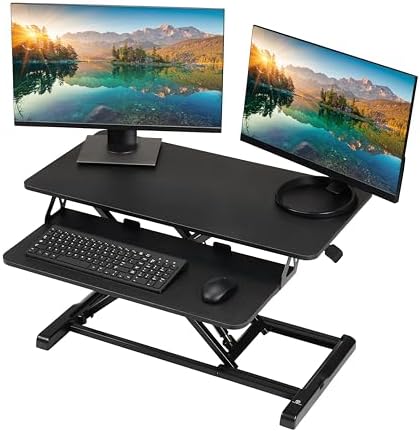
- Adjust to Get it Just Right: Ready to stand? Squeeze the handle and use your weight to adjust the height of your worksta…
- Easy Assembly: Each sit-to-stand ergonomic desk topper comes mostly assembled with minimal setup needed. Attach the keyb…
- Large Work Area: At 32″ wide, our adjustable standing desk converter has room for your computer or laptop, dual monitor …
If you’re working with a tight budget and want to try the standing desk experience before committing more money, the TechOrbits 32″ is a solid budget entry point. It covers the basics — 32″ work surface, dual monitor support, and a keyboard tray — without the premium price tag. With strong owner reviews, it’s not a compromise so much as a choice to skip the extras.
The main trade-off is the particle board surface, which is lighter and less premium-feeling than the MDF options on pricier models. That said, particle board is perfectly functional for keyboards, monitors, and everyday work — you’ll notice the difference in feel, not in performance. Height adjustment is smooth and the converter is stable enough for two monitors at standing height.
Key Specs
- Work surface width: 32 inches
- Surface material: Particle board
- Keyboard tray: Included
- Monitor compatibility: Dual monitor
- Price tier: Budget
Pros & Cons
- ✅ Most affordable option in this roundup
- ✅ Strong review count for a budget pick
- ✅ Covers all essential sit-stand features
- ✅ Compact size fits any standard desk
- ❌ Particle board surface feels less premium
- ❌ Slightly less sturdy than VIVO models at maximum height
Who It’s For
The TechOrbits converter is for people who want to test the standing desk experience without a big upfront investment. It’s also a smart pick for a secondary workstation or a spare office setup where you don’t need premium build quality. If you find you love standing while working, you can always upgrade to the VIVO K or V Series later.
How to Choose the Best Standing Desk Converter for Your Setup
Not all converters are built the same. Here’s what actually matters when you’re picking one.
Width: Match It to Your Monitor Count
32 inches works for one monitor plus a laptop, or two smaller monitors up to 24″. For two 27″ monitors side by side, go for at least 36 inches. Measure your desk first — a converter that’s too wide creates awkward overhangs and defeats the purpose.
Height Range: Know Your Standing Ergonomics
A good converter should raise your monitor so the top of the screen sits roughly at eye level when standing. This typically means a height adjustment range of at least 13–15 inches above the desk surface. Most two-tier converters in this price range get you there. If you’re taller than 6’2″, double-check the max height spec before buying.
Mechanism: Spring vs. Gas vs. Electric
Spring-assisted mechanisms (used by VIVO and TechOrbits) are the most common. They’re easy to adjust and hold position reliably. Gas spring converters tend to be smoother but cost more. Electric converters are at the premium end — they’re the easiest to use but add significant cost and mechanical complexity you probably don’t need for a home office.
Weight Capacity: Don’t Forget Your Monitors
Two monitors can weigh anywhere from 15 to 30+ lbs combined. Add a laptop and accessories and you can approach the 35 lb capacity limit on standard converters. If your setup is on the heavy side, verify the rated capacity before buying. The VIVO V Series at 35 lbs handles most dual-monitor setups comfortably.
Pair It With an Anti-Fatigue Mat
If you’re planning to stand for extended periods, an anti-fatigue mat makes a real difference in how your feet and lower back feel. Check out our guide to the best anti-fatigue standing mats for options that pair well with any desk converter.
Prefer a Laptop-Only Setup?
If you’re using a laptop and don’t need the two-tier converter design, a laptop stand paired with an external keyboard is a simpler and cheaper alternative. But if you want a monitor-level view with keyboard independence, a desk converter is the right tool.
Related Home Office Guides
- Best Anti-Fatigue Standing Mat — your feet will need this
- Best Under Desk Treadmill — go from standing to walking
- Best Laptop Stand — get your screen to eye level
Frequently Asked Questions
What is a standing desk converter?
A standing desk converter is an adjustable riser that sits on top of your existing desk. It lifts your monitors, keyboard, and other peripherals to a standing-friendly height, then lowers back down when you want to sit. It’s a simpler, less expensive alternative to replacing your desk entirely.
Are standing desk converters worth it?
Yes — if you actually use them. The health benefits of alternating between sitting and standing are well-documented: reduced back pain, better posture, and improved energy throughout the day. A converter makes the habit easy since height adjustment takes just seconds. The key is building the routine of switching every 30–60 minutes.
What size standing desk converter do I need?
For a single monitor or laptop, a 28–32″ converter is plenty. For two monitors, 32–36″ is the sweet spot. If you have an ultrawide monitor (34″ or wider), look for a 36–40″ converter to make sure it fits without hanging over the edges of the keyboard tray.
Will a standing desk converter work on any desk?
Generally, yes. Most converters simply sit on top of a flat desk surface and don’t require mounting or attachment. The main requirements are that your desk is wide enough to fit the converter and deep enough (usually at least 24 inches front-to-back) to support it without feeling unstable.
How do I find the right standing height?
Stand up straight in front of your desk. Bend your elbows to 90 degrees — that’s the height your keyboard should be at. From there, set your monitor so the top of the screen is roughly at eye level or slightly below. Most people need a few sessions to dial in their ideal standing height before locking it in.
Can a standing desk converter hold dual monitors?
Yes — most two-tier converters in this roundup are designed specifically for dual monitors. Check the weight capacity: two monitors typically weigh 15–25 lbs combined, well within the 35 lb limit on models like the VIVO V Series. If your monitors are unusually heavy (like large curved 32″+ displays), factor that into your choice.
Do standing desk converters wobble?
Lower-quality converters can wobble at full height, especially with heavier monitors. The VIVO models in this guide are specifically praised in reviews for their stability. If wobble is a concern, stick with established brands and avoid no-name options, which often cut corners on mechanism quality.
What’s the difference between a standing desk converter and a monitor riser?
A monitor riser just lifts your screen to a more comfortable sitting height — no real adjustment for standing. A standing desk converter raises your full workstation (monitor and keyboard) high enough to stand at, then lowers it for sitting. They solve different problems: a riser is an inexpensive ergonomic fix, while a converter is a pricier sit-stand solution.
Which One Should You Buy?
Our top pick is the VIVO 36″ V Series — the extra width suits two larger monitors and it stays stable at full height. If your desk is standard width, the VIVO 32″ K Series is the best value: it handles dual monitors reliably and costs less than the V Series without sacrificing much. And if you’re budget-conscious or just want to try the standing desk lifestyle first, the budget-tier TechOrbits 32″ is a perfectly capable starting point.
Any of these three will be a genuine upgrade over working from a fixed-height desk all day. Pick the one that fits your monitor count and budget, set it up in 15 minutes, and start alternating — your back will thank you.
- Create Instant Active Standing – VIVO’s desk riser provides on-demand standing throughout the day for the freedom to get…
- Space Efficient 31.5″ Surface – The top surface measures 31.5” x 15.7”, which maximizes space while still providing room…
- Strong 33 lbs Lift Assist – Go from sitting to standing in one smooth motion using the innovative simple touch height lo…
- Create Instant Active Standing – VIVO’s desk riser provides on-demand standing throughout the day for the freedom to get…
- Spacious 91cm Surface – The 91cm x 56cm desktop provides room for single and dual monitor/laptop setups. The 64cm x 27cm…
- Strong 15kg Lift Assist – Go from sitting to standing in one smooth motion with dual pneumatic spring force. Adjust to y…
- Adjust to Get it Just Right: Ready to stand? Squeeze the handle and use your weight to adjust the height of your worksta…
- Easy Assembly: Each sit-to-stand ergonomic desk topper comes mostly assembled with minimal setup needed. Attach the keyb…
- Large Work Area: At 32″ wide, our adjustable standing desk converter has room for your computer or laptop, dual monitor …
See full specs and the complete lineup on VIVO’s official site.
Last updated: July 2026 | Prices subject to change.
Questions about any of these picks? Get in touch via our contact page.
Pingback: Best Under Desk Treadmill For Home Office In 2026
Pingback: Best Ergonomic Mouse For Home Office 2026: Top 4 Picks
Pingback: FlexiSpot Vs Fezibo 2026 — Which Standing Desk Wins?
Pingback: NB North Bayou F80 Review 2026 — Does It Sag Or Wobble?