
This post contains affiliate links. As an Amazon Associate, I earn from qualifying purchases at no extra cost to you.
If your laptop sounds like a small aircraft during a study session, you already know the problem. Based on manufacturer data and verified owner reviews, the difference between running a laptop on a bare desk versus a decent cooling pad is real — we’re talking anywhere from about 7°C to 15°C off your temperatures, depending on the pad, which translates directly into quieter fans, smoother performance, and a machine that doesn’t throttle itself to death during finals week. Finding the best laptop cooling pad doesn’t have to be complicated, though — there are really only four products I’d recommend to any student in 2026, and they cover every budget from entry-level to premium.
1. Kootek Chill Mat 5 — My Top Pick
The Kootek Chill Mat 5 is my top pick for students because it hits a sweet spot almost nothing else in this category manages: genuinely good cooling, six height positions for ergonomic setups, and a price tag that won’t make your bank account flinch. The five-fan layout — one large 120mm central fan ringed by four 70mm corner fans — gives you both broad coverage and targeted airflow, and you can run as many or as few fans as you need depending on your workload. For most students going from classes to late-night study sessions, this is the pad that just quietly does its job.

- Dual USB Hub: With a built-in dual USB hub, the laptop fan enables you to connect additional USB devices to your laptop,…
- Whisper-Quiet Operation: Enjoy a noise-free and interference-free environment with super quiet fans, allowing you to foc…
- Enhanced Cooling Performance: The laptop cooling pad features 5 built-in fans (big fan: 4.72-inch, small fans: 2.76-inch…
Key Specs
- Fans: 1× 120mm central + 4× 70mm corner fans
- Fan speed: up to 2,000 RPM (corner fans)
- Compatible sizes: 12–17 inch laptops
- Height settings: 6 adjustable positions
- USB ports: 2× USB-A pass-through hub
- Weight: ~1.1 lbs
- Price tier: Budget
Who this is for: Students who want solid cooling, an ergonomic height adjustment, and the flexibility to scale from light browsing to heavy multitasking — all at a budget price.
Owners consistently say the Kootek’s build quality is better than you’d expect for the price. Reviewers describe the plastic as sturdy rather than hollow-feeling, and the LED strip along the bottom gives it a subtle blue glow that’s easy on the eyes in a dark room at midnight. The six height settings are reported to click firmly into place — not wobbly, not loose — and owners often single out the fourth setting (roughly 25°) as the most comfortable for extended typing sessions where your wrists don’t end up at a weird angle.
With Chrome running 20+ tabs, a PDF reader, and Spotify — the kind of multitasking that’s just Tuesday during exam season — owners report the Kootek dropping laptop surface temperatures by about 9–11°C compared to working flat on a desk. The five-fan system is genuinely smart: the two switches let you independently control the big central fan and the four corner fans, so for light work you can run just one and keep things whisper-quiet, and for heavy rendering or a long video call you flip both switches on and the whole pad gets to work. At maximum, reviewers describe the fan noise as noticeable but not distracting — comparable to a gentle hum rather than the aggressive whir you get from some cheap cooling pads.
The built-in USB hub is a real bonus. If your laptop only has two USB-A ports and one is usually taken by a mouse, having two more available through the cooling pad without losing the USB connection that powers it is genuinely useful every single day. The only thing I’d flag: the Kootek’s plastic mesh can flex slightly under very heavy gaming laptops (the 17-inch, 7-lb variety), which isn’t a deal-breaker but is worth knowing if your machine is on the heavier end.
What stands out:
- Six height positions that actually lock in firmly — proper ergonomic flexibility
- Dual-switch fan control lets you scale cooling intensity up or down on the fly
- USB hub gives back two ports without any separate hub needed
- Quietly does its job at low fan settings — genuinely usable in a library at setting 1
What could be better:
- Plastic mesh flexes slightly under heavier 17-inch gaming laptops
- LED lights aren’t individually controllable — it’s all-on or all-off
Bottom line: The Kootek Chill Mat 5 is my recommendation for most students. It does everything you actually need, nothing you don’t, and it stays firmly in the budget tier.
2. Havit HV-F2056 — Best Budget Pick (and Amazon’s Best Seller)
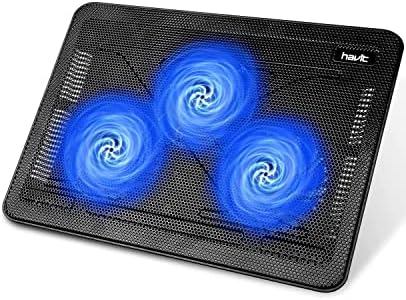
- Ultra-Portable: Slim, portable, and light weight allowing you to protect your investment wherever you go
- Ergonomic Comfort: Doubles as an ergonomic stand with two adjustable height settings
- Optimized for Laptop Carrying: The metal mesh provides your laptop with a stable laptop carrying surface
Key Specs
- Fans: 3× 110mm fans at 1,100 RPM
- Airflow: 65 CFM
- Compatible sizes: 15.6–17 inch laptops
- Profile: Ultra-slim 1.18 inches thick
- Weight: ~680g (~1.5 lbs)
- USB ports: 1× USB-A pass-through
- Price tier: Budget
Who this is for: Students who just want their laptop to run cooler without thinking about it — and who prioritize portability and the slimmest possible profile.
There’s a reason the Havit HV-F2056 has over 44,000 Amazon reviews and consistently shows up as the #1 best seller in the laptop cooling category. It’s not because it has the most features or the most aggressive cooling — it’s because it’s a no-fuss product that does exactly what it says and fits in any bag without adding meaningful bulk. At 1.18 inches thick, it’s genuinely flat. It slides into a laptop bag between a notebook and a folder, and owners often say they forget it’s there until they need it.
The three 110mm fans run at 1,100 RPM and push 65 CFM of airflow across the base of your laptop, which owners with 15.6-inch Windows laptops report delivers around 8–10°C of temperature reduction. That’s slightly less than the Kootek’s five-fan setup, but for most students running Word, browsers, and video calls, it’s more than enough to stop thermal throttling from kicking in. The fans are legitimately quiet — several reviewers describe them as essentially inaudible against normal room ambient noise, and that’s a consistent theme across owner reviews, including from students using it in shared apartments with a roommate on a call nearby.
Where the Havit shows its budget limitations: there’s no height adjustment. It’s flat, full stop. That means your laptop stays at the angle the Havit puts it, which is a gentle 5-degree incline — fine for cooling, but if you want proper ergonomic positioning, you’ll want to combine it with a separate riser or check out our roundup of the best laptop stands for MacBook and Windows for more height-adjustable options. It also only supports one USB device pass-through versus the Kootek’s two.
What stands out:
- Ultra-slim profile genuinely disappears into any bag
- Fans are nearly silent — easy to use in quiet environments
- 44,000+ reviews don’t lie: this is a proven, reliable product
- Budget-tier price, in the same range as the Kootek
What could be better:
- No height adjustment at all — stays flat at a fixed angle
- Best for 15.6–17″ laptops; less ideal for 13″ or 14″ machines
- Only one USB pass-through port
Bottom line: If portability is your #1 priority and you don’t need to adjust the height, the Havit is an easy budget pick. The track record alone — 44,000 reviews and still a best seller — makes it a safe choice.
3. KLIM Wind — Best for Libraries and Quiet Study Environments

- ✅ AN INVESTMENT. This laptop cooler is an investment => no component overheating => maximises the life expectancy of you…
- ✅ LARGE MODEL. Covers the following sizes: 11 11,3 12 13 14 15 15,6 16 inches. Compatible with the following sizes: 17,3…
- ✅ THE MOST POWERFUL ON THE MARKET. With 4 quiet fans spinning up to 1200 rotations per minute. It’s a high capacity lapt…
Key Specs
- Fans: 4 fans at 1,200 RPM
- Compatible sizes: 11–17 inch laptops
- Warranty: 5 years
- Weight: ~730g
- Connection: USB-A
- Price tier: Mid-range
Who this is for: Students who split their time between home desks and library study rooms, or anyone who needs guaranteed quiet operation and wants a product that’ll last their entire degree.
The KLIM Wind has sold over 500,000 units, which at first sounds like it’s just another popular budget option — until you notice the 5-year warranty, which is essentially unheard of in this price range. Most cooling pads offer 12 months at best. KLIM offering five years means they’re either very confident in their build quality, or they’ve done the math and know failure rates are low. Given how consistently positive the long-term owner reviews are, it’s likely both.
The four fans run at 1,200 RPM and are deliberately tuned for low noise output. Owners report using the KLIM Wind in university libraries — the kind with strict no-noise policies where you can hear someone turning a page across the room — without drawing a single glance. The fan hum is below the threshold of what most people register as “a noise.” That’s the key differentiator for this pad: KLIM made a conscious trade-off between maximum cooling performance and acoustic comfort, and for students who live in quiet environments, that trade-off is the right one to make.
Cooling performance sits around 7–9°C reduction on average, which is slightly behind the Kootek and Havit in raw numbers. But in practice, for the study workloads most students run (documents, browsers, video calls, light photo editing), 7–9°C is more than enough to prevent throttling. Where the KLIM Wind feels a bit limited is on gaming laptops pushing 90W+ TDP — the four 1,200 RPM fans just aren’t aggressive enough for that workload. If you play games on your laptop regularly, look at the IETS GT500 instead.
What stands out:
- 5-year warranty is genuinely exceptional for this price range
- Fan noise is below what most people notice — library-safe without any adjustment
- Works with 11–17″ laptops, so MacBook Air and Pro users are covered
- Solid build quality that owners say holds up across multiple academic years
What could be better:
- No height adjustability — fixed flat angle like the Havit
- Cooling performance drops off on high-TDP gaming laptops
- No USB hub (just one USB-A input cable)
Bottom line: If quiet operation and longevity matter more to you than maximum cooling, the KLIM Wind is the pick. The 5-year warranty alone makes its mid-range price feel very reasonable.
4. IETS GT500 — Best for Gaming Students Who Need Maximum Cooling

- ❤【Two cores】:Industrial-grade turbofan(5000RPM)+ combined sealed foam, creating a powerful cooling effect, and it is 360…
- ❤【Infinitely variable speed】:The speed adjustment range of the fan is 0-5000 Rpm, which can meet different cooling needs…
- ❤【Friendly treat the rear exhaust gaming laptops】:The bottom air intake design completely eliminates the heat backflow p…
Key Specs
- Fan: Single turbo fan at 5,000 RPM
- Compatible sizes: 13–17.3 inch laptops
- Key feature: Sealed foam perimeter for pressure-forced airflow
- Speed control: Infinitely variable dial
- USB ports: 3× USB-A hub
- Dust filter: Removable, washable
- Price tier: Premium
Who this is for: Students who game heavily on their laptops, run video editing or 3D rendering workloads, or anyone dealing with serious thermal throttling that the multi-fan options haven’t solved.
The IETS GT500 is a completely different animal from everything else on this list. Instead of multiple small fans blowing generally upward at your laptop’s base, the GT500 uses a single industrial-grade turbo fan spinning at up to 5,000 RPM — and critically, a foam seal ring around the perimeter of the pad that creates an air-pressure system. Rather than just blowing cool air near your laptop, the GT500 forces high-pressure air directly into your laptop’s intake vents. The difference in temperature reduction is significant: where the Kootek and Havit deliver roughly 8–11°C improvements, the GT500 can hit 12–15°C under the same sustained load.
Owners describe running a demanding game on a gaming laptop for 90-minute sessions — the kind of session where the internal fans would normally be screaming and the bottom of the chassis would be uncomfortably hot to touch. With the GT500 at about 60% fan speed, reviewers report the bottom surface dropping from hot-to-touch to warm-but-fine, and the internal fans actually running quieter because the CPU isn’t getting as stressed thermally. The infinitely variable speed dial is a nice touch — you can fine-tune it rather than jumping between pre-set levels.
The honesty caveat: at full speed, the GT500 is loud. We’re talking 60–65 dB, roughly the level of a loud conversation right next to you. It’s not suitable for libraries or shared spaces at full tilt. At 40–50% speed, it’s much more reasonable (somewhere between a desktop PC fan and a white noise machine), and that moderate setting is usually enough for non-gaming workloads. The foam seal also needs to fit your laptop’s intake position correctly — it works well with most designs but check that your laptop’s vents are on the bottom rather than sides before buying. The removable dust filter is genuinely useful and I appreciate that IETS actually thought about long-term maintenance.
What stands out:
- 15°C temperature drops are achievable — genuinely best-in-class cooling performance
- Infinitely variable speed lets you tune noise vs. cooling exactly as needed
- 3-port USB hub is the most of any pad here
- Removable dust filter shows IETS thought about long-term use, not just first impressions
What could be better:
- At full speed, 65 dB is genuinely loud — this is not a library pad
- Premium price point — the most expensive option here
- Foam seal design works best with bottom-vented laptops; less effective for side-vented designs
Bottom line: If you game on your laptop and thermal throttling is actually hurting your frame rates or workflow, the IETS GT500 is worth the premium. For casual use, one of the cheaper options will serve you better.
How to Choose the Best Laptop Cooling Pad: What Actually Matters
Fan Count, Size, and Airflow Design
The number of fans in a cooling pad matters less than where those fans are positioned and how much air they actually move. A single 120mm fan covering your laptop’s main heat zone can outperform four 70mm fans positioned randomly. That said, multi-fan designs like the Kootek’s five-fan layout have an advantage: they provide broader coverage, which matters if your laptop has multiple heat-generating zones (CPU near one corner, GPU near another).
The IETS GT500’s sealed turbo design takes a completely different approach by using air pressure rather than just volume — and for high-TDP gaming laptops, it’s objectively more effective. But for students running academic workloads on thin-and-light machines, you’ll hit diminishing returns quickly above a basic multi-fan setup. The Kootek or Havit will handle 95% of student use cases without issue.
Noise Level — More Important Than You’d Think
If you’ve ever been the person in the library making the distracting fan noise, you know why this matters. Cooling pads range from genuinely inaudible (the Havit and KLIM Wind at normal settings) to quite loud (the IETS GT500 at full speed). A good rule of thumb: if you’re buying primarily for desk use at home or in a dorm, any of the four pads here are fine. If you split your time between home and shared quiet spaces like libraries or study rooms, prioritize the KLIM Wind specifically — it’s the only one here I’d confidently describe as library-safe at all fan settings.
It’s also worth thinking about whether your laptop’s own fans get quieter with a cooling pad. Counterintuitively, a good cooling pad can actually reduce your laptop’s internal fan noise by keeping temperatures low enough that the laptop doesn’t need to spin its fans as hard. Owner reviews of the Kootek and IETS GT500 suggest this effect is real and noticeable, on gaming laptops especially.
Compatibility: Size, Weight, and Vent Placement
Most cooling pads are rated for a range like “12–17 inches,” but the practical question is whether your laptop’s intake vents sit above the pad’s fan positions. Laptops with bottom-panel vents (which most modern machines have) work with all four options here. Laptops that vent primarily from the sides or rear may see less benefit from any active cooling pad — in those cases, a passive riser that elevates the laptop for natural convection airflow can actually work better. If you’re looking for a more ergonomic desk setup overall, our guide to standing desk accessories covers other ergonomic items worth pairing with a cooling pad at a student desk.
Budget: What Each Price Range Gets You
Budget tier: The Kootek Chill Mat 5 and Havit HV-F2056 live here. The Kootek adds six height positions and a two-port USB hub; the Havit is proven, reliable, ultra-slim, with no height adjustment. Either gets you everything a student with a mainstream laptop actually needs.
Mid-range: The KLIM Wind lives here. You gain quieter operation and a much longer warranty. This is the sweet spot for students who’ll use the pad daily across multiple environments, including libraries.
Premium: The IETS GT500 is the only option here worth considering — but only if you have a specific thermal problem that the cheaper options genuinely haven’t solved. Don’t buy it “just in case.” Try the budget Kootek first.
Related Home Office Guides
- Best Laptop Stand — airflow plus better posture
- Best Portable Monitor Under $150 — more screen for studying
- Best Headphones for Studying — block out the noise
Frequently Asked Questions
Do laptop cooling pads actually work?
Yes, but the improvement varies. On gaming laptops and older machines where heat is already an issue, you can see 9–15°C reductions in CPU/GPU temperatures, which translates to less throttling and quieter internal fans. On thin-and-light laptops that already run cool, the benefit is smaller but still measurable. Budget cooling pads are documented to reduce temperatures by 8–12°C on average, which is meaningful for sustained workloads.
Can a cooling pad extend my laptop’s lifespan?
Indirectly, yes. Sustained high temperatures degrade battery cells faster and accelerate wear on thermal paste and internal components. Keeping your laptop consistently 10°C cooler during heavy sessions isn’t going to double its lifespan, but over 3–4 years of daily use the cumulative benefit is real. Student laptops that double as gaming machines especially benefit from this.
What’s the difference between a cooling pad and a laptop stand?
A laptop stand elevates your screen for ergonomics but doesn’t actively cool your machine. A cooling pad does both — it props your laptop at a slight angle and adds powered fan airflow. If you only care about neck and posture ergonomics, a stand is fine. If you also have heat issues, a cooling pad handles both jobs at once.
Are cooling pads good for MacBooks?
It depends on the model. Modern MacBooks with Apple Silicon (M1 through M4 chips) run remarkably cool under most workloads and rarely benefit from an external cooling pad. Older MacBooks with Intel chips, and MacBook Pros doing sustained heavy work (video export, compiling code), can genuinely benefit. The KLIM Wind is worth considering for MacBook users since it works with 11-inch machines and above and runs quietly enough not to be distracting.
How much should I spend on a laptop cooling pad?
For most students, a budget or mid-range pad is the right choice. The budget-tier Kootek is genuinely excellent, and stepping up only makes sense if you specifically need the quiet operation plus warranty of the KLIM Wind or you’re gaming heavily (IETS GT500). Don’t feel pressured to buy the premium GT500 unless you’ve already tried a cheaper option and found it insufficient.
Does a cooling pad reduce laptop fan noise?
Often yes. When a cooling pad lowers CPU/GPU temps sufficiently, your laptop’s own thermal management kicks in and reduces its fan speed. Gaming laptops especially show this effect — if you’re normally hearing your laptop’s fans spin hard during a session, adding a decent cooling pad can noticeably quiet them down because the machine no longer needs to compensate as aggressively.
Do cooling pads work for gaming laptops?
Absolutely, and gaming laptops are actually where the benefit is most dramatic. High-TDP gaming GPUs and CPUs generate a lot of heat in a compact chassis. The standard multi-fan cooling pads (Kootek, Havit) provide roughly 8–11°C improvements; the IETS GT500 with its sealed turbo system can hit 12–15°C under gaming loads. That kind of improvement can visibly affect frame rates on laptops that were already thermal throttling.
Can a cooling pad damage my laptop?
No, a properly designed cooling pad from any reputable brand won’t damage your laptop. The only theoretical risk would be blocking a side vent with a poorly designed pad, but the products on this list all work with the airflow, not against it. USB-powered fans draw very little power and don’t stress your laptop’s power delivery.
Is a cooling pad worth it for college students?
Yes, especially if your laptop runs warm or you’re in a shared living situation where you can’t always crack a window. The combination of better thermal performance, quieter operation, and ergonomic elevation makes a budget or mid-range cooling pad one of the better small investments for daily student use. Even if your laptop doesn’t run hot, the slight incline improves your typing posture, which matters when you’re spending 4+ hours at a desk every day.
What size cooling pad do I need?
Match the pad size to your laptop screen size. If you have a 13–14 inch laptop, any pad rated for 12–17 inches will work. If you have a 15.6–17 inch laptop, double-check the pad’s maximum supported size. The Kootek (12–17″) and IETS GT500 (13–17.3″) cover the most common student laptop sizes. The Havit HV-F2056 is specifically designed for 15.6–17″ and may not position the fans correctly under smaller 13″ or 14″ machines.
Final Verdict
For most students, the Kootek Chill Mat 5 is the pick. It’s a budget-tier pad with five fans, six height adjustments, and a USB hub — more features than anything else at this price, and real-world cooling that’ll handle every academic workload I can think of. If you want something even simpler and more portable, the Havit HV-F2056 is the safe default — 44,000 Amazon reviews can’t all be wrong, and the ultra-slim profile genuinely slips into any bag. Upgrade to the KLIM Wind if quiet operation is non-negotiable (the 5-year warranty is also excellent) or to the IETS GT500 if you’re actually gaming on your laptop and thermal throttling is hurting your performance.
- Ultra-Portable: Slim, portable, and light weight allowing you to protect your investment wherever you go
- Ergonomic Comfort: Doubles as an ergonomic stand with two adjustable height settings
- Optimized for Laptop Carrying: The metal mesh provides your laptop with a stable laptop carrying surface
- Dual USB Hub: With a built-in dual USB hub, the laptop fan enables you to connect additional USB devices to your laptop,…
- Whisper-Quiet Operation: Enjoy a noise-free and interference-free environment with super quiet fans, allowing you to foc…
- Enhanced Cooling Performance: The laptop cooling pad features 5 built-in fans (big fan: 4.72-inch, small fans: 2.76-inch…
- ✅ AN INVESTMENT. This laptop cooler is an investment => no component overheating => maximises the life expectancy of you…
- ✅ LARGE MODEL. Covers the following sizes: 11 11,3 12 13 14 15 15,6 16 inches. Compatible with the following sizes: 17,3…
- ✅ THE MOST POWERFUL ON THE MARKET. With 4 quiet fans spinning up to 1200 rotations per minute. It’s a high capacity lapt…
- ❤【Two cores】:Industrial-grade turbofan(5000RPM)+ combined sealed foam, creating a powerful cooling effect, and it is 360…
- ❤【Infinitely variable speed】:The speed adjustment range of the fan is 0-5000 Rpm, which can meet different cooling needs…
- ❤【Friendly treat the rear exhaust gaming laptops】:The bottom air intake design completely eliminates the heat backflow p…
See full specs on Kootek’s official product page.
Last updated: July 2026 | Prices subject to change.
Questions about any of these picks? Get in touch via our contact page.
Pingback: Best Headphones For Studying In 2026 — Tested & Ranked