
This post contains affiliate links. As an Amazon Associate, I earn from qualifying purchases at no extra cost to you.
Looking for the best portable monitor for laptop under $150? After comparing several options side by side, I’ve narrowed it down to three solid picks — whether you need a second screen for remote work, studying, or travel. Here’s the honest breakdown.
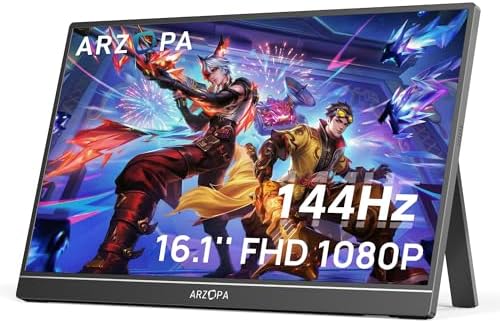
My Top Pick — Arzopa Z1FC 16.1″ 144Hz
If you want the most monitor for your money under $150, the Arzopa Z1FC is it. A 16.1-inch 1080p screen with a 144Hz refresh rate in this roundup’s mid-range price tier — a spec combination that used to cost noticeably more. Whether you’re coding, watching videos on a flight, or squeezing in a gaming session after work, this thing keeps up with everything.
Best Portable Monitor for Laptop Under $150 — Quick Comparison


Reviews — Detailed Breakdown
1. Arzopa Z1FC 16.1″ 144Hz — Best Overall
- 16.1″ 144Hz Display: Arzopa Z1FC 16.1″ portable monitor has 144Hz ultra-high refresh rate for higher motion clarity and …
- Portable Monitor with Kickstand: The portable gaming monitor comes with a built-in stand that allows for easy adjustment…
- 106% sRGB IPS Screen: The 16.1″ portable monitor features 1080P FHD high-definition resolution and 106% sRGB gamut bring…
Key Specs
- Screen: 16.1″ IPS, 1920×1080 FHD
- Refresh Rate: 144Hz
- Color: 106% sRGB, HDR support
- Ports: 2x USB-C (full function) + 1x Mini-HDMI
- Weight: ~1.8 lbs (820g)
- Stand: Built-in kickstand
- Price tier: Mid-range (priciest pick in this roundup)
Who this is for: Anyone who wants a versatile second screen that handles both productivity and gaming without breaking $150 — especially students, remote workers, and casual gamers.
I’ll be upfront: a 144Hz panel at this price sounds like a marketing trick. But owners consistently report that, connected via a single USB-C cable, motion looks noticeably smoother than on 60Hz portables. For gaming, reviewers call it genuinely playable. For productivity, that smooth scrolling through spreadsheets and browser tabs adds up over a full workday.
The kickstand is one of those details that sounds minor until you’re actually using it at a coffee shop. Owners say it holds at a stable angle, doesn’t wobble when you type on the laptop next to it, and setup takes under a minute from bag to working screen. The 106% sRGB color is accurate enough for casual photo editing — not a pro tool, but better than most budget options.
Brightness is the most common complaint in owner reviews. At 300 nits, it’s fine indoors but genuinely hard to use near a sunny window. If you work outside or in a very bright office, factor that in.
What stands out
- 144Hz at this price is legitimately impressive — games feel smooth, scrolling feels snappy
- Single USB-C cable handles both power and video; no adapters, no mess
- 106% sRGB color coverage is better than budget rivals at the same price
- The built-in kickstand is solid — adjustable angle, no wobbling
What could be better
- 300 nits brightness struggles near windows or in bright environments
- At 1.8 lbs it’s slightly heavier than the Lepow — if carrying weight is a top priority, factor that in
- No touchscreen (not a dealbreaker at this price, but good to know)
Bottom line: For well under this guide’s $150 ceiling, the Arzopa Z1FC gives you specs that genuinely surprise. It’s the best all-rounder in this roundup.
Unknown display type. Please re-select display type.2. Arzopa A1 15.6″ FHD — Best Budget Pick
- Full HD 1080P IPS Screen: Immerse yourself in a vivid and accurate image with a 1920 x 1080 resolution IPS screen. Enjoy…
- Portable Monitor with Stand: The ARZOPA portable monitor crafted with high-quality and durable metal materials, monitor …
- Multiple Display Modes: Choose from duplicate mode, extend mode, or second screen mode to suit your preferences. Connect…
Key Specs
- Screen: 15.6″ IPS, 1920×1080 FHD
- Refresh Rate: 60Hz
- Color: 100% sRGB
- Ports: 2x USB-C + 1x Mini-HDMI
- Weight: ~1.7 lbs (770g)
- Stand: Built-in kickstand
- Price tier: Budget
Who this is for: Students, budget-conscious buyers, or anyone who just needs a reliable second screen for documents and video calls — without stepping beyond the budget tier.
As the cheapest pick here, the Arzopa A1 is the easiest recommendation I can make to a student who’s never used a portable monitor before. You open the box, pull out the USB-C cable, plug it into your laptop, and you’ve got a second screen in about one minute. No drivers, no weird compatibility issues — it just works.
Student reviewers often describe the same experience: within minutes they have notes on one screen and writing on the other, and wonder how they managed before. That’s the A1’s whole pitch: pure simplicity at the lowest barrier to entry.
The 100% sRGB panel looks good for general use — sharp text, decent colors for videos, comfortable viewing angles from the IPS panel. You’re not going to use this for serious color grading, but for everything a student or remote worker needs day-to-day, it handles it without complaint.
The 60Hz refresh rate compared to the Z1FC is the main spec trade-off. For documents, video calls, YouTube, and writing — you won’t notice. For gaming or fast-scrolling tasks, the Z1FC is worth the step up.
What stands out
- Budget-tier price makes it genuinely accessible — the lowest-cost pick here that doesn’t skimp on the basics
- Plug-and-play setup via USB-C; works with MacBook, Windows laptop, iPad Pro
- IPS panel means wide viewing angles — useful when showing work to someone next to you
- Lightweight at 1.7 lbs; slides easily into a laptop bag
What could be better
- 60Hz shows its limits if you’re gaming or doing anything that involves fast motion
- Speaker quality is thin — connect earbuds for anything serious
- Kickstand has limited angle adjustment compared to the Z1FC
Bottom line: For anyone who wants a no-fuss second screen on a tight budget, the Arzopa A1 is the cleanest starting point. Don’t overthink it at this price.
Unknown display type. Please re-select display type.3. Lepow 15.6″ Portable Monitor — Best for Travel & MacBook Users
Unknown display type. Please re-select display type.Key Specs
- Screen: 15.6″ IPS, 1920×1080 FHD
- Refresh Rate: 60Hz
- Ports: USB-C + HDMI (Plug & Play, no drivers needed)
- Color: 106% sRGB, HDR support
- Weight: ~1.7 lbs (770g)
- Included: Smart Case doubles as stand
Who this is for: Travelers and MacBook users who want dual-input flexibility with a built-in Smart Case stand — without leaving the mid-range price tier.
Honestly, you wouldn’t expect much from the Lepow at this price — but on paper it surprises. The 106% sRGB color coverage is the same spec you get on the Arzopa Z1FC, and reviewers say the colors genuinely show it. Compared with bargain-bin portable monitors, owners report the difference is immediately obvious. Blacks are deeper, greens are richer, and photos actually look like photos.
What really sets the Lepow apart is the Smart Case. It’s a protective sleeve that folds into a stand — so you arrive at a coffee shop, slide out the monitor, prop it up, and you’re working in about 30 seconds. No fiddling with a separate kickstand or loose case. That’s a meaningful quality-of-life upgrade for anyone who travels regularly with a laptop.
Connectivity is where the Lepow wins over a lot of portable monitors at this price: you get both USB-C and HDMI. Connect via USB-C to your MacBook for Plug & Play (power and display in one cable), or switch to HDMI for older Windows laptops, gaming consoles, or even a hotel TV. That dual-input flexibility means it works with virtually every device in your bag. Owners report setup takes under 2 minutes.
What stands out
- Dual USB-C + HDMI input — works with MacBook, Windows laptops, and gaming consoles
- 106% sRGB color coverage — noticeably richer than budget monitors at this price
- Smart Case doubles as stand — set up anywhere in under 30 seconds
- Plug & Play on Mac and Windows — zero drivers, zero configuration
What could be better
- 60Hz refresh rate — not ideal for gaming (the Arzopa Z1FC offers 144Hz for a bit more)
- Smart Case stand has limited viewing angle adjustment compared with the Z1FC’s built-in kickstand
- It’s not the cheapest option here — but the Smart Case and dual-input justify the cost
Bottom line: In the mid-range tier, the Lepow delivers dual-input connectivity, 106% sRGB colors, and a Smart Case stand that the competition can’t match at this price. If you travel often and connect to multiple devices, this is the one.
Unknown display type. Please re-select display type.How to Choose the Best Portable Monitor for Laptop Under $150
Refresh Rate — Only Matters If You Game or Scroll Fast
Most portable monitors under $150 run at 60Hz, which is perfectly fine for everything from writing and video calls to watching Netflix. You’ll feel the difference only when gaming or doing anything with fast movement on screen. The Arzopa Z1FC at 144Hz is the only option under $150 I’d recommend to anyone who games, even casually. For everyone else — students, remote workers, travelers — 60Hz is enough and saves money.
Connectivity — Check Your Laptop’s USB-C Port First
This is where most people get caught out. Not all USB-C ports output video. USB-C comes in two flavors that look identical: one charges your laptop, the other also carries video signal (DisplayPort Alt Mode). Before buying any USB-C portable monitor, check if your laptop’s USB-C port supports “DP Alt Mode” or “Thunderbolt.” MacBooks (2016+), modern Dell XPS, ThinkPads, and HP Spectre all do. Budget Windows laptops sometimes don’t.
Both the Lepow and Arzopa models in this roundup include HDMI alongside USB-C — so you’ve always got a fallback if USB-C doesn’t cooperate. Dual-input is the standard to look for; avoid single-input monitors unless you’re sure every device you own supports USB-C DisplayPort output. For a quick compatibility check, visit arzopa.com or your laptop manufacturer’s spec page.
At the budget end: expect 60Hz, 1080p, and USB-C + HDMI dual input — that’s the Arzopa A1 and Lepow’s territory. One step up: better color accuracy and 144Hz like the Z1FC. Near the top of a $150 budget: you should be getting 2K resolution or 120Hz+ — if not, you’re paying for branding, not specs.
Size and Weight — 15-16 Inches Is the Sweet Spot
Anything under 14 inches starts to feel cramped for real work. Over 17 inches, you’re carrying a slab that defeats the “portable” purpose. The 15.6–16.1 inch range in this roundup hits the sweet spot: big enough to be genuinely useful, light enough (1.7–1.8 lbs) to slip into a laptop bag without noticing. The weight difference between all three monitors here is under 0.2 lbs — irrelevant in practice for most people.
Related Tech Guides
- Best USB-C Hub for Laptop — connect the second screen
- Best Laptop Stand — get both screens to eye level
- Best Laptop Cooling Pad — keep the laptop cool driving two displays
Frequently Asked Questions
What is the best portable monitor for MacBook Air under $150?
The Lepow 15.6″ is my top pick for MacBook Air users — it connects via a single USB-C cable for Plug & Play (power + display), and the 106% sRGB colors look great alongside the MacBook’s display. If budget is tighter, the budget-tier Arzopa A1 also works with MacBook Air’s USB-C port and includes a Mini-HDMI backup. All M1/M2/M3 MacBook Airs support USB-C DisplayPort output natively.
Do portable monitors work with just one USB-C cable?
Yes — if your laptop supports USB-C with DisplayPort Alt Mode, one cable handles both power and video signal. No external power brick needed. All three monitors in this roundup support single-cable USB-C. The Arzopa models and the Lepow also include HDMI as a fallback for laptops where USB-C doesn’t carry video.
Is 1080p good enough for a portable monitor in 2026?
For a 15–16 inch screen at normal viewing distance, 1080p is sharp enough for text, video, and general productivity. Pixel density on a 15.6″ 1080p panel sits around 141 PPI — comfortable for daily use. If you’re doing detailed photo or video editing, you’d want a 2K panel, but those push well above $150. For everything in this roundup’s intended use cases, 1080p is the right call.
How do portable monitors get their power?
Most modern portable monitors draw power directly through USB-C from your laptop — no separate power adapter needed. Some older or budget models use a separate USB-A cable for power plus a separate video cable, which gets messy. All three monitors in this roundup can run from a single USB-C connection. If your laptop’s USB-C doesn’t support video, you’ll use Mini-HDMI for video and a separate USB cable for power on the Arzopa models.
Is a portable monitor worth it for students in 2026?
Absolutely — especially if you work in libraries, cafes, or share a small dorm room. A portable monitor effectively doubles your screen real estate at a budget-tier price (Arzopa A1). Having a reference document on one screen while writing on the other cuts the constant tab-switching that kills focus. The Arzopa A1 fits in a standard laptop bag, and sets up in under a minute.
Final Verdict
When choosing the best portable monitor for laptop under $150, most people will find the Arzopa Z1FC to be the clear winner — 144Hz, 16.1 inches, and single-cable USB-C setup make it genuinely hard to beat at this price. If you’re on a tight budget, the Arzopa A1 is the simplest, most foolproof entry point into portable monitors. And if you’re a frequent traveler or MacBook user who wants dual-input flexibility and a built-in stand, the Lepow is the best value in this roundup.
Questions about any of these picks? Get in touch via our contact page.
Pingback: Best Laptop Cooling Pad For Students In 2026
Pingback: Best Headphones For Studying In 2026 — Compared & Ranked