
This post contains affiliate links. As an Amazon Associate, I earn from qualifying purchases at no extra cost to you.
The best USB-C hub for laptop users solves one of the most annoying parts of modern laptop design: you’ve got a powerful machine with barely any ports. One port goes to the charger, one to your monitor, and suddenly there’s nothing left for your SD card, external drive, or Ethernet. We compared popular hubs on specs and verified owner reviews, and the options available right now in 2026 — even at budget prices — are genuinely good. Here are the four I’d actually recommend.
Quick Comparison



Best USB-C Hub for Laptop in 2026
1. Hiearcool USB C Hub — Best Value 8-in-1
- Designed for Productivity — Compatible for MacBook & Most USB-C Laptops: Built to expand your MacBook’s USB-C ports, thi…
- 4K HDMI for Crisp Work & Entertainment Displays: Enjoy stunning 4K@60Hz output when connecting to external monitors, TVs…
- High-Speed Wired Internet — Reliable 1Gbps Ethernet: Upgrade your laptop with fast and secure 1Gbps Ethernet, ensuring s…
Eight ports at a budget price sounds like the kind of deal that comes with hidden compromises. Based on specs and verified owner reviews, it isn’t. The Hiearcool USB C Hub gives you 4K HDMI, Gigabit Ethernet, 100W Power Delivery pass-through, two USB-A 3.0 data ports, an SD card slot, and a microSD slot — all in a form factor that fits in a jeans pocket.
The standout in owner reviews is the multi-port stability. Owners report running Ethernet, an external SSD, and a 4K display all at the same time with no throttling and no disconnections. A lot of budget hubs fall apart here — they’ll drop Ethernet as soon as you start copying files. Reviewers say the Hiearcool doesn’t, and across a large base of owner reviews, that’s a consistent pattern.
The one thing to know: the cable is fixed, not detachable. If you prefer a clean desk with a separate cable, that’s a minor annoyance. For everyone else, it’s a non-issue — one less thing to lose.
Best for: Budget-conscious users who want a reliable all-rounder with Ethernet and HDMI without paying brand premium.
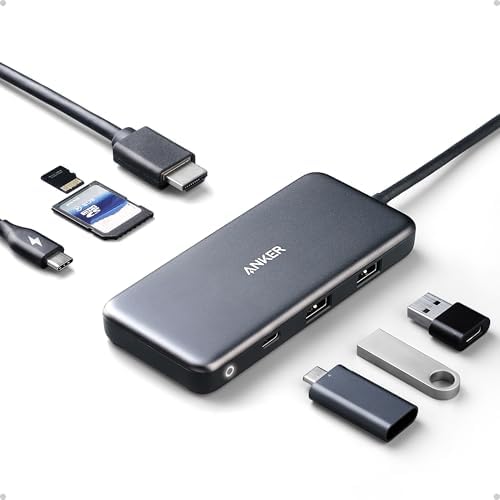
2. Anker USB C Hub 7-in-1 — Best for MacBook Users
- The Anker Advantage: Join the 80 million+ powered by our leading technology.
- Massive Expansion: Get way more out of your laptop’s USB-C port with 4K HDMI, SD card connectivity, USB-A / USB-C data p…
- Pass-Through Charging: Compatible with USB-C Power Delivery to provide high-speed pass-through charging to your laptop a…
If you’ve used Anker products before, you know what you’re getting: solid build, consistent performance, no surprises. The Anker 7-in-1 USB-C Hub is one of the most-reviewed hubs on Amazon for a reason. Owners describe the aluminum casing as premium-feeling; it dissipates heat well during extended use, and the whole thing is light enough that you forget it’s in your bag.
Ports: 4K HDMI, 100W Power Delivery, USB-C data, two USB-A 3.0, SD card, and microSD — all at a budget price. That’s an excellent price-to-quality ratio for an Anker product. MacBook users especially appreciate the compact dongle form factor that plugs flush into the side of the laptop rather than dangling on a cable.
Owners who use it at a coffee shop setup, connected to a portable monitor while charging, report it handles the load without getting hot, which isn’t true of every hub at this price. It’s my pick for daily carry.
Best for: MacBook users who want a proven brand, clean form factor, and a hub that’s genuinely travel-friendly.
3. UGREEN Revodok Pro 9-in-1 — Best Premium Pick
- 9 in 1 USB-C Hub: This USB C ethernent hub turns a single USB-C port into 9 ports with a 4K@60Hz HDMI, gigabit ethernet,…
- Stable Gigabit Ethernet Connection: USB C hub comes with Gigabit RJ45 ethernet port that supports 1000Mbps with faster, …
- 4K HD Visuals: USB C Dock is equipped with a 4K@60Hz HDMI port. Enjoy visually stunning movies, high-definition online m…
The UGREEN Revodok Pro 9-in-1 is the hub I’d recommend to anyone who spends serious time at a desk with an external monitor. Without a big price jump over the budget picks, you get 9 ports including 4K@60Hz HDMI, Gigabit Ethernet, 100W PD charging, multiple USB-A data ports, and both SD and TF (microSD) card slots.
That 60Hz HDMI output is the main reason to pick this over the budget hubs. If you’ve ever used a hub that caps at 4K@30Hz, you know the pain — scrolling feels slightly stuttery, moving windows feels sluggish, and your eyes eventually start to notice the choppiness even when you’re not consciously looking for it. Switching to 60Hz fixes all of that. Cursor movement is smooth, scrolling is fluid, everything feels like it should.
UGREEN’s Revodok line is relatively new but has built a reputation fast. Reviewers consistently rate the build quality above typical budget hubs — the housing doesn’t flex, the ports have a satisfying resistance, and owners say it runs cooler than expected even under sustained load.
Best for: Power users who have an external monitor as their primary display and need smooth 4K@60Hz output every day.
4. Anker 555 USB-C Hub 8-in-1 — Best for DisplayPort Monitors
- The Anker Advantage: Join the 55 million+ powered by our leading technology.
The Anker 555 is the best USB-C hub for laptop users who need DisplayPort. This listing bundles the hub with a separate USB-C to DisplayPort adapter, so if your laptop has a second USB-C port (and supports two external displays), you can run one monitor from the hub’s 4K@60Hz HDMI and another from the adapter. Creative professionals and developers who live across multiple monitors will recognize immediately why this matters.
Beyond the display output, the port lineup is solid: up to 85W PD charging pass-through, Gigabit Ethernet, a 10Gbps USB-C data port, two 10Gbps USB-A ports, SD, and microSD. Eight ports total. It’s also compact (about 4.4 oz and 0.6 inches thick), so it works as well in a laptop bag as it does on a desk.
Anker backs it with an 18-month warranty. For a piece of gear that’s plugged in all day every day, that long-term reliability matters more than most people realize until something goes wrong.
Best for: Professionals with a DisplayPort monitor, or anyone who wants 10Gbps data ports and 4K@60Hz HDMI in one compact hub.
Top Picks at a Glance
- The Anker Advantage: Join the 80 million+ powered by our leading technology.
- Massive Expansion: Get way more out of your laptop’s USB-C port with 4K HDMI, SD card connectivity, USB-A / USB-C data p…
- Pass-Through Charging: Compatible with USB-C Power Delivery to provide high-speed pass-through charging to your laptop a…
- The Anker Advantage: Join the 55 million+ powered by our leading technology.
- Designed for Productivity — Compatible for MacBook & Most USB-C Laptops: Built to expand your MacBook’s USB-C ports, thi…
- 4K HDMI for Crisp Work & Entertainment Displays: Enjoy stunning 4K@60Hz output when connecting to external monitors, TVs…
- High-Speed Wired Internet — Reliable 1Gbps Ethernet: Upgrade your laptop with fast and secure 1Gbps Ethernet, ensuring s…
- 9 in 1 USB-C Hub: This USB C ethernent hub turns a single USB-C port into 9 ports with a 4K@60Hz HDMI, gigabit ethernet,…
- Stable Gigabit Ethernet Connection: USB C hub comes with Gigabit RJ45 ethernet port that supports 1000Mbps with faster, …
- 4K HD Visuals: USB C Dock is equipped with a 4K@60Hz HDMI port. Enjoy visually stunning movies, high-definition online m…
What to Look for in a USB-C Hub for Laptop
Not all USB-C hubs are built the same, and the spec sheet doesn’t always tell the whole story. Choosing the best USB-C hub for laptop use means knowing which specs actually matter for your workflow and which are just marketing.
Power Delivery Pass-Through
Always look for a hub with at least 85W–100W Power Delivery pass-through. This lets you plug your charger into the hub and charge your laptop through the same port you’re using for data and video — no second cable needed. Hubs without PD pass-through force you to keep a separate charging cable plugged directly into your laptop, which defeats half the purpose of having a hub. The USB Power Delivery specification sets the standard for how much wattage a USB-C port can safely deliver.
HDMI Refresh Rate: 30Hz vs. 60Hz
Pay close attention to whether a hub’s HDMI output supports 4K@60Hz or only 4K@30Hz. At 30Hz, scrolling and cursor movement feel laggy — a noticeable problem on any monitor used as a primary display. For a second screen used mostly for reference documents, 30Hz is tolerable. For day-to-day productivity work where you’re constantly moving windows and scrolling, 60Hz is worth the extra few dollars.
USB-A Transfer Speeds
Look for USB 3.0 (5Gbps) data ports rather than USB 2.0. This matters when connecting external SSDs, high-speed flash drives, or camera card readers. Most hubs in this price range include USB 3.0, but it’s worth verifying — some cheaper options quietly use USB 2.0 ports and just don’t mention it prominently on the listing.
Compatibility
All four picks above are compatible with MacBook Pro, MacBook Air, Windows laptops, Chromebooks, and USB-C iPads. For full functionality — especially 4K video output — your laptop’s USB-C port needs to support DisplayPort Alt Mode. The vast majority of modern ultrabooks do. If you’re unsure, a quick search of your laptop model + “DisplayPort Alt Mode” will tell you immediately.
Related Tech Guides
- Best USB-C Hubs for MacBook Air — Mac-specific picks
- Best Portable Monitor Under $150 — what to plug into that hub
- Best Laptop Stand — complete the desk setup
Frequently Asked Questions
Which is the best USB-C hub for laptop use on a budget?
The Hiearcool 8-in-1 is the best USB-C hub for laptop users who want the most ports for the least money. It covers HDMI, Gigabit Ethernet, 100W PD, two USB-A 3.0 ports, SD, and microSD — more than most people need, at a price that’s hard to argue with.
Do USB-C hubs slow down my laptop?
No — a USB-C hub has no impact on CPU or RAM performance. You may see slightly reduced USB bandwidth if multiple ports are transferring data simultaneously, but for normal everyday use — one display, one drive, Ethernet — there’s no measurable slowdown. Owner reviews rarely mention any performance impact, even across months of daily use.
Will a USB-C hub work with my MacBook Air M2 or M3?
Yes. All four hubs on this list are compatible with MacBook Air M2 and M3, as well as MacBook Pro models. The MacBook Air supports one external display via USB-C (two with the M3 dual-display feature). For driving two monitors simultaneously on an M2 Air, you’ll need a workaround, typically a DisplayLink-based adapter or dock, since the M2 Air supports only one external display natively.
Can I use a USB-C hub with a gaming laptop?
Yes, for peripherals, Ethernet, and storage — no problem. For gaming monitors at 144Hz or higher, connect your display directly to the laptop’s dedicated HDMI or DisplayPort output rather than through the hub. USB-C hubs don’t have the bandwidth for high-refresh gaming display output.
What’s the difference between a USB-C hub and a Thunderbolt dock?
A USB-C hub uses standard USB protocols and costs $20–$50. A Thunderbolt dock uses Intel’s Thunderbolt protocol (up to 40Gbps) and costs $150–$350+. Thunderbolt docks support dual 4K monitors simultaneously, higher charging wattage, and faster data transfer. For most laptop users, a USB-C hub is all you need. Thunderbolt docks make sense for professional workstation setups where you’re running two 4K displays and need every bit of bandwidth.
Final Verdict
For most people, the Anker 7-in-1 is the right call — trusted brand, compact design, solid performance, and a budget price. If you have an external monitor as your main display and care about smooth scrolling, step up to the UGREEN Revodok Pro for the 4K@60Hz HDMI output. And if you need DisplayPort, the Anker 555 bundle is the only option here that includes a DisplayPort adapter. Check current pricing and availability on Amazon before you buy.
Pair your new hub with a clean desk setup — check out our picks for the best desk cable management to keep all those extra ports tidy, and the best desk mat for home office to round out the workstation.
Questions about any of these picks? Get in touch via our contact page.
Pingback: Best Bluetooth Tracker For Keys In 2026