
This post contains affiliate links. As an Amazon Associate, I earn from qualifying purchases at no extra cost to you.
Finding the best desk mat for home office 2026 is easier than it looks — if you know what to actually look for. We compared three of the most popular options across every price point: the stylish Logitech Desk Mat Studio Series, the spill-proof Corsair MM350 Pro Extended, and the value-packed Amazon Basics Large Extended. Here’s which one deserves a spot on your desk.
My Top Pick — Logitech Desk Mat Studio Series
If you only buy one desk mat for a home office setup, make it the Logitech Desk Mat Studio Series. It’s got a soft fabric surface that’s gentle on your wrists, stitched edges that don’t fray, and honestly it just looks really good sitting on a desk. It’s the kind of upgrade that makes your workspace feel intentional without spending a fortune.
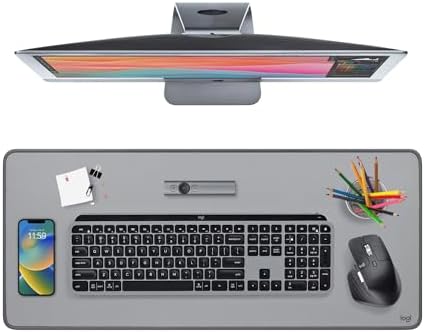
- Elevate your desktop: Add color, style and comfort into your workspace and keep your desk protected with the Logitech St…
- Spill-resistant & easy to clean: This extra-large desk protector mat features a spill-repellent surface to withstand acc…
- Effortless glide: The smooth, comfy cloth pad featuring a fine weave delivers an effortless, silent glide for your mouse…
Best Desk Mats for Home Office — Quick Comparison


| Product | Price Tier | Best For | Edge Finish |
|---|---|---|---|
| Logitech Desk Mat Studio Series | Premium | Style-conscious WFH setups | Stitched |
| Corsair MM350 Pro Extended | Mid-range | Spill-prone desks, heavy use | Stitched |
| Amazon Basics Large Extended Mouse Pad | Budget | Budget coverage, biggest surface | Cut (unstitched) |
Reviews — Detailed Breakdown
1. Logitech Desk Mat Studio Series — Best Overall
- Elevate your desktop: Add color, style and comfort into your workspace and keep your desk protected with the Logitech St…
- Spill-resistant & easy to clean: This extra-large desk protector mat features a spill-repellent surface to withstand acc…
- Effortless glide: The smooth, comfy cloth pad featuring a fine weave delivers an effortless, silent glide for your mouse…
Key Specs
- Size: 27.6 x 11.8 in (700 x 300 x 2 mm)
- Material: Recycled polyester fabric top with spill-resistant coating, natural rubber anti-slip base
- Edge finish: Machine-stitched all around
- Colors: Mid Grey, Lavender, Dark Rose, Eucalyptus (availability varies)
- Cleaning: Wipe spills with a damp cloth
Who this is for: Anyone building a clean, aesthetically coherent work-from-home desk who also wants something that actually performs well.
The first thing owners mention is the texture — reviewers describe it as softer than a typical gaming mouse pad, almost fabric-like but not fuzzy. The fabric surface has just the right amount of drag for a mouse while still feeling smooth under your wrists during long typing sessions. Setup is literally just unrolling it and letting it flatten on your desk.
In day-to-day use, owners consistently report the rubber base does its job, with the mat staying put even when the keyboard gets shoved around. The stitched edges are a real advantage here — cheaper mats often start curling and shedding at the corners within a few months, while Logitech’s anti-fray stitching is designed to keep the edges tight and clean over time.
One standout is how good it looks. The Studio Series comes in colors like Lavender and Rose that you almost never see in the “tech accessories” category — they look great in home office photos and don’t clash with a more minimal desk aesthetic. If your desk is all black everything, Mid Grey keeps it classic.
What we like:
- Fabric surface feels premium without being precious about it — the spill-resistant coating wipes clean, so you don’t need to baby it
- Anti-fray stitched edges with flat seams are built to stay clean over time
- Color variety is genuinely unique for a desk accessory at this price point
- Made from recycled polyester — a nice touch if sustainability matters to you
What could be better:
- At 27.6 x 11.8 in, it’s the narrowest mat here — tight for a full-size keyboard plus mouse
- Only one size — no extended XL option for wide or dual-monitor desks
Bottom line: The Logitech Desk Mat Studio Series is the best desk mat for most home office setups. It’s functional, spill-resistant, great-looking, and priced at a point where it doesn’t feel like a splurge.
2. Corsair MM350 Pro Extended — Best for Spill-Prone Desks
- Spill-Proof, Stain-Resistant Coating: Liquids slide right off the surface so your mouse pad is easy to wipe clean even a…
- Micro-Weave Fabric: Creates a dense surface for a faster and smoother glide for your mouse.
- Massive Size: A huge 930mm x 400mm (36.6” x 15.7”) surface provides ample room for your gaming mouse, keyboard, and more
Key Specs
- Size: Extended XL (36.6 x 15.7 in) / Multiple sizes available
- Material: Micro-textured cloth surface, spill-resistant coating
- Edge finish: Stitched edges
- Base thickness: 3mm heavy rubber
- Spill-resistant: Yes (surface coating)
Who this is for: Heavy desk users — people who eat or drink at their desk constantly, or who use a lot of surface area and want something that won’t shift under pressure.
The Corsair MM350 Pro is actually marketed as a gaming mat, but it’s one of the best desk mats for home office use precisely because of its spill-resistant coating. The surface has a micro-textured feel that’s slightly more grippy than the Logitech — if you use a laser mouse, you’ll appreciate the extra precision. For just scrolling and clicking in a work context, it’s smooth enough to not feel like friction.
At 3mm thick, the rubber base is noticeably heavier than the Logitech’s, and owners say it stays planted — this thing is not moving. Reviewers often mention that when a full coffee mug tips over onto it, the liquid beads up long enough to grab a towel. It’s not completely waterproof, but it buys you a few seconds to save your desk.
The Extended XL size (36.6 x 15.7 in) covers more horizontal space than the Logitech, which makes a real difference if you have a 34-inch ultrawide monitor or a dual-monitor arm setup. You can fit a full-size keyboard, mouse, and a small notepad without running out of mat.
What we like:
- Spill-resistant coating is genuinely useful — not marketing fluff
- Heavier 3mm rubber base means it stays put even during fast mouse movements
- XL size gives you a lot more coverage than competing mats at the same price
- Stitched edges, slightly raised, which some people prefer for wrist comfort
What could be better:
- The cloth surface has slightly more texture than the Logitech — takes a session or two to get used to if you’re coming from a smooth pad
- Only available in black — no color options
Bottom line: If you want serious spill protection and maximum coverage without paying top-tier prices, the Corsair MM350 Pro is the smarter buy. It punches above its price tag.
3. Amazon Basics Large Extended Mouse Pad — Best Budget Pick
- Extended gaming mouse pad―ideal for gamers; graphic designers; or anyone who uses a mouse for long sessions
- High-quality cloth surface promotes smooth mouse gliding and enhanced precision
- Steady; thick; rubberized base keeps mouse pad in place
Key Specs
- Size: 35.5 x 16.88 x 0.13 inches (Large Extended)
- Material: Cloth surface, rubberized base
- Edge finish: Cut edges (not stitched)
- Colors: Black
- Machine washable: Yes
Who this is for: Anyone who just needs coverage — a new desk setup on a tight budget, a first desk mat, or anyone who wants to test whether a mat even improves their setup before spending more.
Let’s be honest: this is a budget desk mat from Amazon Basics. It’s not trying to be anything else. What it does well is cover a lot of desk surface — at 35.5 x 16.88 inches, it’s one of the largest sizes in this price range, easily fitting a full keyboard and mouse with room to spare.
The cloth surface is basic but works. Your mouse will glide on it without resistance, and the rubberized base keeps it from sliding around on smooth desks. The one honest downside is the cut (non-stitched) edges — they’re not sharp enough to cut you, but they’re not as clean or durable as a stitched edge. After heavy use, some users report slight fraying at the corners over several months. At this price tier, that’s expected.
One thing that stands out is how widely owned and well rated this mat is. That’s not an accident. At the budget tier, the value is hard to argue with.
What we like:
- Huge surface area for the price — covers both keyboard and mouse with room left over
- Machine washable (just don’t put it in the dryer — lay flat to dry)
- Rubberized base grips well on wood and glass desks
- A huge owner base and consistently strong ratings are a good confidence signal
What could be better:
- Unstitched edges will eventually fray with heavy, rough use
- Basic cloth surface — less refined than the Logitech or Corsair
- Black only, no style options
Bottom line: If you’re on a tight budget or buying your first desk mat, the Amazon Basics Extended is a solid no-regrets purchase. Don’t overthink it — at this price, the risk is basically zero.
How to Choose the Best Desk Mat for Home Office Use
Size: Match Your Desk, Not Just Your Mouse
The most common mistake when picking the best desk mat for home office setups is going too small. A mat that only fits your mouse still leaves your keyboard rattling on bare wood, which defeats the point. For a standard home office desk, you want a mat that’s at least 31 inches wide — enough to cover a tenkeyless keyboard plus a mouse. If you’re running a mechanical keyboard in a full-size layout, size up further so the whole board sits on the mat.
If you have a 34-inch ultrawide monitor or two monitors, go even larger. The Corsair XL (36.6 inches wide) and Amazon Basics (35.5 inches wide) are better picks for wider setups. The Logitech (27.6 inches) is better suited for minimal setups with a 60% or 75% keyboard. And if you’re using a standing desk, a heavy rubber base like the Corsair’s is worth the extra money — standing desks vibrate more during adjustments.
Surface Material: Cloth vs. Leather vs. PU
Cloth mats are the most common — they’re soft on your wrists, work with all mouse types, and are washable. Most of what you’ll find on Amazon, including all three mats in this article, are cloth.
Hard surface mats offer a sleeker look and wipe clean instantly, but they feel colder and harder on your wrists during long sessions. PU leather mats are a middle ground — they look great, clean easily, but aren’t machine washable and tend to peel at the edges after a year or two of daily use. For home office work, cloth wins on comfort.
Edge Finish: Stitched Edges Are Worth It
If you’re spending more than $20 on a desk mat, it should have stitched edges. Unstitched cuts — like the Amazon Basics — will fray over time with heavy use. Stitched edges (Logitech, Corsair) stay clean longer and feel more finished. That said, at the budget tier unstitched is fine — just know you’re trading longevity for savings.
Related Home Office Guides
- Best Ergonomic Mouse — pairs perfectly with a desk mat
- Best Desk Cable Management — finish the clean desk
- Best Monitor Light Bars — light the desk properly
Frequently Asked Questions
What’s the difference between a desk mat and a mouse pad?
A mouse pad is typically small (under 12 inches) and sits just under your mouse. A desk mat is extended — usually 27 to 36+ inches wide — and covers most of your desk surface, protecting it from scratches while also serving as a mouse surface. The best desk mat for home office setups does both jobs at once, unifying your entire workspace.
Are desk mats worth it for a home office?
Yes — and not just for your mouse. A desk mat protects your desk surface from scratches, absorbs keyboard noise, and makes a workspace feel more organized. For a relatively small spend, the best desk mat for home office use in 2026 is one of the highest-ROI desk upgrades you can make.
Can I use a desk mat with a mechanical keyboard?
Absolutely — and I’d actually recommend it. A cloth desk mat reduces the “clack” of keystrokes bouncing off a hard desk surface. The Logitech and Corsair mats are thick enough to noticeably dampen that echo. If you’re looking for keyboard recommendations too, check out our best budget mechanical keyboards guide.
How do I clean a desk mat?
For cloth mats: hand wash with cold water and mild soap, then lay flat to dry. Never put in a dryer — the rubber base warps with heat. The Amazon Basics mat is machine-washable on a gentle cold cycle. Logitech recommends wiping its spill-resistant surface with a damp cloth, and Corsair recommends hand washing to preserve the spill-resistant coating.
What size desk mat do I need?
For a standard single-monitor setup with a full-size keyboard: 31–36 inches wide. For a tenkeyless or 60% keyboard: 27 inches is fine. For ultrawide or dual-monitor setups: go 36+ inches. Measure your desk first — a mat that’s too wide will hang off the edges and curl over time.
Final Verdict: Best Desk Mat for Home Office 2026
If you want the best desk mat for home office use without overthinking it, go with the Logitech Desk Mat Studio Series. It’s stylish, functional, and spill-resistant — everything a daily-use work mat needs to be. If spill protection is your priority, the Corsair MM350 Pro is the smarter pick at nearly the same price. And if you’re on a budget or just getting started, the budget-tier Amazon Basics Extended does the job — full stop.
No layout selected.See full specs and color options on Logitech’s official product page.
Last updated: May 2026 | Prices subject to change.
Questions about any of these picks? Get in touch via our contact page.
Pingback: Best Desk Cable Management In 2026 (Tested & Reviewed)
Pingback: Best Laptop Stand For MacBook And Windows 2026
Pingback: Best Anti-Fatigue Standing Mat For Your Desk In 2026
Pingback: Best Label Maker For Home Office In 2026 — 4 Top Picks