
This post contains affiliate links. As an Amazon Associate, I earn from qualifying purchases at no extra cost to you.
My Top Pick — BenQ ScreenBar Halo 2
After comparing the best monitor light bars on specs, verified owner reviews and manufacturer data, the BenQ ScreenBar Halo 2 is the one I’d pick. It sits in the premium price tier, above every other pick here, but the wireless puck control, motion sensor wake-up, and rear bias lighting actually justify the price tag. If your eyes burn after a long workday, this is the upgrade.

- ENHANCED BACKLIGHT FOR VISUAL COMFORT: Wide and adjustable ambient backlight reduces contrast between your screen and da…
- GLARE-FREE FRONT LIGHT (ASYM-Light Technology): Precision front lighting at an 18° anti-glare angle illuminates your des…
- WIRELESS CONTROLLER FOR EASY ADJUSTMENTS: The intuitive wireless dial controls brightness, color temperature, and modes,…
Best Monitor Light Bars — Quick Comparison


Reviews — Detailed Breakdown
1. BenQ ScreenBar Halo 2 — Best Overall
- ENHANCED BACKLIGHT FOR VISUAL COMFORT: Wide and adjustable ambient backlight reduces contrast between your screen and da…
- GLARE-FREE FRONT LIGHT (ASYM-Light Technology): Precision front lighting at an 18° anti-glare angle illuminates your des…
- WIRELESS CONTROLLER FOR EASY ADJUSTMENTS: The intuitive wireless dial controls brightness, color temperature, and modes,…
Key Specs
- Power: USB-C (5V/2A)
- Color temperature: 2700K-6500K
- Brightness: up to 800 lux
- Width: 50cm
- Weight: 1.5 lbs
- Rear bias lighting: Yes
Who this is for: Anyone working long hours at a desk who wants the most polished monitor lighting experience available — especially curved monitor owners.
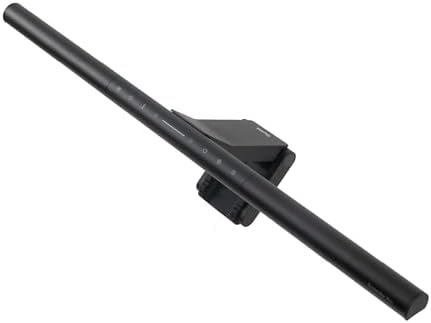
Reviewers often mention the Halo 2 feels premium in a way the others don’t. The clip-on counterweight has a smooth pivot, and owners report the bar settles onto 32-inch curved monitors without any wobble. Owners say mounting it and pairing the wireless puck via USB-C takes just a few minutes. No drivers, no app — just plug and play.
The wireless puck is the real story here. You can sit it next to your keyboard and dim the lights with a quick spin while you’re on calls. The motion sensor wakes the bar when you sit down, which sounds gimmicky but, according to owners, is one of those features you stop noticing because it just works.
Rear bias lighting adds a soft glow behind the monitor designed to reduce contrast strain when working at night. It’s easy to dismiss, but owners consistently report less squinting during late-night sessions.
What stands out:
- Wireless puck is the best control option of any light bar we compared
- Motion sensor auto-on is surprisingly useful for daily workflow
- Asymmetric optical design = no screen glare reported on curved monitors
- USB-C power means one cable to the monitor’s spare port
What could be better:
- It’s the priciest bar here — you’re paying for the puck and rear lighting
- The puck’s built-in battery needs occasional USB-C recharging (BenQ quotes about 3 months of standby per charge)
- Doesn’t fit ultra-thin frameless monitors under 6mm
Bottom line: If your eyes feel tired by 4pm and you spend 6+ hours at a desk, the Halo 2 is worth every penny. Nothing else feels this refined.
2. BenQ ScreenBar Pro — Best Premium Mid-tier
- BRIGHT AND ULTRAWIDE ILLUMINATION – ScreenBar Pro offers over 1000lx central brightness and a 500lx range within 33″x20″…
- HIGH COMPATIBILITY – Fits monitors 0.17″ – 2.56″ (0.43cm-6.5cm) thick and curvature 1000-1800R. Patented clamp design ac…
- MOTION SENSOR – The ultrasonic motion sensor detects movements within a 24″±4″ (60cm±10cm) diameter range, automatically…
Key Specs
- Power: USB-C
- Color temperature: 2700K-6500K
- Brightness: up to 1000 lux
- Width: 50cm
- Control: Touch sensors + motion sensor
- USB-C powered, ultrawide lighting
Who this is for: Anyone who wants the newer USB-C BenQ experience with motion sensor and ultrawide lighting — at a noticeably lower price than the Halo 2.
The ScreenBar Pro is a popular pick for ultrawide monitors. It’s the newer USB-C generation of BenQ’s lineup — same eye-care asymmetric optics as the Halo 2, but without the wireless puck or rear bias lighting. Instead you get a motion sensor that auto-wakes the bar when you sit down, plus touch controls right on the unit.
Owners report setup takes about three minutes. Reviewers often mention the aluminum body has a satisfying weight and the clip-on counterweight pivots smoothly onto monitors up to 34 inches. USB-C means one cable to the monitor’s spare port — much cleaner than the older USB-A models. Owners say the motion sensor actually works: sit down and the lights come on; leave for a meeting and they fade off after about a minute.
Compared to the Halo 2, you lose the wireless puck and rear bias lighting. But you pay noticeably less and keep the motion sensor and USB-C. For most home office setups, that’s the right trade.
What stands out:
- Motion sensor auto-wake actually works, not a gimmick
- USB-C cable management is cleaner than older USB-A models
- Same eye-care optical pattern as the Halo 2
- Touch controls sit right on the bar — no separate remote to misplace
What could be better:
- No wireless puck — adjustments require reaching up to the bar
- No rear bias lighting (only Halo 2 has it)
- Pricier than BenQ’s older ScreenBar Plus
Bottom line: The smarter buy if the Halo 2’s premium price feels excessive. You get the same eye-care optics and motion sensor as the Halo 2 — just without the wireless puck.
3. Xiaomi Mi Computer Monitor Light Bar — Best Wireless Under $100
- Xiaomi mi computer monitor light bar: Extra computer lighting just for you. No screen reflection magnetic rotation,Doesn…
- Easily attaches to the top of the monitor, leaving you plenty of desktop space: Mi Computer Monitor Light Bar with your …
- Asymmetric polished design for a more comfortable experience with no screen reflection: The custom made optical glass an…
Key Specs
- Power: USB-A
- Color temperature: 2700K-6500K
- Brightness: 500+ lux at desk level
- Width: 45cm
- Control: 2.4GHz wireless puck
- CRI: Ra95
Who this is for: Anyone who wants the wireless puck experience at half the BenQ price.
This one surprised me on paper. You’d expect a bargain-bin budget option, but the specs and owner reviews point to a light bar that genuinely competes with BenQ’s mid-tier. Reviewers often mention the wireless puck has a satisfying click and the magnetic mount on the bar holds firm on monitors from 17 inches up.
The build quality is the giveaway that Xiaomi cut some corners — the body is plastic instead of the brushed aluminum BenQ uses — but owners say it doesn’t matter in daily use. The CRI Ra95 color rendering is a notch above most budget light bars, which makes a real difference if you edit photos or work with color-critical content.
The most common complaint in owner reviews: the wireless puck occasionally stops responding and needs a re-pair. It’s a quick fix that takes about 30 seconds.
What stands out:
- A wireless puck at a mid-range price is borderline unbeatable value
- Color rendering is properly accurate, not just “looks bright”
- Owners report setup takes about 60 seconds from box to working
- Magnetic mount system holds up on thicker curved monitor frames
What could be better:
- Plastic build feels less premium than BenQ
- USB-A connector, while both BenQ picks use USB-C
- Asymmetric light isn’t quite as tight — slight glare on glossy 4K screens
Bottom line: If you want a wireless puck without paying Halo 2 money, this is the answer. Best value-per-dollar in the lineup.
4. Yeelight Monitor Light Bar — Best Budget
- 【Smart Voice & App Control】Control your light bar effortlessly through the MIJIA/YEELIGHT app (2.4GHz WiFi) or via Alexa…
- 【RGB Backlight with Razer Chroma Sync】Customize your setup with 16.8 million vibrant RGB colors (Razer Synapse 3 compati…
- 【Tunable White Front Light】Experience professional-grade lighting with our adjustable white light (2700K-6500K, Ra>95 hi…
Key Specs
- Power: USB-A
- Color temperature: 2700K-6500K (stepless)
- Brightness: 250 lumens, no glare
- Width: 45cm
- Control: Touch sensors
- CRI: Ra95
Who this is for: Students, first-time buyers, or anyone deciding whether they want a monitor light bar without spending over $50.
Yeelight is Xiaomi’s smart lighting sub-brand, and it shows in the build. In the budget price tier, you’re getting eye-care optics that hold their own against pricier BenQ bars on basic metrics — 250 lumens output, full 2700K-6500K stepless temperature range, and Ra95 CRI for accurate color.
Owners report clipping it onto a 27-inch flat monitor in about 90 seconds. Reviewers often mention the touch sensors on the front of the bar are responsive without being twitchy, with few reports of accidental brightness changes. It’s USB-A powered, which is fine since most monitors and laptop hubs still have one free port.
Where it falls short of BenQ is the wireless puck. There isn’t one. You reach up to the bar each time you want to dim or change temperature. For most home office users that’s not a deal-breaker — you set it once and forget it.
What stands out:
- Budget-tier price for eye-care optics that hold up against pricier bars
- Touch sensors feel premium, not laggy
- Stepless 2700K–6500K color temperature, not just a few fixed presets
- Setup under 90 seconds, no app required
What could be better:
- No wireless puck at this price tier
- USB-A only (no USB-C option yet)
- Slightly narrower than 50cm BenQ Halo 2 — best for 24-27 inch monitors
Bottom line: The smartest budget pick of the best monitor light bars I compared. If you’re starting out and don’t need premium features, this is the one.
How to Choose a Monitor Light Bar: What Actually Matters
Asymmetric vs Symmetric Lighting
The single most important spec on a monitor light bar isn’t the brightness — it’s whether the light pattern is asymmetric. Asymmetric means the LEDs are angled so light shines down onto your desk, not back onto your screen. Cheap LED strips from generic brands skip this and end up reflecting onto your monitor, which defeats the entire purpose.
All four picks in this list have asymmetric optics. If you’re shopping outside this list, that’s the first thing to check on the product spec sheet. Anything calling itself a “monitor light bar” without asymmetric optics is just an LED strip with marketing.
Color Temperature Range
Look for a bar that adjusts from 2700K (warm/yellow) to 6500K (cool/daylight). The warm end matters in the evening when you’re winding down — running 6500K at 10pm tells your brain it’s still daytime and wrecks your sleep. The cool end matters when you’re focusing on detail work in the afternoon.
Under $40 you’ll often see fixed temperature presets (3 modes) instead of stepless adjustment. It’s fine but less flexible.
Control Type: Touch vs Wireless Puck
Touch sensors on the bar work but require reaching up to your monitor every time you adjust. Wireless pucks let you sit one next to your keyboard and adjust without breaking flow. The puck is genuinely worth paying extra for if you adjust brightness often.
Wired dials (found on some older models outside this list) are a middle ground — better than touch, slightly less elegant than wireless.
Power & Connectivity
USB-A still dominates, but USB-C is starting to appear on premium models like the Halo 2. If your monitor has a spare USB-C port (most 2024+ panels do), USB-C powered bars are cleaner. Otherwise, USB-A works off any laptop hub or wall adapter.
For full spec breakdowns and reliability data, I’d point you to BenQ’s official ScreenBar comparison page — they publish lux measurements and CRI data that’s useful for cross-checking competitor claims.
Related Home Office Guides
- Best Ring Light for Home Office — lighting for video calls
- Best Desk Mat for Home Office — finish the desk setup
- NB North Bayou F80 Monitor Arm Review — free up desk space
Frequently Asked Questions
Do monitor light bars actually reduce eye strain?
Yes, when used correctly. The reason your eyes hurt at night isn’t the monitor itself — it’s the contrast between your bright screen and a dim room. A monitor light bar lifts the ambient brightness of your desk to match the screen’s brightness, which lowers contrast and reduces eye muscle fatigue. Owners commonly report noticing the difference within a few days of full-time use.
Will a monitor light bar fit my curved monitor?
Of the four picks here, the BenQ ScreenBar Halo 2 is the one designed for curved monitors, with a flexible mounting clip. The Xiaomi works on gentle curves (1500R+) but struggles on aggressive 1000R panels. Other curved-specific light bars exist outside this list, so check the clip specs before buying.
USB-A vs USB-C — which should I get?
Get USB-C if your monitor or laptop hub has a free port. It’s cleaner. USB-A is fine and works off any wall adapter — only mid-2024+ models commonly ship with USB-C.
Are these compatible with MacBook setups?
All four work with MacBook. The light bars just need power from a USB port, which any MacBook hub provides. Some users wire them into the monitor’s USB port instead, which keeps the cable run cleaner.
Is the BenQ ScreenBar Halo 2 worth the premium price?
Yes if you spend 6+ hours daily at a desk and have noticed eye fatigue. The wireless puck, motion sensor, and rear bias lighting genuinely improve daily workflow in ways the cheaper bars can’t match. No if you’re a casual user — the mid-range Xiaomi covers 80% of what you’d actually use.
Final Verdict
Of the best monitor light bars I compared, the BenQ ScreenBar Halo 2 wins overall for serious home office and creative work, but the budget-tier Yeelight Light Bar is the smarter buy for most people deciding whether they want a monitor light bar at all. The Xiaomi Mi Light Bar is the mid-range sweet spot if you want wireless puck control without paying BenQ’s premium. Pick the BenQ ScreenBar Pro, noticeably cheaper than the Halo 2, if you want BenQ’s eye-care optics without the wireless puck overhead.
Please enter product(-s) ASIN(-s)!For more home office upgrades that reduce strain and improve daily workflow, see our guides on the best portable monitors under $150 and best USB-C hubs for MacBook Air 2026.
Last updated: May 2026 | Prices subject to change.
Questions about any of these picks? Get in touch via our contact page.
Pingback: Best Home Office Webcam In 2026 — Tested & Ranked
Pingback: NB North Bayou F80 Review 2026 — Does It Sag? Tested
Pingback: Best AI Camera Mounts For Solo Creators 2026