
This post contains affiliate links. As an Amazon Associate, I earn from qualifying purchases at no extra cost to you.
My Top Pick — Anker 555 USB-C Hub (8-in-1)
After comparing four of the best USB-C hubs for MacBook Air on specs, verified owner reviews and manufacturer data, the Anker 555 8-in-1 is the one I’d pick. Eight ports, up to 85W passthrough charging (from a 100W input), 4K HDMI, gigabit Ethernet, and 10Gbps data speeds at a mid-range price — nothing else in this price range packs this much utility into a 4.4 oz aluminum brick.
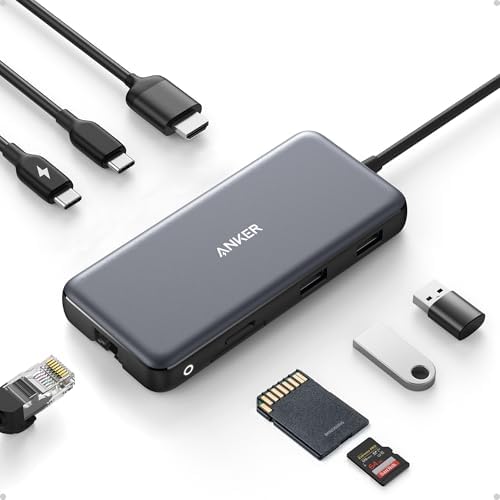
- Flawless 4K Video via HDMI: Enjoy crystal-clear visuals with 4K@60Hz output when using a DP 1.4 laptop, or 4K@30Hz with …
- Massive Expansion: Equipped with a USB-C Power Delivery input port, a built-in 7.48″ USB-C cable, a USB-C data port, 2 U…
- High-Speed, High-Def: USB-C and USB-A data ports provide file transfer at speeds up to 10 Gbps, while an HDMI port suppo…
Best USB-C Hubs for MacBook Air — Quick Comparison


Reviews — Detailed Breakdown
1. Anker 555 USB-C Hub (8-in-1) — Best Overall
- Flawless 4K Video via HDMI: Enjoy crystal-clear visuals with 4K@60Hz output when using a DP 1.4 laptop, or 4K@30Hz with …
- Massive Expansion: Equipped with a USB-C Power Delivery input port, a built-in 7.48″ USB-C cable, a USB-C data port, 2 U…
- High-Speed, High-Def: USB-C and USB-A data ports provide file transfer at speeds up to 10 Gbps, while an HDMI port suppo…
Key Specs
- Ports: HDMI 4K, Gigabit Ethernet, USB-C 10Gbps, 2× USB-A 10Gbps, USB-C PD 100W, microSD, SD
- Power Delivery: 85W passthrough (100W input minus 15W operation)
- Weight: 4.4 oz
- Cable: 7.48″ built-in USB-C
- Body: Aluminum
Who this is for: MacBook Air owners who want a single hub that handles everything — external monitor, ethernet, multiple drives, fast charging — without compromise.
Reviewers often mention the Anker 555 feels reassuringly solid in the hand. The aluminum body has weight without being heavy, and on paper the built-in 7.48″ USB-C cable is a good length to reach a MacBook Air’s left port without dangling awkwardly. Setup is plug-and-play — plug into your Air, add Ethernet + HDMI + a keyboard’s USB-A receiver, done.
The 10Gbps USB-C data port is the unsung hero here. If you move large Lightroom catalogs to a Samsung T7 SSD regularly, the difference between this hub’s USB-C 3.2 Gen 2 and a budget hub’s USB 3.0 is dramatic — 10Gbps vs 5Gbps on paper, roughly 2× the bandwidth. The two USB-A ports are also 10Gbps, which is unusual at this price.
Owners consistently report 4K HDMI working smoothly with 27-inch monitors at 60Hz. With the lid open, a MacBook Air M3 drives only one external display anyway, so the single HDMI port isn’t a limitation. The Ethernet port is rated for full gigabit speeds, and owner reviews point to near-gigabit real-world results.
What stands out:
- 10Gbps speeds on USB-C AND both USB-A ports at this price tier is exceptional
- 4K HDMI + gigabit Ethernet covers 90% of MacBook Air use cases
- Built-in cable length is just right — not too short, not floppy
- Anker’s 18-month warranty adds peace of mind
What could be better:
- Pass-through PD caps at 85W after the hub’s 15W operation overhead
- No SD card express speeds (UHS-I only, not UHS-II)
- Aluminum body picks up fingerprints easily
Bottom line: If you spend 6+ hours daily on your MacBook Air with external peripherals, the Anker 555 pays for itself in workflow efficiency. Best balance of price and features in 2026.
2. Satechi Pro Hub Mini — Best Premium
- Next-Gen USB4 – Experience advanced USB4 technology with a versatile USB C dock offering up to 100W charging, 5K @ 60Hz …
- All-in-One Peripheral Solution – Streamline your connectivity with a USB C Hub that features all the essential ports, in…
- Sleek Design for Portability – Experience premium craftsmanship with the compact and stylish Pro Hub, available in silve…
Key Specs
- Ports: USB4 (40Gbps), USB-C data, 2× USB-A, Gigabit Ethernet, 3.5mm audio jack
- Power Delivery: 100W via USB4
- Weight: 2.9 oz
- Body: Space Gray aluminum (matches MacBook)
- Compatibility: M5/M4/M3/M2/M1 MacBook Air & Pro
Who this is for: MacBook Air owners who care about design as much as function — and need USB4/Thunderbolt speeds for external SSDs or eGPUs.
The Pro Hub Mini is the hub I’d buy if Apple made one. The Space Gray aluminum finish is designed to match the MacBook Air M3 — when it’s plugged in, it looks like an extension of the laptop, not a clip-on accessory. At 2.9 oz it’s lighter than the Anker 555 by a third, which matters if you’re stuffing this into a Peak Design backpack.
The headline feature is the USB4 port — full 40Gbps bandwidth, perfect for fast external NVMe enclosures or even an eGPU. Paired with a fast drive like the Samsung X5 portable SSD (rated up to 2,800 MB/s reads), the 40Gbps port has enough bandwidth that it shouldn’t bottleneck the drive. No other hub at this price tier offers genuine USB4.
The 3.5mm audio jack is a nice touch for users who still prefer wired headphones at their desk. Setup is near-instant — Satechi includes nothing extra, just the hub itself. It uses the MacBook’s USB-C port directly (no cable), so cable management is non-existent in a good way.
What stands out:
- USB4 at 40Gbps is genuinely future-proof for external SSDs
- Aluminum design matches MacBook Air aesthetics perfectly
- 100W power delivery is full passthrough — no operation overhead
- No cable means cleanest cable management possible
What could be better:
- No HDMI port — you’ll need a USB-C to HDMI adapter or use the USB4 port
- Costs noticeably more than the Anker 555 for similar daily-use features
- Direct-plug design ties up the MacBook’s side ports while it’s connected
Bottom line: If your MacBook Air is your primary creative work machine and you’d pay extra for design plus USB4 bandwidth, the Satechi Pro Hub Mini earns its premium. Pass if you mostly need HDMI for external displays.
3. UGREEN Revodok Pro 6-in-1 — Best Value
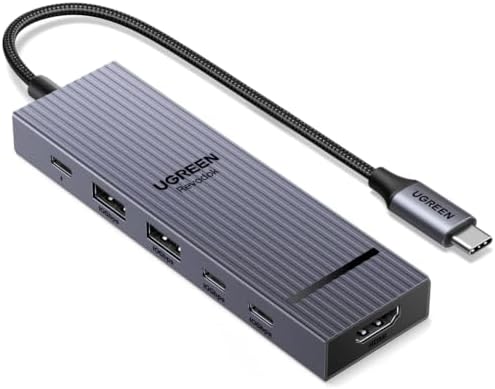
- 6-in-1 10Gbps USB C Hub: Inspire more potential of your laptop’s USB-C port with two 10 Gbps USB-C 3.2 Gen 2 port, two 1…
Key Specs
- Ports: 4K@60Hz HDMI, Gigabit Ethernet, USB-C 10Gbps, 2× USB-A 10Gbps, USB-C PD 100W
- Power Delivery: 100W passthrough
- Weight: 3.5 oz
- Cable: Short built-in USB-C
- Compatibility: MacBook Air/Pro M1-M5, iPad Pro
Who this is for: Anyone who wants Anker 555-level features at a noticeably lower price.
This one surprised me on paper. You’d expect “you get what you pay for” — instead the spec sheet shows a hub that competes feature-for-feature with the Anker 555 at a noticeably lower price. 4K@60Hz HDMI (the Anker only does 4K@60Hz too, so identical), gigabit Ethernet (identical), 10Gbps USB-C + USB-A (identical), 100W PD passthrough (better — no operation overhead).
The catch is build quality. UGREEN uses a thinner aluminum shell that doesn’t feel as premium as the Anker, and the corners are slightly sharper. Owners who toss it in a backpack report minor surface scratches over time that the Anker tends to resist. Functionally, none of that matters.
The 4K@60Hz HDMI is honestly the bigger value story. Many hubs at this price tier are limited to 4K@30Hz, which makes mouse movement feel slightly off. Owners report UGREEN’s 60Hz output feels native, with no noticeable difference from plugging directly into a monitor’s USB-C port.
What stands out:
- 4K@60Hz HDMI at a budget-tier price is the best value in the lineup
- 100W PD passthrough with no operation overhead
- Genuine 10Gbps speeds on USB-C and USB-A
- Compatible across every MacBook Air generation since M1
What could be better:
- Build quality noticeably below Anker — feels lighter and thinner
- No SD card reader (deal-breaker for photographers)
- Shorter built-in cable than Anker — sometimes a stretch on Air’s left port
Bottom line: If you don’t need an SD card reader, the UGREEN Revodok Pro is the smartest value purchase in this list. You’re paying for build quality, not function, when you go up to the Anker.
4. Anker USB-C 7-in-1 Hub (2-Pack) — Best for Travel + Home Setup
- Widely Compatible: Transform any USB-C port into a USB-A port and connect up a wide range of USB-A devices including ext…
- 7 ports in 1 compact hub: USB-C, 2 USB-A, HDMI, microSD and SD card readers
Key Specs
- Ports: 4K HDMI, Gigabit Ethernet, USB-C data, 2× USB-A, 100W PD, SD card reader
- Power Delivery: 100W passthrough
- Weight: 3.4 oz each
- Pack: 2 identical hubs
- Compatibility: MacBook Air, Pro, XPS, iPad
Who this is for: Digital nomads, hybrid workers, or anyone who wants one hub at the home desk and one in the travel bag — without buying two separately.
Here’s the angle I didn’t expect to recommend: a 2-pack hub bundle. Because you get two identical 7-in-1 hubs in one pack, the per-hub cost works out lower than buying the UGREEN on its own. The math only makes sense if you genuinely need two, which a lot of MacBook Air users do (one always at the desk, one always packed).
The idea: leave one permanently connected to your home setup (Ethernet + HDMI + USB drive) so plugging in is just one cable to the MacBook. The second lives in your travel backpack for client calls and coffee shop sessions. No more “did I bring the hub?” anxiety.
Feature-wise it’s a standard 7-in-1: 4K HDMI (30Hz, not 60Hz — the only spec that disappoints), gigabit Ethernet, USB-C data, 2× USB-A, 100W PD, and SD card reader. The SD slot is what tips this above the UGREEN if you’re a photographer who shoots regularly.
What stands out:
- Lowest per-hub cost in this lineup
- Includes SD card reader (UGREEN doesn’t)
- Identical builds means accessories like cases work for both
- Solves the “one hub at home, one in bag” problem with one purchase
What could be better:
- 4K HDMI is 30Hz only — not 60Hz like the Anker 555 or UGREEN
- USB-C and USB-A are 5Gbps, not 10Gbps
- 2-pack obligation means you’re committed even if you only need one
Bottom line: Smartest purchase for hybrid workers or remote-first folks who travel weekly. Skip if you only need one hub and don’t shoot photos.
How to Choose a USB-C Hub for MacBook Air: What Actually Matters
Power Delivery (PD) Wattage
The single most important spec for a MacBook Air hub is the passthrough power delivery. MacBook Air models ship with 30W–35W chargers (M2 and M3 models can fast-charge at up to 70W), so any hub with 60W+ PD gives you comfortable headroom. Look for 85W+ PD so you can run a power-hungry external SSD off the hub without slowing your MacBook charge.
Low-wattage hubs can still charge an Air, but more slowly, especially once the hub’s own overhead and any bus-powered drives take their share.
HDMI: 4K@30Hz vs 4K@60Hz
This is the spec to inspect carefully. Cheap hubs advertise “4K HDMI” but cap at 30Hz refresh rate, which makes the mouse cursor feel laggy and is uncomfortable for daily use. Spend the extra few dollars for 4K@60Hz — your eyes will thank you after an 8-hour workday.
Of the four picks here, only the Anker 555 and UGREEN Revodok Pro do 4K@60Hz. The Anker 7-in-1 and basic Anker 341 hubs cap at 4K@30Hz.
USB-C and USB-A Speeds (5Gbps vs 10Gbps)
For most users, 5Gbps is plenty — that’s about 600 MB/s, faster than most spinning hard drives. But if you regularly move large files to fast NVMe SSDs (like the Samsung T7 Shield), 10Gbps doubles your transfer speed. The Anker 555 and UGREEN both offer 10Gbps across all data ports — that’s the spec to chase if you work with big files.
Build: Aluminum vs Plastic
All four hubs in this list use aluminum bodies. Cheaper hubs use plastic that flexes, gets warm under load, and looks tacky next to a MacBook. Always pick aluminum — the $10 price premium is worth it for longevity.
For full spec sheets and reliability data on Anker’s hub lineup, see Anker’s official USB-C Hub comparison page — they publish detailed specs and reliability data that’s useful for cross-checking competitor claims.
Related Tech Guides
- Best USB-C Hub for Laptop — Windows and Mac picks
- Best Portable SSD for Mac — storage to plug into the hub
- Best Portable Monitor Under $150 — use that new video output
Frequently Asked Questions
Will any USB-C hub work with my MacBook Air M3?
Most do, but compatibility matters more than you’d think. MacBook Air M3 supports only ONE external display when the lid is open — adding a second display requires a hub with DisplayLink technology (like the Plugable UD-6950H). The four hubs in this list all work with a single external monitor in clamshell or lid-open mode.
Do USB-C hubs damage MacBook Air ports?
No, when used correctly. Avoid hubs that put strain on the port by being heavy or rigid. All four picks in this list either have built-in flexible cables (Anker 555, UGREEN) or are compact enough to be supported by the port itself (Satechi Pro Mini, Anker 7-in-1).
What’s the difference between USB-C and Thunderbolt on a MacBook Air?
MacBook Air M3 has Thunderbolt / USB 4 ports, but USB-C hubs only use the USB-C data lanes, not the full Thunderbolt bandwidth. If you need 40Gbps speeds for an eGPU or fast external SSD, you’ll need a USB4 hub like the Satechi Pro Hub Mini above or a Thunderbolt 4 dock (noticeably pricier) instead of a standard USB-C hub. For most users, a USB-C hub is enough.
Can I daisy-chain hubs from a hub?
Technically yes, practically no. Daisy-chaining USB-C hubs leads to power instability and dropped connections. If you need more ports than a single hub provides, look at a Thunderbolt 4 dock instead.
Is the Anker 555 worth the extra cost?
Yes if you use external peripherals daily (monitor, ethernet, drives). No if you just need occasional HDMI for presentations — the cheaper UGREEN Revodok Pro covers that perfectly. For most MacBook Air users with a real home office, the Anker 555 is the right call.
Final Verdict
Of the best USB-C hubs for MacBook Air I compared, the Anker 555 8-in-1 wins overall for daily home office work — 10Gbps speeds, 4K@60Hz, and 85W PD passthrough at a mid-range price is hard to beat. The Satechi Pro Hub Mini is worth its premium price if you need USB4 bandwidth or want a hub that matches your MacBook’s aesthetic. For pure value, the UGREEN Revodok Pro 6-in-1 delivers most of the Anker 555’s features at a noticeably lower price. Pick the Anker 7-in-1 2-Pack if you genuinely need two hubs (one home, one travel) — it’s the lowest per-hub cost in this lineup.
Please enter product(-s) ASIN(-s)!For more home office upgrades that improve daily workflow, see our guides on the best monitor light bars for eye strain in 2026 and best portable monitors under $150.
Last updated: May 2026 | Prices subject to change.
Questions about any of these picks? Get in touch via our contact page.