
This post contains affiliate links. As an Amazon Associate, I earn from qualifying purchases at no extra cost to you.
Shopping for a 9-year-old who’s already blown through every Lego set and is bored of tablets, when what you really want is “something that actually teaches them something,” is tough. That’s exactly where an electronics kit for kids shines. Owners of the Snap Circuits Jr. consistently report kids building their first circuits within ten minutes of opening the box, and reviewers often mention kids running their own “experiments” within days and dragging the whole family over to hear the FM radio project actually work.
We researched and compared several electronics kit for kids options across different ages and learning styles, based on specs, verified owner reviews and manufacturer data. In 2026, the market has expanded — there’s everything from color-coded snap-together kits for 8-year-olds to full Arduino starter kits for teens who want to learn real coding and hardware. This guide covers the top picks at every budget.
1. Snap Circuits Jr. SC-100 — My Top Pick
If you only need one electronics kit for kids aged 8–12 and want a guaranteed hit, this is it. The Snap Circuits Jr. has been around for decades, but it remains the best entry-level circuit-building kit available. Over 100 projects, 28 numbered components, no soldering, no frustration — just snap and build.

- SO MANY TOYS IN A SNAP: Make dozens of cool electronic gadgets – all from one box! A safe and fun way to introduce child…
- PROJECTS THEY’LL LOVE: So many fun electric-powered projects you can make and play! Ages 8 to 108 will love building 100…
- GREAT GIFT Give the gift of learning and fun this holiday season! Snap Circuits kits will keep kids busy and having fun …
Key Specs
- Projects: 100+
- Components: 28 snap modules
- Age range: 8 and up
- Batteries needed: 2 AA (not included)
- Price tier: Budget
Who this is for: Kids aged 8–12 who are curious about how electronics work but have never touched a circuit before — the ideal first kit.
The first thing owners mention about the Snap Circuits Jr. is how immediately approachable everything looks. There’s no rat’s nest of wires, no confusing diagrams with tiny text, and — critically — no soldering iron required. Each component has a clearly printed number and snaps onto a plastic grid using oversized, color-coded connectors. Parents often report kids picking up the concept of the grid in under five minutes by following the first project diagram. That’s genuinely impressive for a 9-year-old with zero electronics background.
The project progression is really well thought out. It starts with dead-simple circuits — a light that turns on when you flip a switch — and gradually introduces concepts like series versus parallel circuits, transistors, and a working FM radio. That last one is the project reviewers mention most. After a few days of little LED setups, kids reach a working FM radio they can actually tune to real stations. Hearing music come through something they built from scratch is a genuinely powerful moment that most toys can’t deliver.
In terms of durability, owners consistently report that the snap connectors hold up well to repeated use, with modules showing little wear after weeks of regular building and rebuilding. According to reviewers, the plastic grid is solid and doesn’t flex under pressure. My one note: the project manual has small print in some sections, which can be a challenge for younger or less confident readers. Having a parent nearby for the first couple of sessions helps a lot.
The other thing I appreciate about Snap Circuits is the ecosystem. The SC-100 components are cross-compatible with the SC-300 and SC-500 kits — so when your kid finishes the 100 projects and wants more, you don’t start over. You buy the next level up and keep all your existing parts. That’s real value.
What stands out:
- Project progression is perfectly calibrated — never too easy, never overwhelming for an 8-year-old
- The FM radio project at intermediate level is a genuine “wow” moment — real radio from scratch
- Components are sturdy enough to survive hundreds of sessions without breaking
- Cross-compatible with SC-300 and SC-500 for long-term progression
What could be better:
- Project manual text can be small for younger or less confident readers
- 28 components means you’ll hit a ceiling if your child is a fast learner — the SC-300 is the natural next step
Bottom line: The Snap Circuits Jr. SC-100 is the single best first electronics kit for kids in 2026. It’s reliable, well-priced, and draws more “I built something real” excitement in owner reviews than any other kit we compared. Start here.
2. Thames & Kosmos Easy Electric Circuits — Best for Complete Beginners

- The greatest hits of electrical science!
- Conduct 15 experiments with simple electric circuits.
- Use what you learn from the experiments to build 5 motorized models that use electric circuits to function: a walking li…
Key Specs
- Experiments: 15
- Motorized models: 5
- Age range: 8 and up
- System: Block-and-connector (no grid)
- Price tier: Budget
Who this is for: Kids aged 8–10 who are absolute beginners, and parents who want a gentler, more guided introduction to circuits without the competitive “how many projects can I finish” energy.
Thames & Kosmos has been making science kits for over 30 years, and the Easy Electric Circuits kit is a great example of what they do best: clean design, thorough instruction, and a genuine focus on understanding rather than just completing projects. The system uses block-style connectors rather than the Snap Circuits grid — each module clips onto the next in a linear chain, which makes the concept of circuit flow very visual and intuitive. When you physically disconnect a block and watch the light go out, the concept of a complete circuit clicks immediately. Parents of kids at the young end of the 8+ age range often report them engaging with it easily within the first ten minutes.
The blocks themselves are physically larger than Snap Circuits’ components, which matters for smaller hands. Reviewers often mention the satisfying way they clip together — a tactile click that tells you the connection is solid. The 15 experiments are well-sequenced: open and closed circuits first, then LEDs, then motors, then the five motorized model builds at the end (a spinning fan, a wheeled vehicle). These motorized builds are where kids usually light up the most — there’s something about seeing a physical thing move because of a circuit you wired that hits differently than a light turning on.
Thames & Kosmos’ instruction quality is genuinely better than average. The manual uses real diagrams with arrows showing current direction and briefly explains the physics behind each experiment in plain, non-condescending language. If you have a kid who asks “why?” after every step, this is the kit for them. The main trade-off is depth: 15 experiments is significantly fewer than the SC-100’s 100 projects, and there’s no ecosystem to expand into. Your child will likely work through the whole kit in two to three weeks of regular use.
What stands out:
- Block connection system makes circuit flow extremely visual — kids understand it almost immediately
- Instruction manual is a genuine standout — teaches the “why” behind each circuit, not just the “how”
- Motorized project models are a big hit, especially with hands-on or kinesthetic learners
- Larger components are easier for younger or smaller-handed kids to manipulate
What could be better:
- Only 15 experiments — a motivated kid will complete these in two to three weeks and want more
- Not expandable — this is a one-kit system, unlike Snap Circuits’ tiered lineup
Bottom line: If your child is 8–10 and completely new to circuits, the Thames & Kosmos Easy Electric Circuits kit is the most beginner-friendly option on this list. The instruction quality and visual connection system make it excellent for kids who need a gentler entry point before moving to something like the SC-100.
3. ELEGOO UNO R3 Project Super Starter Kit — Best for Teen Coders
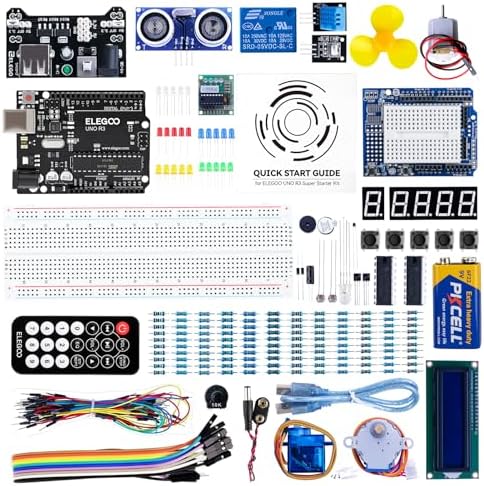
- PDF tutorial(more than 22 lessons) and clear listing in a nice package
- The most economical kit based on Arduino platform to starting learning electronics for those beginners who are intereste…
- Lcd1602 module with pin header (not need to be soldered by yourself)
Key Specs
- Platform: Arduino-compatible UNO R3 microcontroller
- Components: 200+ (sensors, LEDs, resistors, breadboard, servo motor, relay module, LCD display)
- Age range: 12 and up
- Programming language: C++ via Arduino IDE (free download)
- Price tier: Budget
Who this is for: Teens aged 12+ who’ve either outgrown snap-together kits or want to learn actual programming and hardware engineering — and who ideally have a parent or older sibling available for initial setup guidance.
I’ll be honest: the ELEGOO UNO R3 Super Starter Kit is a genuinely different category of product than the two kits above. There are no colored snap connectors here. You’re working with a breadboard, jumper wires, real resistors, and an actual Arduino-compatible microcontroller that you program using a computer. It’s a significant step up in complexity — and for the right teenager, it’s extraordinary value.
It’s the natural next step for a 13-year-old who’s burned through the Snap Circuits SC-300 and is getting bored. The early tutorials walk you through building a temperature sensor with an LCD display readout, a motion detector that triggers a buzzer alarm, and a “traffic light” system using LEDs on a timed program you write yourself. Each of those requires reading actual C++ code, wiring components correctly on a breadboard, and debugging when something doesn’t work. Real, transferable skills — the kind that matter if you’re heading anywhere near computer science, electrical engineering, or robotics.
The tutorial PDF that comes with the kit walks through 20+ projects step by step, with code included and explained line by line. It’s 200+ pages and clearly aimed at self-directed learners who don’t mind spending 30 minutes on a problem before it clicks. There is a real learning curve, especially for kids who’ve never encountered programming before — and that’s a feature, not a bug. The frustration is the productive kind. When the sensor finally reads the right temperature on the LCD screen, it feels genuinely earned. The component variety is also impressive: you get an ultrasonic distance sensor, a DHT11 temperature sensor, a servo motor, a relay module, a small 16×2 LCD display, plus all the standard LEDs, resistors, and breadboard components. For a budget-tier kit, it’s a remarkable amount of hardware.
One practical note: you need a computer to program the board (Windows, Mac, or Linux all work), and the initial driver installation on some systems takes 15–20 minutes to sort out. First-time Arduino setup can be genuinely confusing if you’ve never done it. I’d recommend sitting with your teen for the first hour of setup, then stepping back and letting them drive the tutorials themselves.
What stands out:
- Teaches real programming fundamentals (C++, logic, variables, loops) — not simplified block coding
- Component variety is remarkable at this price — sensors, servo, LCD display, relay all included
- Tutorial quality is excellent for self-directed learners; projects scale in complexity naturally
- Skills built here directly apply to high school robotics clubs, coding competitions, and beyond
What could be better:
- Not appropriate for kids under 12 — the programming complexity will frustrate rather than engage younger children
- Initial Arduino IDE setup can be confusing; a parent’s help in the first hour is strongly recommended
- Requires a computer for programming — not entirely standalone like the snap-together kits
Bottom line: For any teen showing early interest in technology, coding, or engineering, the ELEGOO UNO R3 Super Starter Kit is one of the best-value investments you can make in their learning. It teaches real skills that stay useful long after the kit’s tutorials are finished.
How to Choose an Electronics Kit for Kids: What Actually Matters
Age and Skill Level Come First
This is the single most important variable, and it’s the one most parents get wrong. Buying a kit that’s too advanced is far more damaging than buying one that’s slightly too easy — a frustrated kid won’t try again, but a kid who breezes through basic projects will naturally ask for the next level up.
For ages 8–11, snap-together systems like the SC-100 or the Thames & Kosmos Easy Electric Circuits are ideal. They’ve been specifically engineered so that the physical act of building reinforces the concept — you can’t accidentally build a circuit “wrong” in a way that doesn’t make visual sense. For ages 12 and up — particularly kids who’ve already done some block coding on Scratch or Code.org and found it too simple — an Arduino-based kit like the ELEGOO delivers a real challenge that grows with them over months or years, not weeks.
Project Count vs. Project Quality
Most parents focus on the number of projects when shopping, but the more interesting question is: what does your child do after finishing all the listed projects? The Snap Circuits ecosystem has a clear answer — buy the next kit up (SC-300, SC-500, SC-750) and all the components stay compatible. This is genuine long-term value. A typical path: start with the SC-100, finish the 100 projects over two to three months, and move to the SC-300 without losing any of the original components.
Under $30: expect around 15–20 experiments or 100 snap-together projects — good for one to three months of engagement. $30–$60: the sweet spot where you get either 300+ snap projects or a full Arduino component ecosystem that’s essentially open-ended. Over $60: typically advanced electronics labs with multimeters and real breadboard work — appropriate only for teens who’ve already proven their interest with a starter kit.
What Your Child Is Actually Into
A kid who loves building physical things (blocks, Lego Technic, model cars) will respond best to a kit where the end result is something tangible — a motorized vehicle, a working radio, a light-up alarm system. The Thames & Kosmos motorized models and the Snap Circuits radio projects hit this instinct well. A kid who’s drawn to computers, gaming, and “how does this software work?” questions is better matched to the ELEGOO Arduino kit — the programming component will feel natural rather than intimidating.
If you’re genuinely unsure, the Snap Circuits Jr. SC-100 is the safest starting point across the board. Owner reviews show it working for kids across wildly different personality types, from hyperactive builders who just want to snap things together quickly to cautious readers who work through every manual page carefully. It’s the closest thing to a universal first electronics kit we’ve come across.
Related STEM Guides for Kids
- Best Coding Robots for Kids Under $80 — programming next
- Best Science Kits for Kids — broader experiments
- Best AI STEM Toys for Kids — smart toys that teach
Frequently Asked Questions
What is the best electronics kit for an 8-year-old?
The Snap Circuits Jr. SC-100 is consistently the best starting point for 8-year-olds. The numbered components, full-color diagrams, and progressive project difficulty make it accessible without being patronizing. It’s the kit I’d recommend to any parent buying their child’s first electronics kit.
Is Snap Circuits worth the money?
Yes — it’s one of the rare toys that delivers genuine educational value while still being fun to use. The SC-100 sits at the budget end of the market, yet owners report engagement that tends to last months rather than weeks. The cross-compatibility of components across the SC-100, SC-300, and SC-500 also means it’s a long-term investment rather than a one-off purchase.
What age is Snap Circuits best for?
The SC-100 is designed for ages 8 and up, and owner reviews suggest that’s accurate. The instructions require solid reading ability, and the core concepts (circuits, switches, polarity) start to click around age 8–9. If your child is younger — say 5–7 — the Snap Circuits Beginner SCB-20 targets that age range with larger components and simpler 20-project builds.
What is the difference between Snap Circuits SC-100 and SC-300?
The SC-100 includes 28 components and 100+ projects. The SC-300 includes 60+ components and 300+ projects. Both use the exact same grid system and snap-together interface — your SC-100 components work in SC-300 projects and vice versa. The SC-300 is the natural upgrade once a child has worked through the SC-100’s project list, typically after a few months of regular use.
Do Snap Circuits need batteries?
Yes. The SC-100 requires 2 AA batteries for most projects (not included in the box). A few specific projects also use a 9V battery. The Thames & Kosmos Easy Electric Circuits kit similarly uses AA batteries. The ELEGOO Arduino kit is powered by USB — plugged into your computer or a USB wall adapter — so no separate batteries are needed for those projects.
Is ELEGOO good for kids?
ELEGOO’s UNO R3 kits are excellent for kids aged 12 and older, particularly those with an existing interest in coding or who’ve outgrown beginner snap-together circuits. For children under 12, the programming complexity is generally too advanced and will frustrate rather than engage. Think of ELEGOO as the step you take after Snap Circuits, not instead of it.
What can a 10-year-old build with an electronics kit?
With the Snap Circuits Jr. SC-100, a 10-year-old can build a working FM radio, a voice-activated switch, a motion alarm, and dozens of LED circuits. Most 10-year-olds can complete the SC-100’s 100 projects within two to three months with regular use. The Thames & Kosmos Easy Electric Circuits kit produces working motorized vehicles and fans — satisfying, concrete results that are great for that age.
What STEM electronics kit teaches real skills?
For genuine skill transfer into future career fields, the ELEGOO Arduino kits are the gold standard for teens. They teach actual C++ programming, breadboard wiring, and sensor integration — skills that directly apply to high school robotics clubs, engineering coursework, and coding competitions. Snap Circuits teaches foundational concepts (circuit flow, switches, resistance) that are equally real, just at a more introductory level. Both are valuable; they just target different stages of learning.
Final Verdict
The best electronics kit for kids in 2026 depends on where your child is in their learning journey. For ages 8–12 on a modest budget, the Snap Circuits Jr. SC-100 is my overall pick — it’s the most broadly applicable first kit we compared, and owner reviews describe more genuine “I built this” moments for it than for anything else on this list. If your child is on the younger end or a complete beginner who needs a more visual, guided system, the Thames & Kosmos Easy Electric Circuits kit’s block-based approach and excellent instruction manual make it the better fit. And for any teen aged 12+ who’s serious about technology, the ELEGOO UNO R3 Super Starter Kit is the most educational purchase you can make at this price — real programming, real hardware, real skills.
- SO MANY TOYS IN A SNAP: Make dozens of cool electronic gadgets – all from one box! A safe and fun way to introduce child…
- PROJECTS THEY’LL LOVE: So many fun electric-powered projects you can make and play! Ages 8 to 108 will love building 100…
- GREAT GIFT Give the gift of learning and fun this holiday season! Snap Circuits kits will keep kids busy and having fun …
- PDF tutorial(more than 22 lessons) and clear listing in a nice package
- The most economical kit based on Arduino platform to starting learning electronics for those beginners who are intereste…
- Lcd1602 module with pin header (not need to be soldered by yourself)
- The greatest hits of electrical science!
- Conduct 15 experiments with simple electric circuits.
- Use what you learn from the experiments to build 5 motorized models that use electric circuits to function: a walking li…
If your child enjoyed this kind of hands-on STEM project, check out our Best Coding Robots for Kids Under $80 in 2026 and Best Science Kits for Kids Under $50 in 2026 for more picks across different STEM categories.
See the full Snap Circuits lineup on Elenco’s official Snap Circuits page.
Last updated: July 2026 | Prices subject to change — check Amazon for current pricing.
Questions about any of these picks? Get in touch via our contact page.
Pingback: Best Microscope For Kids In 2026 — Top 3 Picks
Pingback: Best Magnetic Tiles For Kids In 2026 — Top 3 Picks
Pingback: Best Marble Run For Kids In 2026 — Top 3 Picks