
This post contains affiliate links. As an Amazon Associate, I earn from qualifying purchases at no extra cost to you.
If your wrist hurts after a day of clicking, your mouse is working against you. The best ergonomic mouse for home office use doesn’t just feel different — it changes the angle of your hand, reduces forearm tension, and lets you work for hours without that dull ache setting in by 3 PM.
We researched and compared the top options available in 2026 — from precision sculpted designs to pure vertical mice — and narrowed it down to four picks that genuinely deliver across different budgets and hand sizes. Whether you’re dealing with early carpal tunnel symptoms or just want to set up a more comfortable desk before problems start, one of these will be a clear upgrade.
Best Ergonomic Mice for Home Office at a Glance

- Experience enhanced comfort and productivity with the Anker 2.4G Wireless Vertical Ergonomic Optical Mouse. Its scientif…
- Enjoy superior sensitivity and precision with this wireless mouse. It boasts 800/1200/1600 DPI Resolution Optical Tracki…
- The Anker Ergonomic Mouse is not only convenient but also user-friendly. It comes with next/previous buttons for effortl…
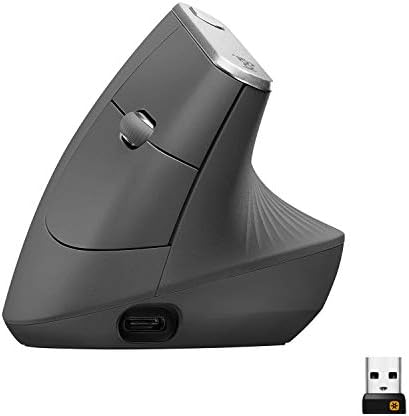
- NATURAL HANDSHAKE POSITION – MX Vertical’s natural handshake position reduces muscular activity by 10 percent compared t…
- 57° VERTICAL ANGLE FOR IMPROVED WRIST POSTURE – MX Vertical’s unique 57° vertical angle reduces the pressure on your wri…
- USER TESTED. ERGONOMIST-APPROVED. MX Vertical has been designed and tested with criteria set out by leading ergonomists …

- Logitech MX Master 3S Standard Edition comes with a Logi Bolt USB receiver (dongle), and a USB-C charging cable (USB-A t…
- Install free Logi Options+ App to enable Logi AI Prompt Builder for your Logitech wireless mouse and keyboard setups
- 8K DPI Any-surface tracking: Use MX Master 3S cordless computer mouse to work on any surface – even glass (1) – with an …

- Lift yourself up: When the desk life gets you down, lift yourself up with Logitech Lift Vertical Ergonomic Mouse – a gre…
- Raise your hand into comfort: Rest on Lift upright mouse throughout the day, with a softly textured grip and snug thumb …
- 57 degrees of sooooothe: Lift’s vertical shape helps wrists feel like “ahhh” at work, and promotes a more natural postur…
How We Picked the Best Ergonomic Mouse
Not every mouse marketed as “ergonomic” earns that label. We evaluated each pick on four criteria: hand position angle (does it actually reduce forearm pronation?), grip size compatibility, sensor quality for all-day precision, and long-term comfort data from thousands of user reviews. We also confirmed Amazon availability as of August 2026 before including anything on this list.
1. Logitech MX Master 3S — Best Overall Ergonomic Mouse
The MX Master 3S is the gold standard for home office mice and the pick we’d recommend to most people without hesitation. It doesn’t use a radical vertical angle like pure ergonomic mice — instead, it uses a sculpted right-hand shape with a thumb rest and a slightly elevated arc that keeps your wrist in a more natural position than a flat mouse, all without requiring a multi-day adjustment period.
- Logitech MX Master 3S Standard Edition comes with a Logi Bolt USB receiver (dongle), and a USB-C charging cable (USB-A t…
- Install free Logi Options+ App to enable Logi AI Prompt Builder for your Logitech wireless mouse and keyboard setups
- 8K DPI Any-surface tracking: Use MX Master 3S cordless computer mouse to work on any surface – even glass (1) – with an …
What makes the MX Master 3S worth its premium price is the combination of features that add up to a genuinely better workday. The MagSpeed electromagnetic scroll wheel switches automatically between ratchet and free-spinning mode depending on how fast you spin it — owners often say a normal scroll wheel feels like going back to dial-up afterward. The clicks are 90% quieter than a standard mouse, which matters enormously if you’re on video calls or working in a shared space.
It connects via Logi Bolt USB receiver or Bluetooth and switches between up to three devices. Charging is USB-C with up to 70 days per charge. The 8K DPI sensor handles 4K displays without breaking a sweat, and customizable buttons — including a side-mounted thumb button cluster and a horizontal tilt scroll wheel — make it a genuine productivity tool rather than just a pointing device.
Specs
| Connectivity | Logi Bolt USB + Bluetooth |
| DPI Range | 200–8,000 (adjustable) |
| Battery | Up to 70 days (USB-C charging) |
| Weight | 141g |
| Compatibility | Windows, macOS, Linux, iPadOS |
| Multi-device | Up to 3 devices |
Pros: Sculpted shape reduces wrist fatigue for right-handed users, MagSpeed scroll wheel is uniquely satisfying, near-silent clicks, excellent multi-device support, long battery life, USB-C charging, full Logi Options+ software support.
Cons: Right-hand only with no left-handed version. Not a true vertical design, so if you have severe RSI or diagnosed carpal tunnel, you’ll get more relief from the MX Vertical. Large size may not suit smaller hands.
Best for: Home office workers who want the best all-around ergonomic mouse — not necessarily in pain now, but want to prevent it long-term while gaining a serious productivity upgrade.
2. Logitech MX Vertical — Best Vertical Ergonomic Mouse for Wrist Pain
If you’re specifically dealing with wrist pain, forearm tension, or early signs of repetitive strain injury, the MX Vertical is where to go. It holds your hand at a 57-degree natural handshake angle, which rotates your forearm out of the prone position that flat mice force on you. Logitech’s own testing showed a 10% reduction in muscle strain compared to traditional mice, and studies on vertical mice broadly show up to 32% less median nerve pressure — which translates directly to less carpal tunnel aggravation.
- NATURAL HANDSHAKE POSITION – MX Vertical’s natural handshake position reduces muscular activity by 10 percent compared t…
- 57° VERTICAL ANGLE FOR IMPROVED WRIST POSTURE – MX Vertical’s unique 57° vertical angle reduces the pressure on your wri…
- USER TESTED. ERGONOMIST-APPROVED. MX Vertical has been designed and tested with criteria set out by leading ergonomists …
The design takes a few days to adapt to. Clicking motion shifts from a lateral action to a downward press, and tracking feels slightly different because your whole hand is oriented differently. Most users adapt fully within a week and report they can’t comfortably go back to a flat mouse after that. The 4K DPI switch button on top is a smart addition for toggling between precision work and general browsing without opening software.
It connects via included USB receiver or Bluetooth and switches between three devices, with battery life of up to four months. The one genuine complaint in 2026 is the charging port — it’s still micro-USB, which feels outdated next to the MX Master 3S’s USB-C. Otherwise, build quality is excellent and the sensor is reliable for office use.
Specs
| Connectivity | Unifying USB + Bluetooth |
| DPI Range | 400–4,000 (4 levels) |
| Battery | Up to 4 months (micro-USB) |
| Weight | 135g |
| Hand Angle | 57 degrees |
| Multi-device | Up to 3 devices |
Pros: True 57-degree vertical angle with clinically supported muscle strain reduction, multi-device switching, excellent four-month battery life, solid Logitech build quality and warranty.
Cons: Micro-USB charging is outdated in 2026, right-hand only, larger size not ideal for small hands, requires a 3–7 day adjustment period.
Best for: Anyone with existing wrist pain, carpal tunnel symptoms, or forearm fatigue who wants a clinically-informed vertical ergonomic design from a major brand with full software support.
3. Logitech Lift Vertical — Best Ergonomic Mouse for Small Hands
The Lift Vertical solves the biggest problem with vertical mice: they’re almost always designed for medium-to-large hands. The Lift is smaller, lighter, and — critically — available in both right-handed and left-handed versions. That makes it the only mainstream vertical ergonomic mouse that genuinely works for people with smaller hands or for lefties who’ve been largely excluded from this category.
- Lift yourself up: When the desk life gets you down, lift yourself up with Logitech Lift Vertical Ergonomic Mouse – a gre…
- Raise your hand into comfort: Rest on Lift upright mouse throughout the day, with a softly textured grip and snug thumb …
- 57 degrees of sooooothe: Lift’s vertical shape helps wrists feel like “ahhh” at work, and promotes a more natural postur…
The 57-degree vertical angle is identical to the MX Vertical, but the footprint is noticeably smaller. The textured sides and rubberized coating give it excellent passive grip — the mouse stays put in your palm without gripping hard, which itself reduces muscle tension over a long day. The scroll wheel feel is slightly lighter than the MX Vertical’s but perfectly functional for everyday use.
Price-wise, it sits between the budget Anker and the premium MX Vertical. The main trade-off is power: the Lift runs on a single AA battery rather than a rechargeable cell. Minor inconvenience, offset by a two-year battery life estimate and the fact it uses the modern Logi Bolt standard plus Bluetooth, with two-device pairing.
Specs
| Connectivity | Logi Bolt USB + Bluetooth |
| DPI Range | 400–4,000 |
| Battery | Up to 2 years (1× AA) |
| Weight | 125g (without battery) |
| Hand Angle | 57 degrees |
| Multi-device | 2 devices |
Pros: Available in a left-handed version, compact size suits smaller hands, excellent grip texture, same 57-degree vertical angle as MX Vertical at a lower price, very long battery life, modern Logi Bolt standard.
Cons: Non-rechargeable (AA battery only), only 2-device pairing vs. 3 on the MX Vertical, fewer customization buttons than the MX Master 3S.
Best for: People with smaller hands, left-handed users, and anyone who wants a solid vertical ergonomic mouse at a mid-range price without committing to the MX Vertical’s premium.
4. Anker 2.4G Wireless Vertical Mouse — Best Budget Ergonomic Mouse
As the budget pick, the Anker 2.4G Wireless Vertical is how you test whether vertical mice actually help you before spending on a mid-range or premium model. The core ergonomic principle — a roughly 57-degree vertical angle, handshake grip, reduced forearm pronation — is the same regardless of price. What you’re paying more for with Logitech is build quality, sensor precision, software, and brand warranty. The fundamental wrist relief mechanism works at any price point.
- Experience enhanced comfort and productivity with the Anker 2.4G Wireless Vertical Ergonomic Optical Mouse. Its scientif…
- Enjoy superior sensitivity and precision with this wireless mouse. It boasts 800/1200/1600 DPI Resolution Optical Tracki…
- The Anker Ergonomic Mouse is not only convenient but also user-friendly. It comes with next/previous buttons for effortl…
For a budget mouse, Anker delivers a genuinely usable vertical device. The 800/1200/1600 DPI sensor handles home office use on standard 1080p or 1440p displays without issue. The rubberized grip is comfortable. The 2.4G USB receiver gives you reliable wireless without Bluetooth pairing hassle. Battery runs around 90 days on two AA batteries — better than you’d expect for this price.
The compromises are real: no rechargeable battery, no Bluetooth, no multi-device support, a plasticky feel compared to Logitech, and a 1,600 DPI ceiling that may feel sluggish on high-DPI or ultrawide displays. But for someone who has never tried a vertical mouse and wants to find out if the ergonomic concept works for their body before investing, this is exactly the right starting point.
Specs
| Connectivity | 2.4G USB receiver |
| DPI Range | 800 / 1,200 / 1,600 |
| Battery | ~90 days (2× AA) |
| Weight | ~100g (without batteries) |
| Hand Angle | ~57 degrees |
| Multi-device | No |
Pros: Extremely affordable entry into vertical mice, reliable 2.4G wireless, comfortable vertical angle, good risk-free way to validate whether a vertical mouse works for you.
Cons: No Bluetooth, no rechargeable option, 1,600 DPI ceiling, plasticky build compared to Logitech, no software customization.
Best for: Budget-conscious buyers, first-time vertical mouse users, secondary desk setups, and anyone who wants to test the concept before committing to a pricier option.
What to Look for in a Home Office Ergonomic Mouse
Before buying, it helps to understand what actually separates a genuinely ergonomic mouse from one that just uses the word in its marketing copy. Here’s what matters in practice — and if you’re building a broader ergonomic desk setup, pairing a good mouse with a standing desk converter makes a noticeable combined difference.
Hand Angle and Forearm Position
A flat mouse forces your forearm into full pronation — palm facing down — which compresses the median nerve and strains the tendons along the underside of your wrist. True ergonomic mice tilt your hand anywhere from 30 to 90 degrees toward a handshake position. The sweet spot most manufacturers target is 57 degrees, which provides meaningful relief without making clicking feel completely foreign. All three vertical mice on this list hit that 57-degree mark.
Grip Style and Hand Size
There are three grip styles: palm (whole hand rests on mouse), claw (fingers arched, palm raised), and fingertip (minimal contact). Most ergonomic mice are designed for palm grip, which distributes contact area and reduces finger tension. Hand size matters significantly — the MX Vertical fits medium-to-large hands best, while the Lift Vertical is more compact. Before buying, measure your hand from wrist crease to middle fingertip and compare to the mouse’s listed dimensions.
Wireless vs. Wired
For ergonomic mice, wireless is strongly preferred. A cable creates drag that forces constant small stabilizing wrist movements — exactly the repetitive micro-motion ergonomic mice try to eliminate. All four picks above are wireless for this reason. Modern 2.4G wireless mice have imperceptible input lag compared to wired, so there’s no performance trade-off worth worrying about.
DPI and Sensor Quality
Higher DPI means less physical arm movement to cover the same screen distance — good for ergonomics. For home office use on 1080p or 1440p displays, 1,600 DPI is workable but 4,000+ gives you more flexibility and less arm travel. If you’re on a 4K monitor or large ultrawide, aim for a mouse that exceeds 4,000 DPI — the MX Master 3S at 8,000 DPI handles anything you throw at it.
Right-Handed vs. Left-Handed Options
Most ergonomic mice are right-hand only due to their asymmetric sculpted shapes. If you’re left-handed, your options narrow significantly. On this list, the Logitech Lift Vertical is the only pick with a dedicated left-handed version. Evoluent also makes left-handed vertical mice, but they’re not covered in this guide.
Related Home Office Guides
- Best Desk Mat for Home Office — a smoother surface for your mouse
- Best Laptop Stand — fix screen height while you fix wrist angle
- Best Standing Desk Converter — complete the ergonomic setup
Frequently Asked Questions
What is the best ergonomic mouse for home office use in 2026?
The Logitech MX Master 3S is the best ergonomic mouse for most home office workers. It combines a sculpted ergonomic shape, near-silent clicks, a premium MagSpeed scroll wheel, and three-device switching. If you specifically need a vertical design for wrist pain, the Logitech MX Vertical is the better choice.
Can an ergonomic mouse help with carpal tunnel syndrome?
A vertical ergonomic mouse can reduce carpal tunnel symptoms by rotating your forearm out of the prone position, reducing compression of the median nerve by up to 32% compared to flat mice. That said, an ergonomic mouse is not a medical treatment for carpal tunnel syndrome — if you have a diagnosis, consult a physician alongside any hardware changes.
What’s the difference between an ergonomic mouse and a vertical mouse?
All vertical mice are ergonomic mice, but not all ergonomic mice are vertical. “Ergonomic mouse” covers any mouse designed to reduce strain — including sculpted horizontal mice like the MX Master 3S, trackballs, and rollerbars. “Vertical mouse” specifically refers to mice that tilt your hand 57–90 degrees toward a handshake position. Vertical mice are generally more effective for forearm and wrist strain specifically.
How long does it take to get used to a vertical mouse?
Most users adapt to a vertical mouse in 3–7 days. The first day or two can feel awkward as the clicking motion shifts from a lateral movement to a downward press. Precision and tracking usually feel natural by day three. Most people who commit to a full week report they can’t comfortably go back to a flat mouse.
Is an ergonomic mouse worth it for home office work?
Yes, especially if you use a mouse for more than four hours a day. The cumulative effect of poor wrist positioning over months contributes to RSI, tendonitis, and carpal tunnel. Switching to an ergonomic mouse is one of the lowest-friction ergonomic upgrades you can make — no behavioral change required, just a better tool.
Should I get a wireless or wired ergonomic mouse?
Wireless. A cable creates drag that forces constant small stabilizing wrist movements throughout the day — exactly the repetitive micro-motion ergonomic mice are designed to minimize. Modern 2.4G wireless mice have imperceptible input lag, so there’s no performance penalty for going wireless.
What’s the best ergonomic mouse for small hands?
The Logitech Lift Vertical is the best vertical ergonomic mouse for small hands. It’s smaller and lighter than the MX Vertical, fits without overextension, and is available in a left-handed version. If you have larger hands, the MX Vertical or MX Master 3S will fit better.
Can a vertical mouse make wrist pain worse?
In rare cases, yes — if the mouse is too large for your hand and forces overextension, or if you grip too hard during the adjustment period. Choose the right size (the Lift Vertical for smaller hands) and consciously relax your grip when switching. If pain increases after two weeks, see a physician.
Is Logitech the only brand worth buying for ergonomic mice?
Logitech dominates this category for mainstream home office users, but alternatives exist. Evoluent makes vertical mice with higher tilt angles and dedicated left-handed designs. Contour makes rollerbars and adjustable-angle mice for specific pain profiles. Anker covers the budget tier well, as shown above. For most home office buyers who want reliability, software support, and a solid warranty, Logitech is the safest default.
Final Verdict
The best ergonomic mouse for most home office workers is the Logitech MX Master 3S — it covers the ergonomic basics with a sculpted shape, adds premium features that make all-day work genuinely more comfortable, and backs it up with Logitech’s build quality and software ecosystem.
If wrist pain or forearm fatigue is already a problem, step up to the Logitech MX Vertical for a true 57-degree handshake angle and measurable muscle strain reduction. Smaller hands and left-handed users should look at the Logitech Lift Vertical. And if you’ve never tried vertical before and want to test the concept before spending more, the budget-priced Anker Wireless Vertical is the right risk-free starting point.
Pingback: Best Under Desk Treadmill For Home Office In 2026