
This post contains affiliate links. As an Amazon Associate, I earn from qualifying purchases at no extra cost to you.
My Top Pick — Lutron Caseta Original Smart Dimmer Switch
Looking for the best smart light switches no neutral wire solution? If your home was built before 1985 and you’ve been staring at that bundle of just two wires in your switch box wondering if you’ll ever get smart lighting — the Lutron Caseta is the answer. Owners in older homes consistently report it works flawlessly — no neutral wire needed, no flickering, no drama. It has the strongest reliability reputation of any no-neutral switch on the market.
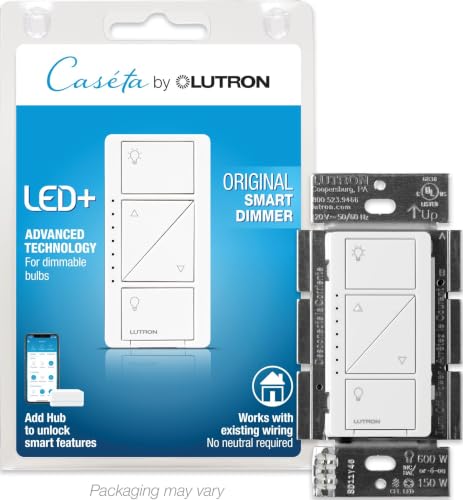
- MAKE YOUR LIGHTS SMART: One Lutron Caseta switch can turn multiple lights or fixtures into a smart dimmer light switch s…
- MOST CONNECTED SMART LIGHTING: The Caseta Lutron smart switch connects with Alexa light switch, Apple HomeKit light swit…
- RELIABLY SMART CONNECTION: The Lutron Smart Hub works without Wi-Fi, providing ultra-fast, stable performance beyond a t…
Best Smart Switches Without Neutral Wire — Quick Comparison
| Product | Price Tier | Hub Required? | Best For | Our Rating |
|---|---|---|---|---|
| Lutron Caseta Dimmer | Mid-range | Yes (Smart Hub) | Best Overall | 5/5 |
| GE Cync On/Off No Neutral | Budget | No | Best Hub-Free | 4.5/5 |
| GE Cync Dimmer No Neutral | Mid-range | No | Best Budget Dimmer | 4/5 |
| Aqara Smart Switch No Neutral | Budget | Yes (Aqara Hub) | Best for HomeKit | 4.5/5 |
| Lutron Caseta Deluxe Kit | Premium | Included | Best Starter Bundle | 5/5 |
Reviews — Detailed Breakdown
1. Lutron Caseta Original Smart Dimmer — Best Overall
Key Specs
- Wiring: No neutral required (line, load, ground only)
- Protocol: Lutron Clear Connect RF (434 MHz proprietary)
- Hub: Lutron Smart Bridge required (sold separately)
- Max load: 150W LED / 600W incandescent
- Compatibility: Alexa, Apple HomeKit, Google Home, Ring, Sonos
- Price tier: Mid-range (switch only)
Who this is for: Homeowners in pre-1980s houses who want the most reliable, proven no-neutral smart switch and don’t mind spending a little more for rock-solid performance.
The first thing owners mention is how solid the Caseta feels — not heavy in a chunky way, but dense and purposeful. Reviewers often point to the satisfying tactile click that cheap smart switches completely miss. Installation takes about 15 minutes, according to owner reports: line wire to the line terminal, load wire to the load terminal, ground to ground, done. No rewiring, no neutral hunting, no stress.
What really sets the Caseta apart in real-world use is Lutron’s proprietary Clear Connect radio technology. Unlike Wi-Fi switches that compete with your streaming and smart home traffic on 2.4GHz, Clear Connect operates on its own 434MHz band. The practical result? Owners consistently report the light responds instantly — no delay, no “checking connection,” none of the 1-2 second lag common with cheaper Wi-Fi switches. Long-term owner reviews rarely mention dropouts.
The Lutron Smart Bridge (the hub it requires) is an added cost, but it connects via Ethernet to your router, sits quietly on a shelf, and handles up to 75 devices. Once you have it, every additional Caseta switch is just a 15-minute install away. The Lutron app is genuinely polished — schedules, geofencing, Smart Away mode that randomly toggles lights while you’re on vacation — it all works exactly as advertised.
What we like:
- Zero flickering with LED bulbs — works with virtually every dimmable LED, no minimum wattage issues
- Instant response every time — Clear Connect RF is noticeably faster than Wi-Fi switches
- Works with more smart home platforms than any competitor (Alexa, HomeKit, Google, Ring, Sonos)
- Physical Pico remote option — mount a wireless “switch” anywhere without running new wire
What could be better:
- The Smart Bridge is a separate purchase — makes it expensive for just one switch
- The original button layout takes some getting used to if you’re replacing standard rockers
Bottom line: If you want the best no-neutral smart switch and plan to install more than one, the Caseta ecosystem pays for itself quickly. It’s the most dependable long-term choice on this list.
- MAKE YOUR LIGHTS SMART: One Lutron Caseta switch can turn multiple lights or fixtures into a smart dimmer light switch s…
- MOST CONNECTED SMART LIGHTING: The Caseta Lutron smart switch connects with Alexa light switch, Apple HomeKit light swit…
- RELIABLY SMART CONNECTION: The Lutron Smart Hub works without Wi-Fi, providing ultra-fast, stable performance beyond a t…
2. GE Cync On/Off Smart Switch — Best Hub-Free Pick
Key Specs
- Wiring: No neutral required (line, load, ground only)
- Protocol: 2.4GHz Wi-Fi + Bluetooth
- Hub: None required
- Compatibility: Alexa, Google Home (no Apple HomeKit)
- Includes: Bulb adapter to prevent flickering
- Price tier: Budget
Who this is for: Renters or first-time smart home buyers who want hub-free setup, work primarily with Alexa or Google Home, and need only basic on/off control.
The GE Cync is the natural pick for anyone who just wants to dip a toe into smart lighting without buying a hub. You pull it out of the box, wire it in (line, load, ground — same as Caseta, no neutral), download the Cync app, and you’re connected via Bluetooth in under five minutes. Then it registers on your Wi-Fi for remote access. Owners often describe the whole process as more approachable than most smart home setups.
GE includes a bulb adapter (bypass capacitor) in the box, which is genuinely thoughtful. A lot of no-neutral switches cause LED flicker when bulb wattage is too low — the adapter prevents this by allowing just enough current to flow. Owners using low-wattage bulbs (around 8W) report flickering disappears once the adapter is installed at the fixture.
What we like:
- No hub required — connects directly to Wi-Fi, zero extra purchases
- Bulb adapter included — saves the frustration of figuring out LED compatibility yourself
- Reliable app and voice control for day-to-day use
What could be better:
- No Apple HomeKit support — iPhone users who want Siri control should look elsewhere
- App occasionally disconnects and requires re-login, though voice control stays stable
- On/off only — no dimming capability in this model
Bottom line: For a single switch in a rented apartment or a quick upgrade to one room, the GE Cync delivers solid functionality without the hub commitment. Don’t expect perfection, but for the price, it’s genuinely useful.

- Upgrade to Smart Lighting: Transform your traditional bulbs into smart lights effortlessly with the Cync smart button st…
- Convenient Control Anytime, Anywhere: Experience ultimate convenience with a WiFi light switch that offers remote contro…
- Voice Control: Hands-free control with home automation by connecting the Cync smart switch to Amazon Alexa or Google Hom…
3. GE Cync Dimmer Smart Switch — Best Budget Dimmer
Key Specs
- Wiring: No neutral required (line, load, ground only)
- Protocol: 2.4GHz Wi-Fi + Bluetooth
- Hub: None required
- Minimum load: 15W LED
- Compatibility: Alexa, Google Home
- Price tier: Mid-range
Who this is for: Budget-conscious buyers who want dimming capability without paying for a Lutron ecosystem, and whose rooms have at least 4-5 LED bulbs totaling 40W or more.
The Cync Dimmer is the hub-free dimmer to consider if you’re not ready to commit to Lutron’s price point. Setup is identical to the on/off model — same Wi-Fi + Bluetooth approach, same app, same installation process. On the switch itself, a center button handles on/off and clickable paddles above and below adjust brightness. Owners report smooth dimming down to low levels without visible flicker with standard 60W-equivalent LED bulbs.
The honest caveat here is the 15W minimum load requirement. If you’re trying to dim a single LED nightlight or a closet with one 8W bulb, this switch won’t work reliably. Lutron handles those low-wattage situations better. But for standard multi-bulb ceiling fixtures — living rooms, kitchens, dining rooms — the Cync Dimmer performs well above its price.
What we like:
- Hub-free dimming at a mid-range price — hard to beat for the money
- Physical dim up/down paddles provide manual control without needing a phone
- Works smoothly in the Cync app with scheduling and scenes
What could be better:
- 15W minimum load — won’t work with single low-wattage LED fixtures
- No Apple HomeKit — Google and Alexa households only
- Dimming performance at very low levels (under 10%) can be slightly uneven
Bottom line: A solid, affordable dimmer for older homes with no neutral wire. Know your bulb wattage going in and you’ll be satisfied.

- Make Traditional Dimmable Bulbs Smart: The WiFi dimmer switch allows you to upgrade your smart home and make any bulb in…
- Smart Switch Control: Set daily schedules to match your routine, control your lights while you are away, or schedule lig…
- Save Money with Schedules: Set a schedule in the Cync App to turn off your LED light bulbs when you aren’t home so you c…
4. Aqara Smart Wall Switch (No Neutral, Single Rocker) — Best for Apple HomeKit
Key Specs
- Wiring: No neutral required
- Protocol: Zigbee 3.0
- Hub: Aqara Hub required (M2, M1S Gen2, E1, or compatible)
- Compatibility: Apple HomeKit, Alexa, Google Home, SmartThings
- Min load: 3W LED (far lower than the GE Cync’s 15W)
- Price tier: Budget
Who this is for: Apple HomeKit users who already own an Aqara hub or are building a Zigbee-based smart home, especially anyone dealing with very low-wattage LED fixtures where other switches struggle.
The Aqara switch stands out in two ways. First, it looks genuinely good — the clean rocker design blends into a modern wall better than most smart switches. Second, that 3W minimum load rating is legitimately impressive. Owners report it handles single low-wattage LED fixtures, like a 5W spotlight, that cause flickering on other no-neutral switches. The Zigbee connection also means it doesn’t add to Wi-Fi congestion — useful in homes with a lot of smart devices already on 2.4GHz.
The catch is the hub requirement. If you don’t already have an Aqara hub, you’re adding the cost of one. But if you’re already in the Aqara or broader Zigbee ecosystem, this budget-tier switch becomes an excellent value. Apple HomeKit integration is native, and owners report setup in the Home app takes about three minutes, with reliable Siri control from day one.
What we like:
- 3W minimum load — works reliably with single-bulb fixtures where other switches fail
- Native Apple HomeKit support — rare at this price point
- Zigbee extends your smart home mesh and doesn’t congest your Wi-Fi
- Lowest-priced hub-based switch on this list
What could be better:
- Requires Aqara hub — adds cost if you’re starting from scratch
- Aqara Home app has a steeper learning curve than GE Cync or Lutron apps
Bottom line: The best no-neutral option for iPhone households, especially if you have low-wattage fixtures that other switches can’t handle. The hub investment pays off if you plan to add more Aqara devices.

- 【NOTES】An Aqara Hub is required and sold separately. Requires a secured 2. 4 GHz Wi-Fi network connection for Hub M100/M…
- 【CONTROL FROM ANYWHERE】Convert your old light bulbs and fixtures into smart lights. The Aqara Smart Light Switch enables…
- 【HOME AUTOMATION】Tailor it to your personal needs and simplify your life through smart home automation. Supports schedul…
5. Lutron Caseta Deluxe Dimmer Kit — Best Whole-Home Starter Bundle
Key Specs
- Includes: 2 Caseta Dimmer Switches + 2 Pico Remotes + Lutron Smart Hub + 2 Wall Plates
- Wiring: No neutral required
- Protocol: Lutron Clear Connect RF
- Max load per switch: 150W LED / 600W incandescent
- Compatibility: Alexa, Apple HomeKit, Google Home, Ring, Sonos
- Price tier: Premium
Who this is for: Homeowners planning to upgrade multiple rooms at once who want everything — switches, hub, and remotes — in one box with no compatibility guesswork.
The Deluxe Kit is essentially the “just handle it” option. A typical setup — two switches, two Pico remotes for three-way setups, and the Smart Hub — takes owners under an hour including app configuration. The Smart Hub connects via Ethernet, registers in the Lutron app, and reviewers report both switches are controllable by Alexa within about five minutes of the app setup completing.
The math typically works out better than buying pieces separately: the kit bundles the Smart Hub, two Caseta dimmers, and two Pico remotes for less than the components usually cost individually. If you’re equipping two or more rooms, it’s the smart starting point.
What we like:
- Everything in one box — no compatibility research, no separate hub order
- Typically costs less than buying all components separately
- Pico remotes enable three-way setups without running new wire
- Hub supports up to 75 devices — plenty of room to expand later
What could be better:
- High upfront cost — not the move for a single-switch upgrade
- Only the original Caseta button aesthetic, not the newer Diva rocker style
Bottom line: If you’re upgrading two or more rooms in a house with no neutral wires, this kit makes the most financial sense and eliminates all the compatibility guesswork.

- WHEN RELIABILITY MATTERS: The Lutron Smart Hub works without Wi-Fi, providing ultra-fast, reliable performance beyond a …
- ADD A NEW SWITCH ANYWHERE: Add a new switch location anywhere in under 15 minutes. Simply replace the existing light swi…
- RELIABLY SMART CONNECTION: The Lutron Smart Hub works without Wi-Fi, providing ultra-fast, stable performance beyond a t…
How to Choose a Smart Switch Without Neutral Wire
First: Do You Actually Have No Neutral Wire?
Before buying anything, open your switch box and count the wires. Two wires — one black (hot) and one going to the light fixture — means no neutral, and you need a switch from this list. Three wires where one is a white wire connected directly to the switch (not bundled and capped) means you have a neutral, and a much wider range of smart switches will work. If you’re not sure, a licensed electrician can confirm in about two minutes. Homes built after 1985 typically have neutral wires at the switch; older homes often don’t.
Hub vs. No Hub: Which Should You Choose?
Hub-free switches like the GE Cync are simpler to set up and cheaper upfront. They connect directly to your 2.4GHz Wi-Fi, which makes installation fast but also means they depend on your Wi-Fi being reliable. Hub-based switches like Lutron Caseta and Aqara use dedicated protocols (Clear Connect and Zigbee respectively) that are faster and more reliable, but they require a separate hub device that connects to your router. Under $50 and just one switch: go hub-free. Outfitting multiple rooms: invest in the hub — the reliability difference becomes obvious when you have 5+ devices.
See full specs on Lutron’s official Caseta page.
LED Bulb Compatibility and Minimum Load Requirements
No-neutral switches need to draw a tiny amount of current through your light bulbs to stay powered, even when the lights are “off.” This is called power harvesting or power stealing. The problem is that very efficient LED bulbs — particularly those under 10 watts — may not allow enough current to flow, causing flickering or the switch failing to turn on at all. Check the minimum load rating before buying: the Aqara handles as low as 3W per way, Lutron Caseta has no minimum load requirement, and the GE Cync switches require at least 15W. If you have a single LED bulb in a hallway fixture, the Aqara or Lutron Caseta are your safest bets.
Related Smart Home Guides
- Best Smart Bulbs for Alexa — the no-rewiring alternative
- Best Smart Plugs with Energy Monitoring — easiest smart home entry
- Best Smart Thermostat Without a C-Wire — same old-house problem
Frequently Asked Questions
Do I need a neutral wire for a smart light switch?
Not necessarily. Older homes built before the mid-1980s often have switch boxes with only two wires — hot and load — and no neutral. The switches in this guide are specifically designed to work without a neutral wire using power-harvesting technology that draws tiny amounts of current through your light fixtures to stay powered.
What is the best no-neutral smart switch without a hub?
The GE Cync On/Off No Neutral is the best hub-free option. It connects directly to 2.4GHz Wi-Fi, works with Alexa and Google Home, and includes a bulb adapter to prevent LED flickering. The GE Cync Dimmer No Neutral is the hub-free choice if you need dimming capability.
Does Lutron Caseta require a neutral wire?
No — this is one of its biggest advantages. Lutron Caseta dimmers and switches are specifically engineered to work in homes without neutral wires. They use Lutron’s Clear Connect RF technology rather than Wi-Fi, which draws almost no standby power and works reliably without a neutral.
Can I install a smart switch without neutral wire in an old home?
Yes, and it’s usually straightforward. The wiring process for no-neutral switches is actually simpler than neutral-required models — you just connect line (hot), load, and ground. No neutral wire to hunt for or connect. Most people complete the installation in 15-20 minutes with a flathead screwdriver and a wire stripper.
Will a no-neutral smart switch cause my LED lights to flicker?
It can, depending on your bulb wattage. Flickering happens when bulbs are below the switch’s minimum wattage requirement, usually affecting fixtures with a single low-wattage LED under 10W. Solutions: install the included bulb adapter (GE Cync includes one), choose bulbs with higher wattage (10W+ typically works fine), or use a Lutron Caseta or Aqara switch which have better low-load handling.
Final Verdict
The Lutron Caseta Original Dimmer is the best smart light switch without neutral wire you can buy in 2026 — its Clear Connect RF reliability, zero-minimum-load LED compatibility, and integration with every major smart home platform are unmatched. If you’re starting from scratch with one or two switches and don’t want to pay for a hub, the GE Cync On/Off gives you solid hub-free smart control at a reasonable price. Apple HomeKit users should look seriously at the Aqara No Neutral — native HomeKit at this price tier is genuinely hard to find. And if you’re upgrading multiple rooms at once, the Lutron Caseta Deluxe Kit bundles everything you need and typically costs less than buying each piece separately.
Already upgraded your old wiring with a smart plug? Check out our Best Smart Plugs with Energy Monitoring 2026 guide to see how smart switches and plugs work together in a complete setup.
No layout selected.Last updated: May 2026 | Prices subject to change.
Questions about any of these picks? Get in touch via our contact page.
Pingback: Best Smart Thermostat Without A C-Wire In 2026