
This post contains affiliate links. As an Amazon Associate, I earn from qualifying purchases at no extra cost to you.
My Top Pick — Kwikset Halo Wi-Fi Smart Lock
After comparing three of the most popular smart locks available right now, the Kwikset Halo keeps coming out on top for most homeowners. Finding the best smart lock for your front door is harder than it sounds — the category is flooded with options at every price, and specs alone don’t tell you which ones actually hold up in daily use. The Kwikset Halo is grade AAA certified, works over Wi-Fi without a separate hub, and owners consistently report that the geofence auto-unlock functions reliably — something that can’t be said for every smart lock out there. If you’re upgrading your front door for the first time, this is where I’d start.

- CONTROL FROM ANYWHERE: Wi-Fi enabled smart door lock (no hub required), use the Kwikset app to remotely lock and unlock,…
- CONVENIENT KEYLESS ENTRY: Enable intelligent geofencing to automatically unlock as you approach your home, unlock using …
- SHARE ACCESS WITH GUESTS: Backlit keypad supports up to 250 access codes for keyless entry; use the Kwikset app to share…
Best Smart Lock for Front Door — Quick Comparison

Reviews — Detailed Breakdown
1. Kwikset Halo Wi-Fi Smart Lock — Best Overall
- CONTROL FROM ANYWHERE: Wi-Fi enabled smart door lock (no hub required), use the Kwikset app to remotely lock and unlock,…
- CONVENIENT KEYLESS ENTRY: Enable intelligent geofencing to automatically unlock as you approach your home, unlock using …
- SHARE ACCESS WITH GUESTS: Backlit keypad supports up to 250 access codes for keyless entry; use the Kwikset app to share…
Key Specs
- Security Grade: BHMA Grade AAA (residential certification)
- Connectivity: Built-in Wi-Fi 2.4GHz (no hub)
- Access Methods: Keypad, App, Voice (Alexa, Google)
- User Codes: Up to 250
- Auto-Lock: Yes, timer-based
- Geofence Auto-Unlock: Yes
- Battery: 4 AA batteries (~12 months)
- Price tier: Mid-range
Who this is for: Homeowners who want reliable Wi-Fi control without the hassle of a separate hub, and don’t need Apple HomeKey.
The Kwikset Halo is the kind of product that doesn’t try to do everything — it just does everything it promises, consistently. Owners typically report about 20 minutes from box to working app control, which puts it near the top for installation ease. Reviewers often mention that the touchscreen keypad has just the right amount of resistance — not too squishy, not too stiff — and the backlit keys are readable even in the middle of the night when you’re fumbling with grocery bags.
The feature owners praise most in daily use is the geofence auto-unlock. Owners describe setting a radius around their house and, after a few days of learning their commute pattern, having the door unlock shortly before they reach the front step. That kind of subtle, friction-free experience is what smart home technology should feel like. Some competing locks have this feature on paper but execute it poorly — owners say the Halo actually nails it. The companion app (Kwikset app) is clean and shows you a full history log of who entered and when, which is genuinely useful if you have kids coming home from school or service people stopping by.
Owners describe the lock body itself as substantial. Kwikset built it with SmartKey Security, which means you can re-key it yourself in seconds without a locksmith if you ever lose a key or move into a new home. That’s a practical value-add that most smart lock buyers overlook until they actually need it. The BHMA Grade AAA certification covers security, durability, and finish — so this isn’t just a software-heavy device slapped onto cheap hardware. It’s genuinely built to hold up over years of use.
What stands out:
- Owners report geofence auto-unlock works consistently after the initial learning period — a frequent point of praise over competitors at this price point
- SmartKey re-key feature means you never need a locksmith if circumstances change
- 250 user codes is generous — useful for Airbnb hosts or households with multiple family members
What could be better:
- No Apple HomeKit support — if you’re deep in the Apple ecosystem, you’ll need the Schlage Encode Plus instead
- Some owners report the app occasionally takes 3–4 seconds to reflect the current lock state — minor, but noticeable
Bottom line: For most homeowners buying their first smart lock, the Kwikset Halo hits the right balance of price, reliability, and features. It’s my go-to recommendation unless you specifically need Apple HomeKey or fingerprint access.
2. Schlage Encode Plus Smart Wi-Fi Lock — Best Security
- ANYWHERE ACCESS: With built-in WiFi compatibility, you can easily and securely connect your Schlage Encode Plus lock to …
- PEACE OF MIND: Lock and unlock from anywhere, manage up to 100 access codes, view lock history, receive customizable not…
- TAP TO UNLOCK: Works with Apple HomeKit and Apple home keys; with home keys you can simply tap to lock or unlock using y…
Key Specs
- Security Grade: ANSI/BHMA Grade 1 (highest residential rating)
- Connectivity: Built-in Wi-Fi 2.4GHz (no hub)
- Access Methods: Keypad, App, Apple HomeKey, Siri, Alexa
- User Codes: Up to 100
- Apple HomeKey: Yes — tap iPhone or Apple Watch to unlock
- Battery: 4 AA batteries (~12 months)
- Price tier: Premium
Who this is for: iPhone and Apple Watch users who want the fastest possible unlock experience, or anyone prioritizing the highest ANSI security rating available for residential deadbolts.
The Schlage Encode Plus is what I recommend to anyone who asks “what’s the best smart lock money can buy for a front door?” It holds the ANSI Grade 1 certification — the highest available for residential locks — which means it’s been tested against forced entry, corrosion, and thousands of use cycles at a level most competitors don’t even attempt. Owners consistently notice the difference out of the box: reviewers describe it as heavier and more solid-feeling than most other smart locks.
The Apple HomeKey feature is the headline selling point here, and it genuinely earns it. You tap your iPhone or Apple Watch to a small NFC area on the lock face, and the door opens in under half a second. No app, no PIN, no fumbling — just tap and walk through. Owners often say that once they’ve used it for a week, going back to any other unlock method feels antiquated. If you’re an iPhone user with an Apple Watch, this alone justifies the premium price for the Encode Plus over the standard Schlage Encode.
Installation is similar to the other locks here — owners report about 20–25 minutes with just a screwdriver. Reviewers often rate the Schlage app as one of the more polished ones in the category, and owners say the Alexa and Google Home integration both work without any fuss. One standout on the spec sheet: the lock supports up to 100 access codes, and you can set individual schedules per code — so a housecleaner who comes every Tuesday gets a code that only works Tuesday mornings. That kind of granular control is common at the enterprise level but feels genuinely useful in a home context.
What stands out:
- ANSI Grade 1 — the strongest deadbolt you can put on a residential front door, full stop
- Apple HomeKey tap-to-unlock is among the fastest, most effortless entry methods of any smart lock on the market
- Scheduled access codes per user — excellent for housecleaners, dog walkers, or rental guests
What could be better:
- Premium-tier pricing is a real investment — if you don’t care about Apple HomeKey, the Kwikset Halo gives you most of the experience for noticeably less
- No fingerprint reader — if biometric access matters to you, look at the Ultraloq instead
Bottom line: The best smart lock you can put on a front door, period. Worth every dollar if you’re in the Apple ecosystem — but if you’re not an iPhone user, the Kwikset Halo is the smarter buy.
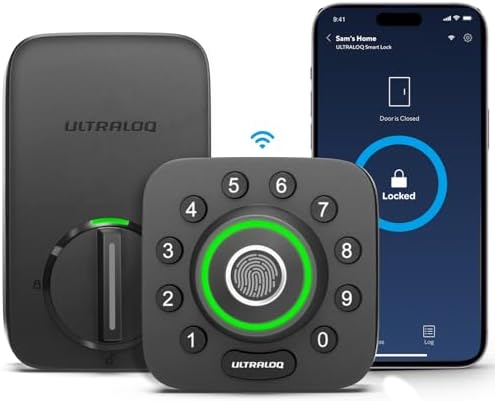
3. Ultraloq U-Bolt Pro WiFi Smart Lock — Best Value with Fingerprint
- Control Your Ultraloq Smart Lock Anytime, Anywhere: Lock, unlock, share access and see a Log of who’s entered and exactl…
- 8-in-1 Keyless Entry Door Lock: Fingerprint ID(stores up to 100 fingerprints, 2 per user) + Passcode(up to 50 codes) + A…
- Enhanced Security and Intelligence: smart deadbolt lock auto-locks when the door closes and unlocks as you approach with…
Key Specs
- Security Grade: ANSI Grade 1
- Connectivity: Built-in Wi-Fi 2.4GHz + Bluetooth (no hub)
- Access Methods: Fingerprint, Keypad, App, Voice, Physical Key, Shake-to-Open
- Fingerprint Capacity: Up to 100 fingerprints
- Door Sensor: Included (alerts if door left open)
- IP65 Waterproof Rating: Yes
- Battery: 4 AA batteries (~8 months)
- Rating: 4.3/5 — 6,157 reviews
- Price tier: Budget
Who this is for: Anyone who wants fingerprint access without paying premium prices, or households with kids who reliably forget keypads — because they’ll never forget their finger.
As the lowest-priced lock in this comparison, the Ultraloq U-Bolt Pro WiFi does something remarkable: it undercuts both the Kwikset and Schlage on price while adding a fingerprint scanner neither of them offer. That’s a genuinely unusual value proposition in this category, and verified owner reviews suggest it’s not a case of getting what you pay for in the wrong direction — this is a legitimate, well-built lock that earns its 4.3-star average across 6,000+ reviews.
According to the spec sheet, the fingerprint scanner recognizes registered prints in about 0.3 seconds, and owners report it works reliably even with damp fingers. Reviewers with several household fingerprints enrolled mention very few false rejections, and re-enrolling a print usually fixes the ones that do happen. The app lets you see exactly which fingerprint or method was used for each entry, which is more granular detail than the Kwikset Halo provides. The included door sensor is a genuinely useful add-on: you’ll get a notification if the door is accidentally left ajar, which happens more than you’d think with kids in the house.
The IP65 waterproof rating is better than what Schlage and Kwikset publish for their equivalent models, which matters if your front door faces direct weather exposure. The trade-off is battery life — you’ll get roughly 8 months versus 12 months on the Kwikset, so add one battery swap per year to your mental calendar. The shake-to-open feature (physical shake of the handle) feels like a gimmick that many owners simply turn off, but the lock’s core functionality — fingerprint, keypad, and app — all work exactly as advertised.
What stands out:
- Fingerprint scanner that owners say works reliably, including in damp conditions — no other lock at this price comes close
- Door sensor included in the box at no extra cost — something most competitors charge extra for
- IP65 weatherproof rating is genuinely better than most competitors at double the price
What could be better:
- Battery life is ~8 months versus ~12 months for the Kwikset Halo — plan for one extra battery swap per year
- The Ultraloq app is functional but not as polished as the Schlage or Kwikset apps — some settings feel buried in sub-menus
Bottom line: The most feature-rich budget-tier smart lock here, and the only one in this comparison that includes a fingerprint scanner. If you want biometric access or the best weather resistance, this is the one to buy.
How to Choose a Smart Lock for Your Front Door
Security Grade Actually Matters More Than Features
It’s easy to get caught up in comparing fingerprint scanners and app interfaces, but the most important spec on any door lock is the ANSI/BHMA security grade. Grade 1 is the highest residential rating and means the lock has been tested against forced entry, 250,000 use cycles, and corrosion. Both the Schlage Encode Plus and Ultraloq U-Bolt Pro carry Grade 1. The Kwikset Halo carries a BHMA Grade AAA rating, which comes from BHMA’s separate residential certification program (scoring security, durability and finish, with AAA the top result) rather than the ANSI Grade 1–3 deadbolt scale, so the two ratings aren’t directly comparable.
For most suburban homes, Grade 2 or AAA is more than adequate — break-ins are rarely about defeating the lock mechanically, and a determined attacker will target the door frame before the lock itself. But if you’re in a higher-crime area, or if security is a top priority, paying the premium for Schlage Grade 1 is genuinely worth it. On a budget? The Ultraloq gives you Grade 1 at the lowest price in this comparison.
Wi-Fi vs. Bluetooth: What’s the Real Difference?
All three locks reviewed here support Wi-Fi, which means you can control and monitor them from anywhere in the world via your phone. Bluetooth-only locks — which are cheaper — only work when your phone is physically nearby. For a front door, where you need to let in a dog walker while you’re at the office, Wi-Fi is non-negotiable. The good news: all three picks here have built-in Wi-Fi and don’t require a separate hub, which used to be a $30–$50 add-on cost in earlier generations of smart locks.
One practical note: all three use 2.4GHz Wi-Fi only, not 5GHz. If your router is far from your front door and only broadcasts 5GHz, you’ll need to either enable the 2.4GHz band or move the router. This trips people up more often than you’d expect during setup.
Price Tiers: What Each Dollar Buys You
Budget tier: You get fingerprint access, Grade 1 security, built-in Wi-Fi, and a door sensor. The Ultraloq U-Bolt Pro WiFi is genuinely excellent at this level — nothing important is missing. Mid-range: The Kwikset Halo adds geofence auto-unlock, SmartKey re-key capability, and a more polished app experience. The trade-off is losing fingerprint access. Premium: The Schlage Encode Plus gives you the highest security grade available, Apple HomeKey tap-to-unlock, and the most trusted brand name in physical locks. The premium is real, but so is the quality difference.
Related Smart Home Guides
- Best Video Doorbell Without Subscription — see who’s at the door
- Best Security Camera System for Home — full property coverage
- Best Smart Smoke Detector — safety beyond security
Frequently Asked Questions
Do smart locks require a monthly subscription?
No — none of the locks reviewed here require any subscription. Basic app control, access logs, and remote lock/unlock are all free. Some brands offer optional premium tiers for advanced features like extended history logs, but the core functionality is subscription-free.
Can smart locks be hacked?
No lock is completely hack-proof, but modern smart locks with encrypted Wi-Fi and two-factor authentication are significantly harder to compromise remotely than a physical lock is to pick. All three locks here use encrypted communication. The more realistic threat to any door lock is physical force — and that’s where the ANSI grade rating matters.
How long do smart lock batteries last?
Most smart locks use 4 AA batteries and last 8–12 months with typical use (10–15 lock/unlock cycles per day). The Kwikset Halo and Schlage Encode Plus both claim ~12 months. The Ultraloq rates at ~8 months. All three will send you a low-battery notification via the app well before you run out — typically when 20% remains.
Do smart locks work without Wi-Fi?
Yes, locally. If your Wi-Fi goes down, you can still use the keypad, fingerprint (on Ultraloq), physical key, and Bluetooth unlock from your phone if you’re within range. What you lose is remote access and real-time notifications. The door stays functional — you just can’t control it from a distance.
Are smart locks compatible with Alexa and Google Home?
All three locks reviewed here work with Amazon Alexa and Google Home for voice commands like “Alexa, lock the front door.” Note: most smart home platforms don’t allow voice unlock commands by default (for obvious security reasons) — you can typically lock by voice but need your phone or keypad to unlock.
Do I need a hub for these smart locks?
No. All three locks in this review have built-in Wi-Fi and connect directly to your home network without a separate hub or bridge. Earlier generations of smart locks often required a $30–$50 Bluetooth-to-Wi-Fi bridge — that’s no longer the case with current models.
Can I still use a physical key with a smart lock?
Yes. All three locks reviewed here include a physical key cylinder as a backup. The Kwikset Halo uses Kwikset’s SmartKey technology, which allows you to re-key the cylinder yourself in about 10 seconds using a tool included in the box. The Schlage and Ultraloq use standard cylinders.
What ANSI grade should I look for in a smart lock?
For a front door: Grade 1 is best, Grade 2 (or equivalent) is solid for most homes. ANSI Grade 1 means the lock has passed 250,000 operational cycles, a 10-strike forced entry test, and a finish durability test. Both the Schlage Encode Plus and Ultraloq U-Bolt Pro WiFi carry Grade 1. The Kwikset Halo carries BHMA Grade AAA, the top score in BHMA’s residential rating program, which uses a different scale from the ANSI Grade 1–3 system.
How difficult is it to install a smart lock yourself?
Very manageable — no electrician needed, no hardwiring, no drilling for most doors. Installation typically takes 15–25 minutes with a Phillips screwdriver. You’re replacing your existing deadbolt with the new unit. The one thing to check beforehand: confirm your door thickness is within the lock’s specifications (standard 1-3/8″ to 1-3/4″ doors work with all three reviewed here). If your door has a non-standard configuration or a double-cylinder lock, check the manufacturer’s installation guide before buying.
Final Verdict
For most front doors, the Kwikset Halo is the best smart lock to buy in 2026 — it’s reliable, well-built, hub-free, and the geofence auto-unlock is the best-reviewed at this price point. If you’re in the Apple ecosystem and want the fastest possible entry experience, the Schlage Encode Plus justifies its premium with Apple HomeKey and the highest residential security rating available. And if fingerprint access or maximum weather resistance matters to you, the Ultraloq U-Bolt Pro WiFi delivers Grade 1 security with a genuinely impressive fingerprint scanner at a budget-tier price — it’s the most value for money in this comparison.
- CONTROL FROM ANYWHERE: Wi-Fi enabled smart door lock (no hub required), use the Kwikset app to remotely lock and unlock,…
- CONVENIENT KEYLESS ENTRY: Enable intelligent geofencing to automatically unlock as you approach your home, unlock using …
- SHARE ACCESS WITH GUESTS: Backlit keypad supports up to 250 access codes for keyless entry; use the Kwikset app to share…
- ANYWHERE ACCESS: With built-in WiFi compatibility, you can easily and securely connect your Schlage Encode Plus lock to …
- PEACE OF MIND: Lock and unlock from anywhere, manage up to 100 access codes, view lock history, receive customizable not…
- TAP TO UNLOCK: Works with Apple HomeKit and Apple home keys; with home keys you can simply tap to lock or unlock using y…
- Control Your Ultraloq Smart Lock Anytime, Anywhere: Lock, unlock, share access and see a Log of who’s entered and exactl…
- 8-in-1 Keyless Entry Door Lock: Fingerprint ID(stores up to 100 fingerprints, 2 per user) + Passcode(up to 50 codes) + A…
- Enhanced Security and Intelligence: smart deadbolt lock auto-locks when the door closes and unlocks as you approach with…
See full specs on Kwikset’s official Halo page
If you’re building out a smart home alongside your new lock, also check out our picks for the best smart plugs with energy monitoring and best smart light switches without neutral wire — both pair well with the locks reviewed here via Alexa or Google Home.
Last updated: May 2026 | Prices subject to change.
Questions about any of these picks? Get in touch via our contact page.
Pingback: Best Bluetooth Tracker For Keys In 2026
Pingback: Best Smart Smoke Detector 2026 — Top 3 Picks
Pingback: Best Video Doorbell Without Subscription In 2026 | Pickitech